
Hardware chains have spent decades perfecting the physics of their supply chains, only to be held back by e-commerce platforms that treat a 1-ton pallet of cement exactly like a t-shirt.
The reality in 2026 is that your legacy ERP and your modern digital expectations are speaking different languages. If your webstore doesn't know that the forklift at Store #42 is down, or that the last 50 meters of copper piping were just sold to a walk-in contractor, your digital storefront is essentially lying to your customers.
Until inventory, pricing, and fulfillment stay aligned, scaling doesn’t simplify operations. It just makes the gaps more visible.
The operational bottlenecks in modern hardware retail
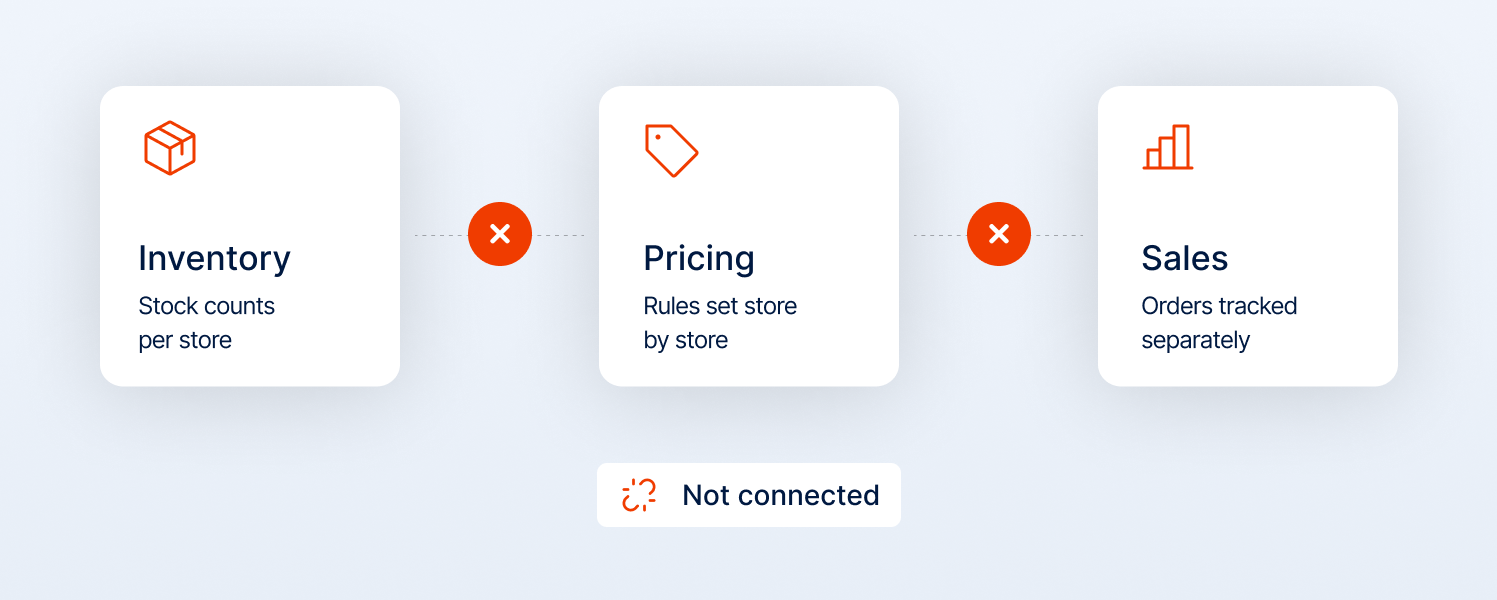
The core issue in multi-store hardware operations is the friction between localized supply and global demand. Legacy systems keep inventory, pricing, and sales data locked in separate silos. That separation shows up in very real ways:
- Inventory exists, but can’t be sold where it’s needed: Stock is sitting somewhere in the network, but is not visible or available at the point of demand.
- Pricing doesn’t move fast enough: Updates lag across stores, especially when material costs shift. Margins get hit before systems catch up.
- Orders get fulfilled from the wrong place: Instead of using nearby stock, orders are routed through central warehouses, driving up logistics costs.
This is compounded by the fact that many hardware businesses still operate traditionally. Manual, disconnected processes (hand-entered billing, uncoordinated pricing updates, and paper-based inventory tracking) are still common. And in a market that runs 24/7, these workflows aren’t just inefficient; they’re unscalable.
Without real-time data, decisions are based on reports that are already outdated. That’s how you miss seasonal spikes, react late to supplier price changes, and end up with stock in the wrong places.
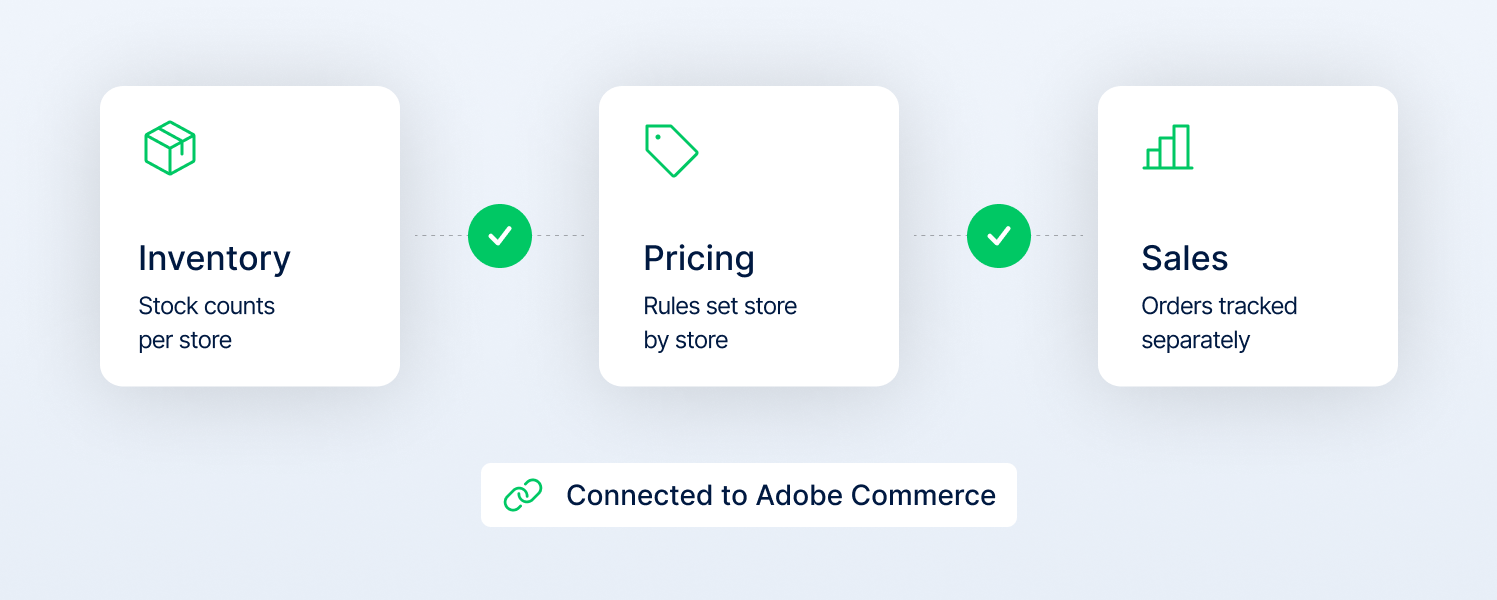
Adobe Commerce addresses these issues at the architectural level by unifying inventory, pricing, and fulfillment into a single synchronized system, removing the lag that creates these failures in the first place.
How Adobe Commerce brings structure to multi-store hardware operations
In hardware chains, multi-store operations aren’t disrupted by volume. They get disturbed because of the data drift.
As stores grow, pricing starts to vary, catalogs get duplicated, and local teams make changes that don’t always align with head office. Over time, the system reflects multiple versions of the truth. What customers see online no longer matches what’s actually available in-store.
Adobe Commerce brings this back under control by structuring everything (inventory, pricing, catalog, and fulfillment) within a single system. Where agencies like Magebit come in is in making sure that the structure doesn’t collapse as complexity increases.
1. Using hierarchy to scale without duplication
You may have seen multi-store setups scaling by adding layers. They introduce new catalogs, separate pricing rules, and disconnected store logic. It works early on, but over time, it creates inconsistencies that are hard to manage.
Adobe Commerce takes a different approach through its hierarchical structure: websites, stores, and store views. It allows you to manage data centrally while still controlling what changes at a local level.
- The website level (brand control)
This defines how different business models operate. B2B and B2C customers can exist within the same system but see completely different pricing, tax rules, and experiences.
In our implementations, this is where we separate business logic early, so pricing and customer rules don’t overlap as the system scales.
- The store level (catalog filter)
Hardware demand is location- and climate-specific. A master catalog is maintained, but each store surfaces only what’s relevant to its region and customer base.
For example, in our implementations, we control catalog distribution by using the Root Category logic to ensure a store manager in a coastal town isn't wasting digital shelf space on products only relevant to the outback.
- The store view (local execution)
This is where localization happens: language, tax rules, and content. It allows a large chain to stay consistent while still feeling local.
In Magebit Adobe Commerce projects, this layer is kept lightweight, so local teams can update content without affecting core catalog or pricing logic.
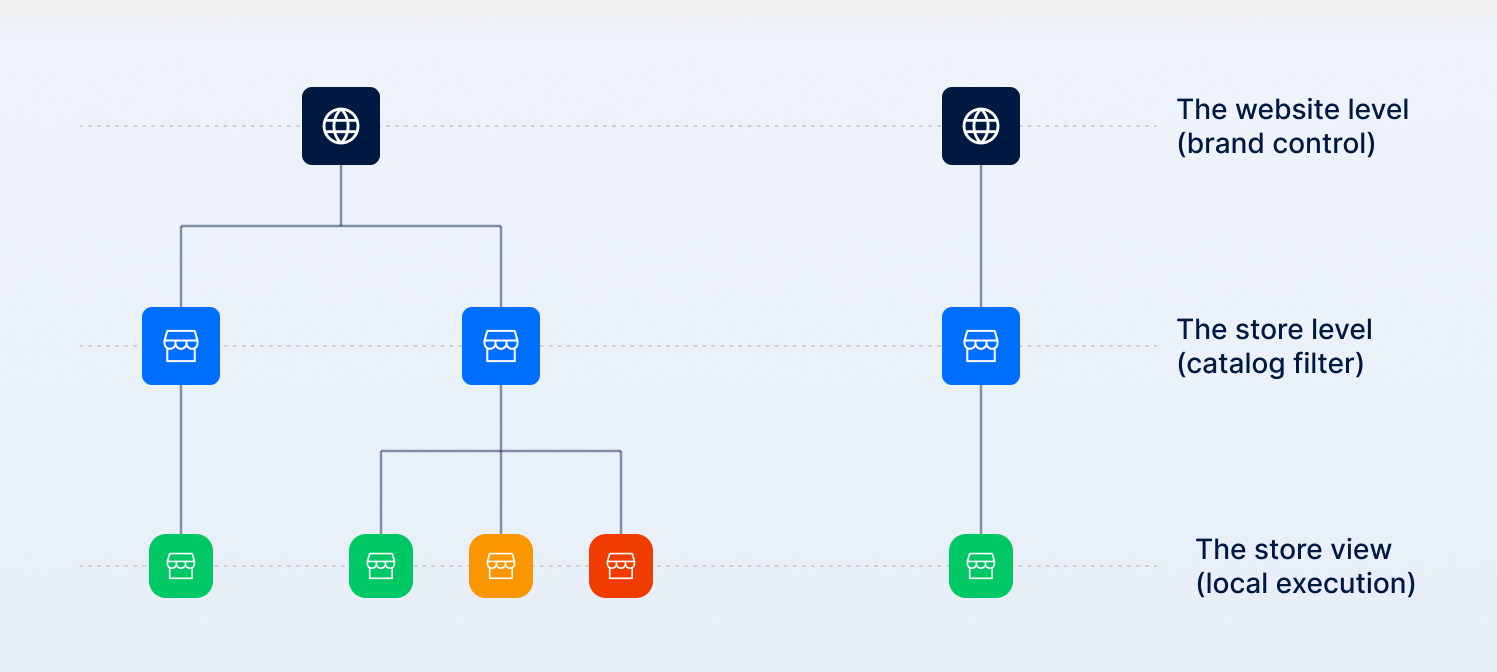
Adobe Commerce multi-store architecture
2. Improving fulfillment efficiency with Multi-Source Inventory (MSI)
In hardware retail, "in stock" can’t be a guess. If a contractor drives out for 50 bags of concrete and finds they were just sold in-store, you lose more than the order.
Most systems treat inventory as a single number. Adobe Commerce lets you work with it as a network of locations. Through multi-source inventory (MSI), you separate where stock sits (sources) from how it’s sold (stocks).
Where Magebit adds value is in how this is set up:
Safety buffers for store inventory
We define thresholds so that low stock isn’t exposed online. If a store only has a few units left, they’re kept for walk-in demand instead of being sold online and canceled later.
Routing that reflects real costs
Adobe Commerce uses a source selection algorithm (SSA) to decide which location fulfills an order. Out of the box, this can follow simple rules like distance or priority. We configure it to reflect actual business logic, factoring in delivery cost, product type, and location, so heavy items aren’t shipped from the wrong place.
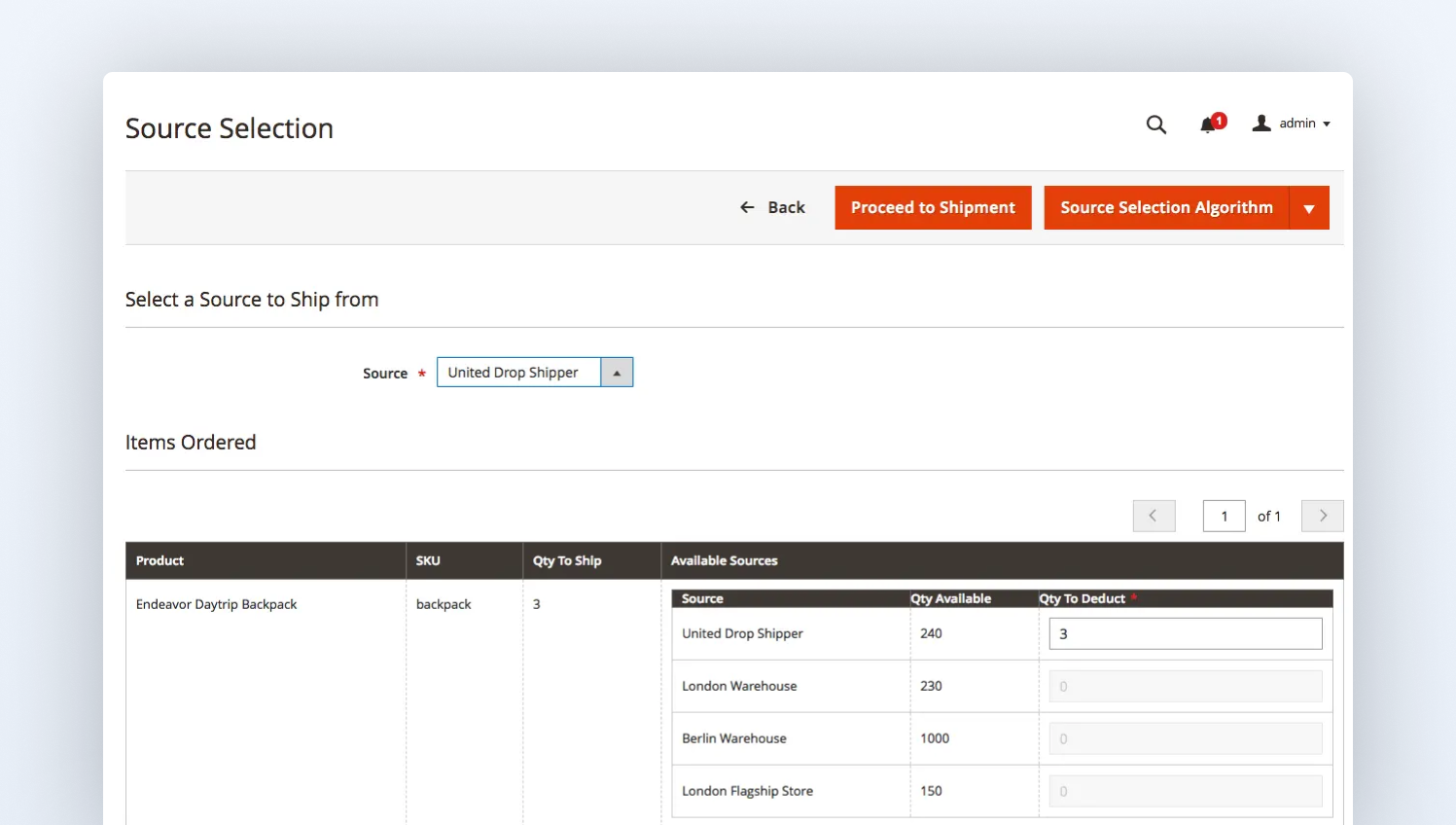
Reservations and saleable quantity
Inventory is reserved as soon as the order is placed, using Adobe Commerce’s saleable quantity logic. Availability is calculated across all sources, factoring in pending orders and reservations. This prevents the overlap where the same stock gets sold twice across channels.
3. Turning your physical store into an omnichannel advantage (BOPIS and SFS)
Your store network is your greatest asset, but without real-time synchronization, it’s also your biggest source of friction.
In most setups, customers can place an order online, but the system doesn’t confirm if a specific store can actually prepare it for pickup or fulfill it immediately. The order is accepted first, and fulfillment is sorted later. That’s where delays happen.
Adobe Commerce fixes this by bringing store-level inventory and fulfillment options into checkout through omnichannel capabilities like BOPIS (Buy-Online-Pickup-in-Store) and Ship-from-Store (SFS).
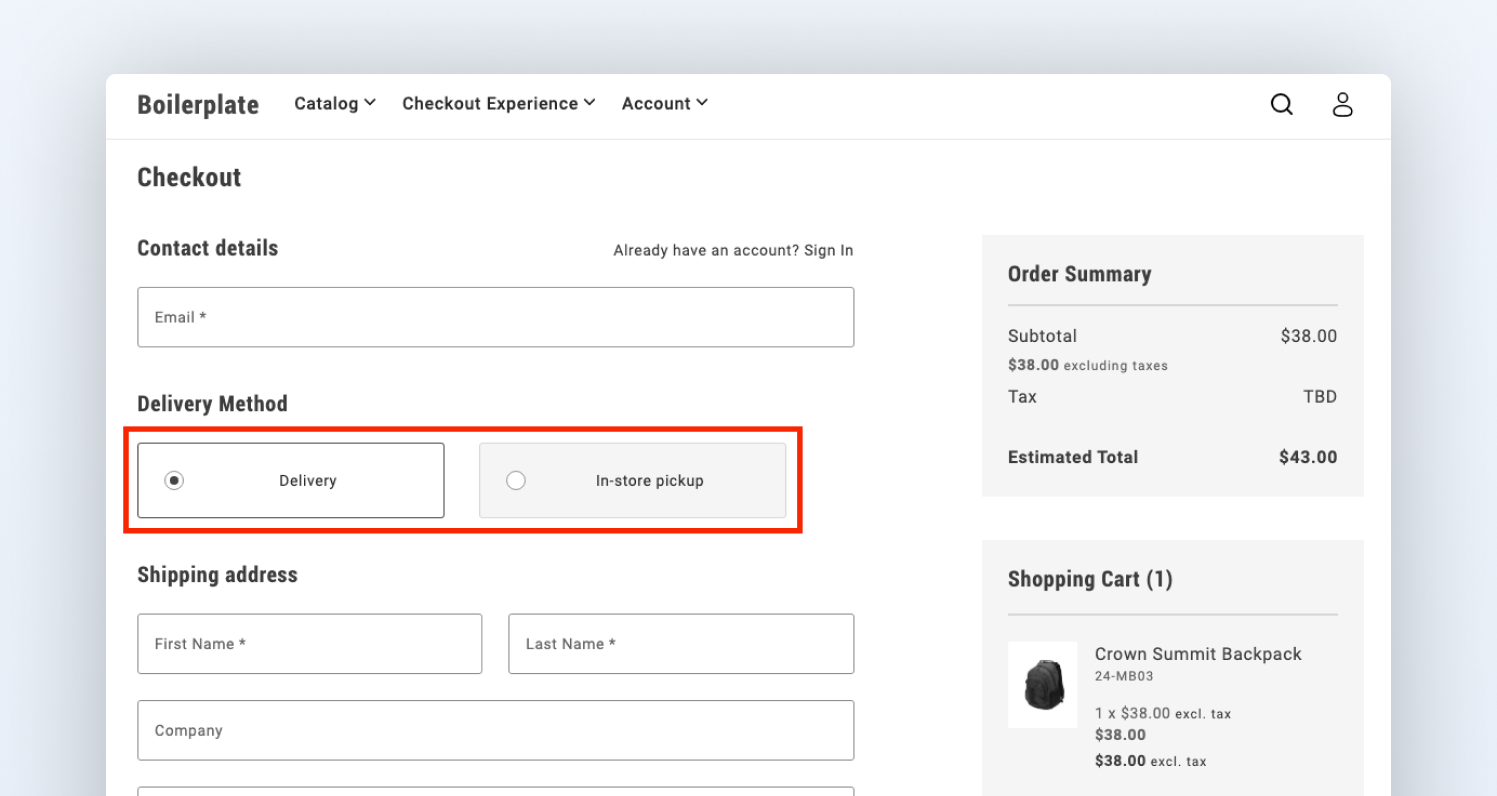
Real-time pickup with BOPIS
BOPIS sounds simple at first. You order online and pick it up from the store. But in hardware, it doesn’t usually play out that cleanly.
The problem is timing. In many setups, the order is placed first, and the store checks availability later. That’s how you end up with missing items, substitutions, or delays at the counter.
Adobe Commerce moves that check into checkout. Store-level inventory is validated before the order is placed, so availability is clear upfront. If stock is split, it’s handled at that point:
- Part of the order can be picked up
- The rest can be delivered or sourced from another store
So the customer knows what will actually be ready. After that, it comes down to store execution. Orders need to be picked and staged in advance, not when the customer shows up.
In our implementations, we connect this flow to OMS systems like Fluent Commerce, so store teams get clear pick tasks, and orders are ready on time.
That’s what makes BOPIS reliable: knowing what’s available before the order is placed and making sure it’s ready before the customer arrives.
Using local inventory to improve delivery with SFS
In hardware, delivery costs aren’t small. They’re tied directly to weight, distance, and handling. When orders are routed from a central warehouse by default, the impact shows up quickly.
For example, shipping heavy, non-conveyable goods (like 4-meter pipes or pallets of brick) from a central warehouse is an operational disaster in 2026. The freight costs alone can wipe out the product margin.
Adobe Commerce uses the Source Selection Algorithm (SSA) to turn your stores into local shipping hubs.
- Distance-Priority Routing: The system automatically selects the closest store with stock to fulfill the delivery, drastically reducing the last-mile cost.
- Non-Conveyable Logic: Rules can be set so that bulky items trigger a local store-delivery truck, while smaller tools are routed via standard courier, automatically, at the point of sale.
By treating your stores as active fulfillment nodes rather than just showrooms, you aren't just meeting digital expectations; you’re leveraging your physical footprint to beat online-only competitors on speed and shipping costs.
4. Structuring B2B procurement for hardware buyers
In hardware, the professional buyer doesn’t behave like a retail customer. They buy in teams, on credit, and with negotiated pricing that isn’t public.
Adobe Commerce supports this through B2B features like company accounts, requisition lists, and quote workflows. These are designed to bring contractor-style buying into the platform instead of pushing it offline.
Company Accounts and role-based access
Adobe Commerce provides a Company Account structure that mirrors construction firms. A single company account can support multiple buyers, each with their own login and permissions.
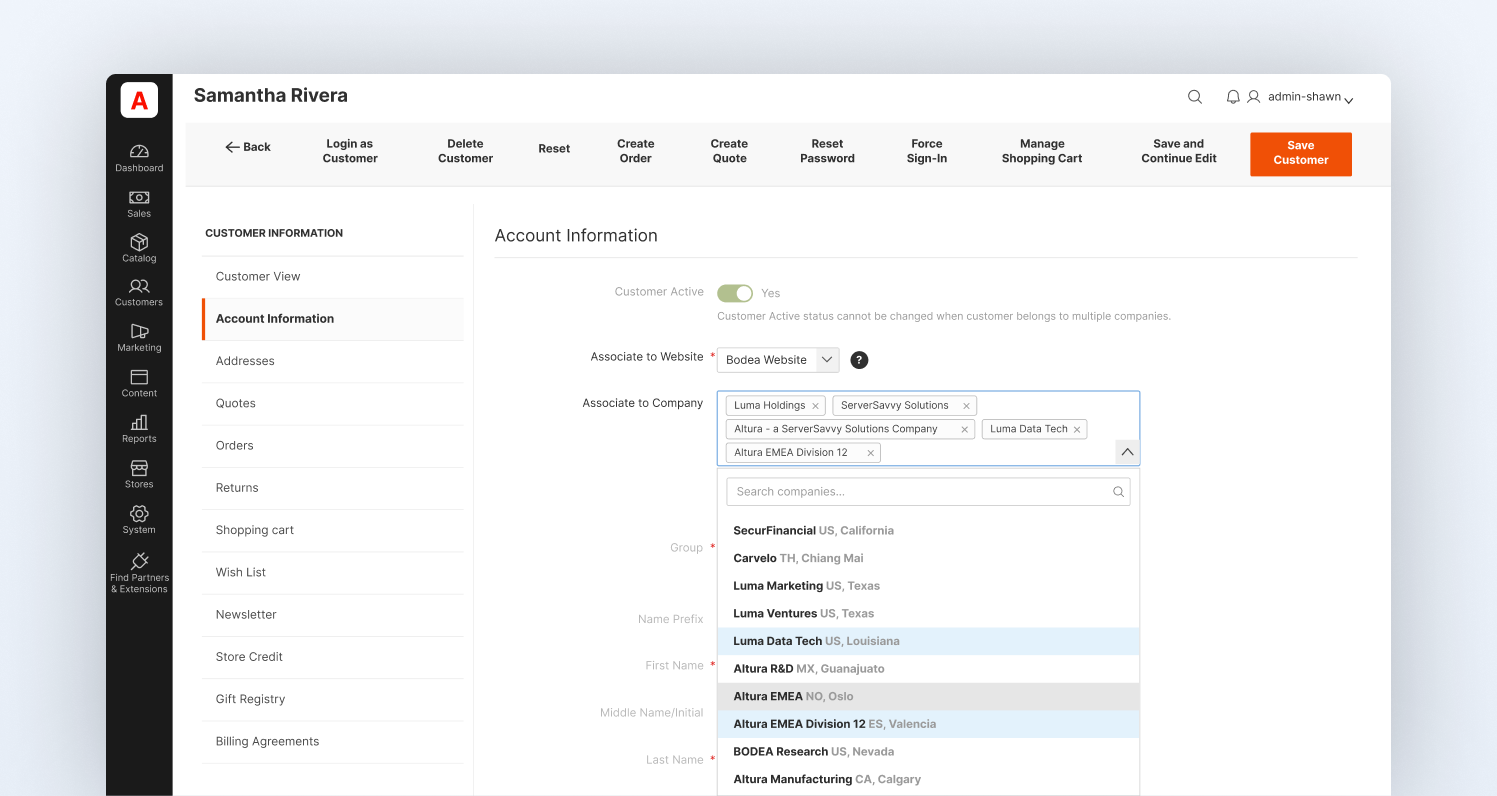
For example, in our implementations, we make sure that a senior project manager can be granted the authority to negotiate quotes and approve large purchases, while junior tradespeople can only add items to a Requisition List for later review.
This structure allows hardware chains to:
- Assign buyers to specific accounts in seconds
- Enable quick account switching for procurement officers managing multiple projects
- Implement automated purchase approval rules to control spending without slowing down the sales process
Negotiated pricing and quote workflows
The platform allows contractors to request custom pricing directly from their cart. Sales teams can respond with updated terms, which can be converted into an order.
Where most setups slow down is in how these flows are handled. We configure them so quotes move quickly and don’t get stuck in back-and-forth.
Requisition lists for repeat orders
Requisition lists are saved lists of products that don’t clear after purchase. They allow contractors to reorder frequently used items without rebuilding the cart each time.
In our implementations, these are structured around real purchase patterns, so repeat buying becomes fast and predictable.
5. Handling dimensional pricing without breaking inventory or margins
In hardware, "one size fits all" is a myth. Selling 15 meters of copper piping or 40 square yards of oak flooring requires a pricing engine that can handle multi-dimensional inputs and convert them into standard inventory units.
Most platforms struggle when a product isn't a single SKU. Adobe Commerce handles this through Unit of Measurement (UOM) logic.
Unit of Measure (UOM) is not unique to Adobe Commerce. It comes from ERP systems, where inventory is tracked in base units and converted during transactions. The challenge in hardware e-commerce is different. That logic needs to be exposed to the customer.
A product might be stored in millimeters, priced per meter, and purchased in feet. If the system doesn’t connect these in real time, pricing and inventory fall out of sync. This is a known issue in inventory systems where poor unit handling leads to stock inaccuracies and pricing mismatches.
Magebit addresses this issue by bringing UOM logic into the buying flow. Customers can select how they want to buy (meters, kg, sq ft), while the system converts everything back to a base unit for inventory accuracy.
We typically implement this through extensions or integrations that align e-commerce with backend systems. There are also a few realities that need to be built in:
- Wastage
Nobody orders exact quantities for flooring or tiles. We add a buffer to the flow so customers don’t under-order and come back frustrated.
- Minimum cuts
You can’t sell 1.3 meters of cable if the warehouse only cuts in fixed lengths. We enforce those rules at the storefront so orders reflect what can actually be fulfilled.
- Consistent stock tracking
However the customer buys, the inventory always updates in one base unit. That’s what keeps the stock reliable.
6. Improving product discovery with AI
In hardware e-commerce, conversion drops when customers can’t describe what they need. With thousands of SKUs and inconsistent naming, keyword-based search alone doesn’t work.
Adobe Commerce improves this through AI-driven search capabilities powered by Adobe Sensei. That said, AI search is just one approach. In our implementations, the focus is always on solving the actual discovery problem, not forcing a specific tool into the stack.
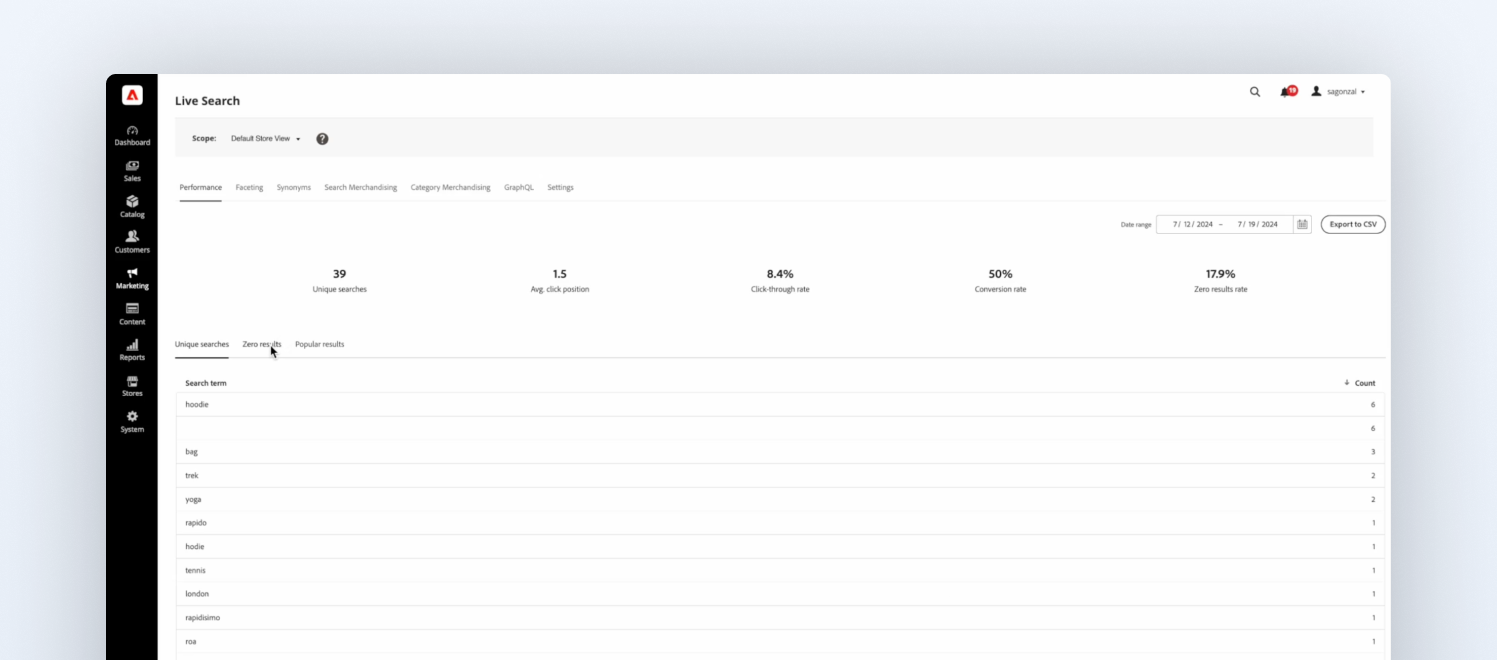
- Live search that adapts to intent, not just keywords
Standard search struggles in hardware because customers rarely search using the exact terms used in the catalog. Adobe Commerce uses behavioral data and natural language processing to group similar queries (“spanner” vs “wrench”) and improve relevance over time.
For larger catalogs, Adobe Live Search also offloads search processing to the cloud, helping keep the storefront fast even with heavy product data. We also work with our search partners like Klevu and Algolia, so the search setup can be tailored to how customers actually search and buy within that hardware catalog.
- Dynamic filtering without heavy manual setup
In large hardware catalogs, manually configuring filters for every category becomes unmanageable. Adobe Commerce surfaces the most relevant attributes (like voltage, brand, or type) automatically based on context and user behavior. This keeps navigation usable even as the catalog grows.
- Visual search for assistive discovery (not exact matching)
Image-based search helps users find similar products when they can’t describe them—useful for items like fixtures or tools. It’s important to be clear: this is not a precise identification of technical parts like screws or threads. It works best as a discovery aid, shortening the path to relevant options rather than guaranteeing exact matches.
Final thoughts
Adobe Commerce is likely the right fit for your hardware business if you’re dealing with inventory spread across locations, complex contractor pricing, or a catalog that’s hard to manage at scale.
But choosing the platform doesn’t solve the problem on its own. The outcome depends on how it’s implemented and structured around your operations.
At Magebit, we’ve worked with Fortune 500 brands on complex Adobe Commerce projects, focusing on getting the system right from the start, so inventory, pricing, and product data actually work the way they should.
If you’re considering Adobe Commerce or struggling with your current setup, it’s worth having a conversation with one of our experts.


Free tips to grow your store
eCommerce related news
New articles every month
Macaroni and cheese recipes
Check your inbox for tips.