
There’s a clear difference between a busy email calendar and a profitable one. You’re sending campaigns regularly, the emails look good, and revenue is coming in. But when you look closer, there are gaps.
A big part of that gap comes from cart abandonment. Around 70% of shoppers add products to their cart but leave without completing the purchase, and only a small portion of that is recovered. Email is meant to bring those people back, but in many cases, it doesn’t.
At the same time, automated flows such as welcome, cart, browse, and post-purchase consistently generate more revenue per recipient than campaigns do. Yet they are often underbuilt or left on default settings.
At Magebit, we have audited enough Shopify Plus and Adobe Commerce stores to see the same pattern repeat. When email underperforms, it is rarely a creative issue. It comes down to the structure: how the lifecycle is set up, what gets prioritized, and where conversion opportunities are missed.
This blog breaks down the six mistakes that cause this and how to fix them.
The revenue leak framework: Where email money disappears
Before diving into the mistakes, here's how email revenue typically leaks in ecommerce:
The 4 leak points:
- Acquisition leak: New subscribers enter but never convert (weak or missing welcome series)
- Engagement leak: Subscribers stop opening because the content isn't relevant (poor segmentation)
- Conversion leak: Opens don't turn into clicks or purchases (weak offers, poor timing, buried CTAs)
- Retention leak: Customers buy once and disappear (missing post-purchase and winback flows)
6 email marketing mistakes that ecommerce brands need to avoid
As a Klaviyo Partner working with brands like The Body Shop, Henry Schein, Dunkin’, and Ace Hardware, Magebit specializes in building email marketing strategies and automations that plug revenue leaks across the customer lifecycle.
Below are the six mistakes costing ecommerce brands the most money, backed by industry research and Magebit's client engagement data.
Mistake 1: The "batch and blast" problem (sending the same message to everyone)
Most teams already know you can’t send the same email to everyone. But in practice, that’s exactly what happens.
A single campaign goes out to recent buyers, inactive subscribers, and first-time visitors alike. Not because teams think it works, but because it’s faster, easier, and fits how campaigns get planned.
The issue is, what worked in 2015 doesn’t hold up anymore. Customer expectations have changed. In fact, today, 71% of consumers expect personalized interactions, and 76% get frustrated when that doesn’t happen.
We know segmentation takes effort. It needs clean data, setup, and ongoing management. Campaigns don’t. So under time pressure, everything gets pushed to the full list. That shortcut comes with a cost:
- Recent buyers get discounts they didn’t need, which trains them to wait
- VIP customers are treated like everyone else, which erodes value
- Inactive users keep getting emails they don’t engage with, pulling down overall performance
Over time, this affects engagement, weakens sender reputation, lowers inbox placement, and reduces the effectiveness of every email you send.
What works better
High-performing email programs segment based on behavior, not demographics. Instead of asking “Who is this customer?”, they ask: “What has this customer done and what are they likely to do next?”
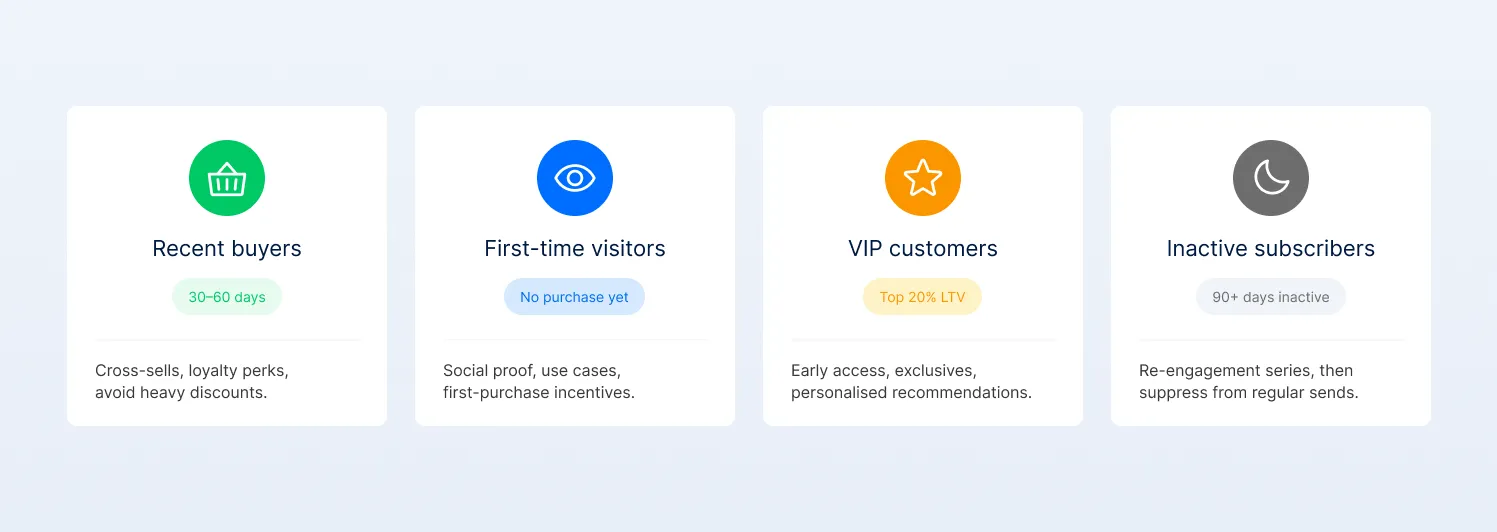
The 5 core behavioral segments
How to start (simple version)
You don’t need complex segmentation to begin. Start with one split:
- Engaged = opened or clicked in the last 90 days
- Non-engaged = everyone else
Send campaigns only to engaged subscribers. Use automated flows to re-engage or suppress the rest. This single change improves relevance, protects deliverability, and usually increases revenue per send.
Mistake 2: Prioritizing campaigns over automated flows
Automated flows consistently outperform campaigns, but most programs are still built the other way around.
When we looked at Klaviyo’s aggregated ecommerce data, we saw the same pattern repeatedly. Campaigns account for 94.7% of sends, but automated flows generate nearly 41% of total email revenue from just 5.3% of sends. On a per-recipient basis, flows drive roughly 18× higher revenue.
So it’s not a question of what works better. It’s a question of why teams still rely on campaigns.
From what we see in audits, campaigns win by default. They’re faster to plan, easier to launch, and show immediate results. Flows take more effort upfront, and if they’re not set up properly, they don’t show their value right away.
So teams keep sending campaigns because it feels more productive. Meanwhile, flows stay basic or underbuilt, and the highest-intent moments in the lifecycle are left underutilized.
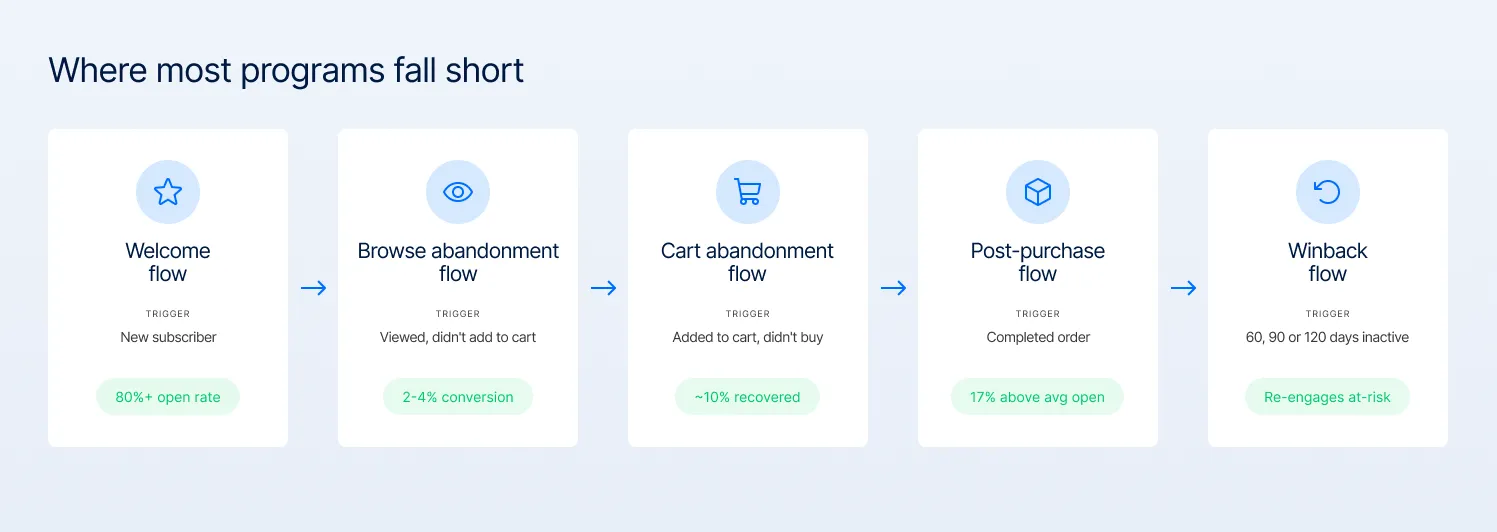
- Welcome series:
Welcome emails often see the highest engagement, with open rates exceeding 80%. For ecommerce brands, this is the best moment to drive a first purchase, especially with a time-bound discount.
Yet many brands still send just one email, missing the chance to convert subscribers when intent is highest.
- Browse abandonment:
Often skipped entirely, even though browse abandonment emails tend to convert significantly better than standard campaigns by targeting users who have already shown product interest.
- Cart abandonment:
In our experience, a single reminder isn’t enough. High-performing programs use a sequence, starting within the first hour, then following up over the next 24–72 hours to capture intent while it’s still high. However, the exact timing can vary depending on the industry and price point.

- Post-purchase series:
According to Klaviyo, post-purchase emails see open rates that are ~17% higher than the average email automation. Yet many brands still treat them as purely transactional, stopping at order confirmation and shipping updates.
In our experience, this is where revenue is quietly lost. Post-purchase is your best chance to influence what the customer buys next.
- Winback series:
Finally, when engagement drops, most programs rely on generic campaigns instead of structured reactivation. Triggered at 60, 90, or 120 days of inactivity, winback campaigns can re-engage a meaningful portion of at-risk customers.
What changes when this mistake is fixed
When these flows are built properly, the system starts to work differently.
In one Magebit client engagement, rebuilding the automation layer (expanding the welcome series, implementing browse abandonment, and optimizing post-purchase) led to $588K in revenue in just 3 months, with 62% of that revenue coming from email.

Pro tip: In 2026, high-performing flows aren’t email-only. They’re coordinated across channels. For example, if a cart abandonment email isn’t opened, a well-timed SMS can act as the final touchpoint that drives conversion.
But this only works when frequency is controlled. Email can be ignored. SMS can’t. Overuse it, and it quickly becomes intrusive.
How to audit your flows:
To assess your own program, look beyond volume and focus on revenue efficiency across key flows. As a directional guide:
- Welcome series: typically ~$2+ revenue per subscriber (higher for top-performing programs or B2B)
- Cart abandonment: can recover ~10% of otherwise lost revenue
- Browse abandonment: ~2–4% conversion rate, depending on setup
- Post-purchase: performance varies widely, but strong programs drive repeat purchases through structured follow-ups
If your flows fall below these levels, get in touch with an expert email marketing partner for e-commerce brands.
Mistake 3: Email frequency chaos (sending too much or too little without a plan)
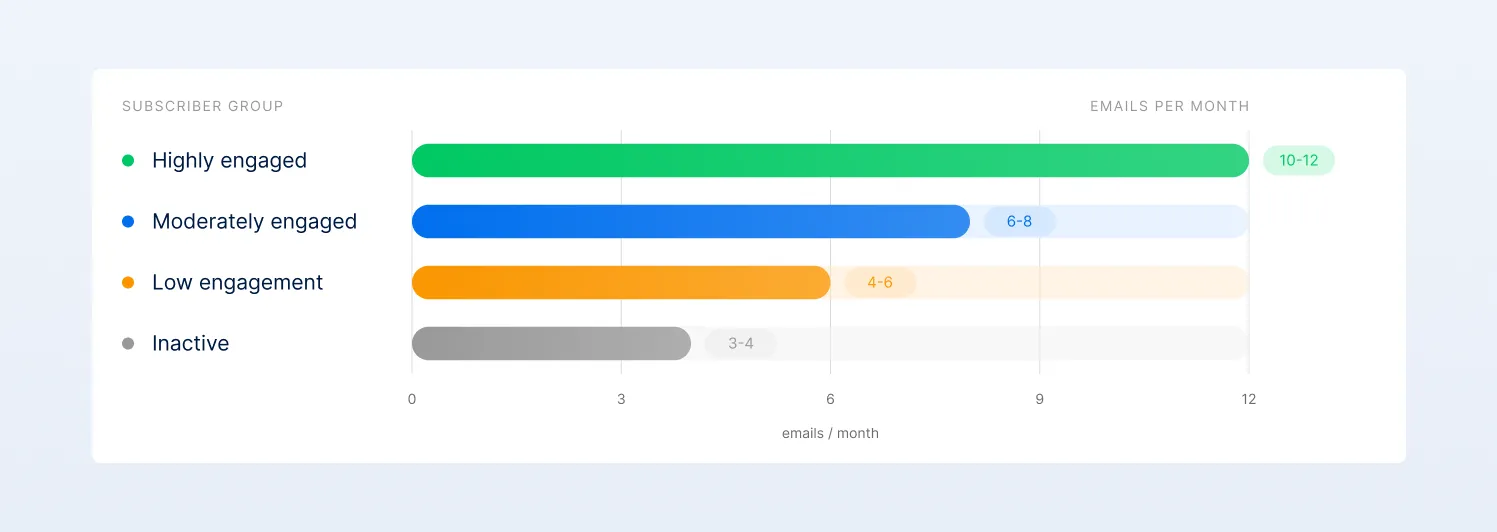
While 86% of consumers are comfortable receiving promotional emails at least monthly, only 15% want them daily. The problem is that most brands still end up oversending, without realizing it.
It’s because teams plan campaigns in isolation and often don’t account for automations. In practice, a single customer might receive a campaign, a browse email, a cart reminder, and follow-ups, all within a short window.
Without a unified view of total volume, frequency quickly exceeds what subscribers are willing to tolerate. In a crowded inbox, where the average office worker receives 121 emails per day, this has clear consequences.
Engagement drops, complaint rates rise, and even small signals can start to impact deliverability and reduce inbox placement over time. What works better is to set frequency based on engagement level, not production capacity. You can also use suppression logic to prevent automation and campaign overlap.
Here is how this process works:
The Magebit frequency framework (based on observed best practices)
Key suppression rules
- Avoid sending campaigns shortly after an automation (e.g., within 24–48 hours)
- Exclude recent purchasers from promotions for a short period (typically 7–14 days, depending on product cycle)
- Remove inactive subscribers (120+ days) from regular campaigns and move them into winback flows
How to audit frequency
Map your email calendar over a month and evaluate total volume per subscriber, including both campaigns and automations.
As a general guideline:
- If highly engaged users receive significantly more than ~10–12 emails/month
- Or low-engagement users receive frequent campaigns
You’re likely over-sending.
Mistake 4: Weak subject lines, buried offers, and missing mobile-first clarity
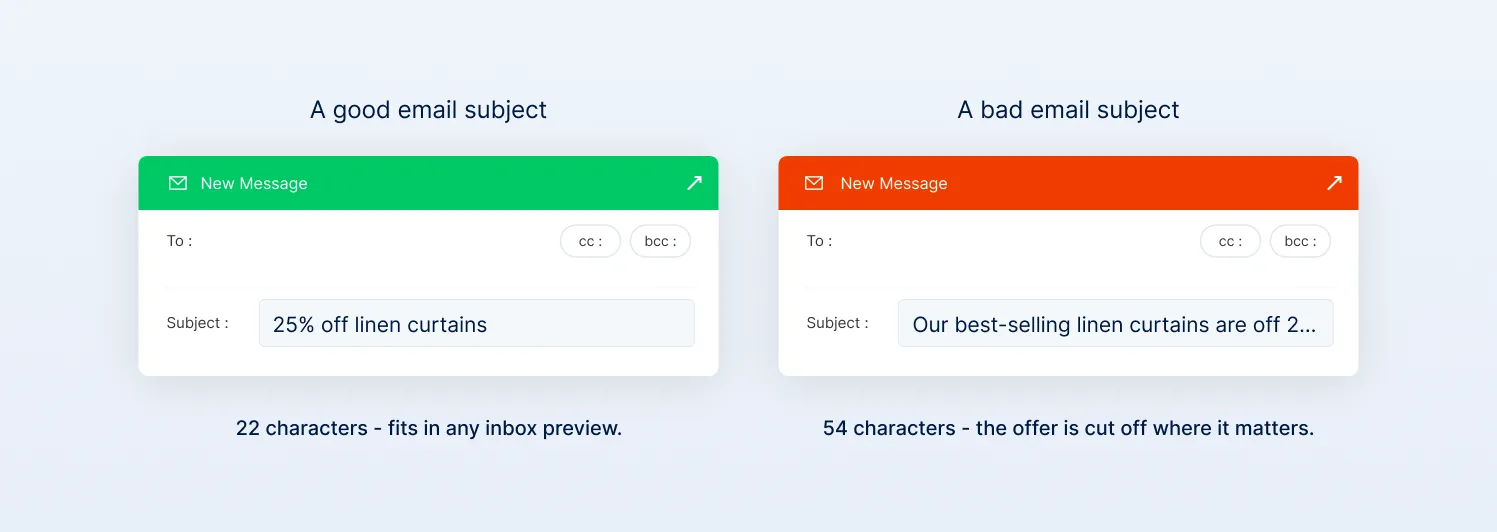
About 43% of email recipients open a brand email based on the subject line alone, and 41% do it because they’re looking for coupons and discounts. That means the value needs to be clear upfront.
At the same time, over 60% of emails are now opened on mobile, which means you need to keep key content above the fold, and ensure CTAs are thumb-friendly and visible without scrolling.
But most emails don’t do this. Subject lines stay vague, the offer is buried inside the email, and CTAs are unclear. The result is simple: fewer opens, fewer clicks, and lower revenue, even when the offer itself is strong.
This happens because clarity isn’t prioritized. Subject lines and offer placement aren’t tested or treated as performance drivers. What works better is straightforward: make the value obvious in the subject line and surface it immediately in the email.
Subject line patterns backed by research:
Offer clarity best practices:
Users spend an average of 51 seconds on an email after opening it, but in the era of skim culture and AI summaries, the reading time may be a few seconds. In that window, they need to quickly understand:
- What’s being offered
- Why it matters to them
- What they should do next
If any of this is unclear or delayed, attention drops off.
Best practice:
Magebit suggests placing the core offer (discount, benefit, or urgency) within the first 100 characters of your body copy, before the fold on mobile.
How to audit your emails:
Review your last 10 campaigns. For each:
- Is the subject line specific (product/benefit mentioned) or vague?
- Is the offer visible in the first 100 characters of body text?
- Is there one clear CTA, or multiple competing CTAs?
Mistake 5: Ignoring deliverability basics
Average inbox placement sits around 83–86%, meaning roughly 1 in 6 emails never reach the inbox. The issue is that most brands don’t see this. ESPs mark emails as “delivered,” but that only means the server accepted them, not that they landed in the inbox. So performance looks stronger than it actually is.
This happens because deliverability is not checked as thoroughly as it should be. Teams focus on copy and creative (what they can see), while ignoring list quality, authentication, and engagement signals (what actually determines inbox placement).
The cost isn’t small. Moving from 85% to 95% inbox placement can drive 20–30% more email revenue for a $5M+ brand, simply by getting more emails seen.
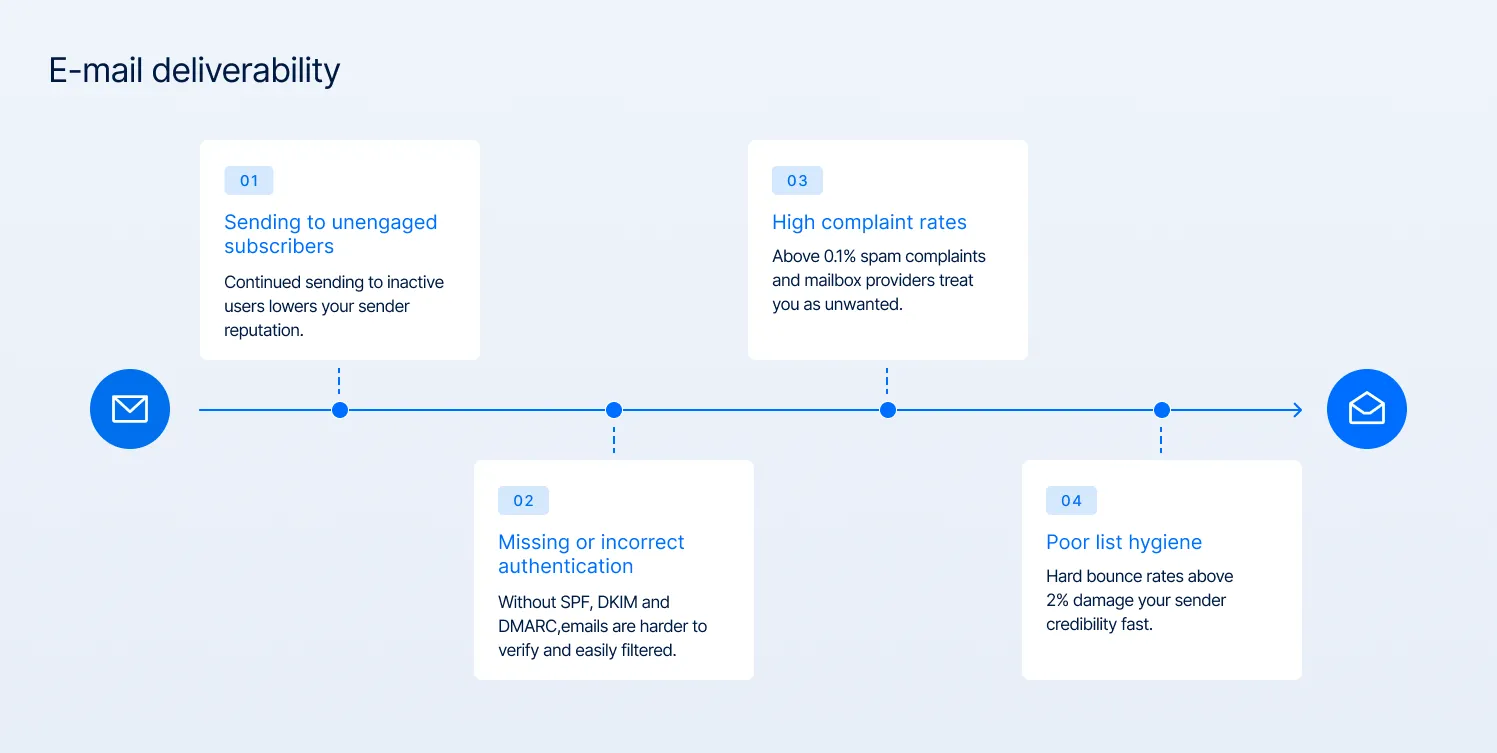
The most common deliverability problems:
Most deliverability issues don’t come from one big mistake. They build quietly from a few patterns that mailbox providers interpret as low trust.
- Sending to unengaged subscribers:
When a large portion of your list hasn’t opened or clicked in months, it signals disinterest. Mailbox providers use engagement as a proxy for relevance, so continued sending to inactive users gradually lowers your sender reputation.
- Missing or incorrect authentication:
SPF, DKIM, and DMARC aren’t optional; they’re baseline trust signals. Without them, your emails are harder to verify and more likely to be filtered. DMARC adoption is still inconsistent globally, which is why providers like Google and Yahoo have tightened requirements.
- High complaint rates:
Industry guidance is consistent here: keep spam complaints below 0.1% (1 per 1,000 emails). Beyond that, mailbox providers start treating your emails as unwanted, which directly impacts inbox placement.
- Poor list hygiene:
High hard bounce rates signal poor data quality (invalid or outdated addresses), which damages sender credibility. As a rule of thumb, hard bounces should stay under 2%; anything higher needs immediate cleanup.
The 5-minute deliverability health check:
How to fix deliverability problems:
- Remove subscribers inactive for 120+ days or move to a re-engagement track.
- Set up SPF, DKIM, and DMARC authentication (your ESP should provide instructions)
- Monitor complaint rates weekly and investigate spikes immediately
- Use engagement-based sending (send only to subscribers who've engaged in the last 90 days)
Mistake 6: Not testing, not learning, just repeating the same patterns
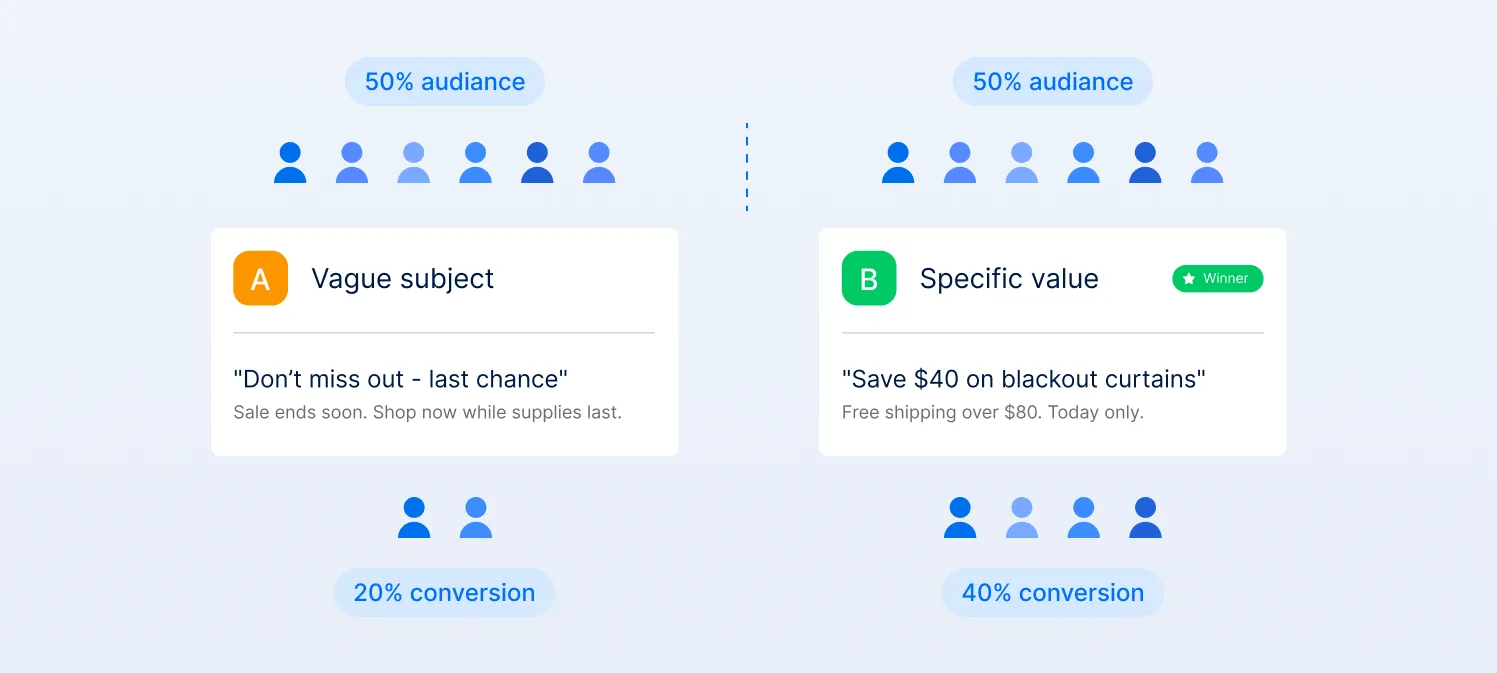
Most teams aren’t learning from their emails. They’re repeating them. The same subject lines, offers, and formats go out every week. Results get reported, but not understood, so nothing really changes.
The gap is clear in the data. 65% of brands rarely A/B test automated emails, and 76% never test transactional emails, even though these are high-impact moments in the lifecycle.
Teams believe testing requires statistical expertise, complex tools, and weeks of runtime. In reality, most ESPs have built-in A/B testing tools, and simple tests can produce actionable insights in 24–48 hours.
The fix is simple: test one thing in every campaign. Subject line, offer, or CTA. Learn, apply, repeat. That’s how email performance compounds.
What to test first (based on impact):
If you’re deciding where to start, focus on what directly affects visibility and action:
- Who you send to (segmentation): engaged vs. entire list
- What you show first (offer clarity): clear value upfront vs. buried
- What you promise (subject line): specific benefit vs. vague
- When you send (timing): varies by audience, but worth validating
- Where you push action (CTA placement): early vs. delayed
How to measure whether the fixes are working
Most teams track email performance through opens and clicks, but those are surface metrics. The real question is: how much revenue is each email actually driving, and is that improving over time?
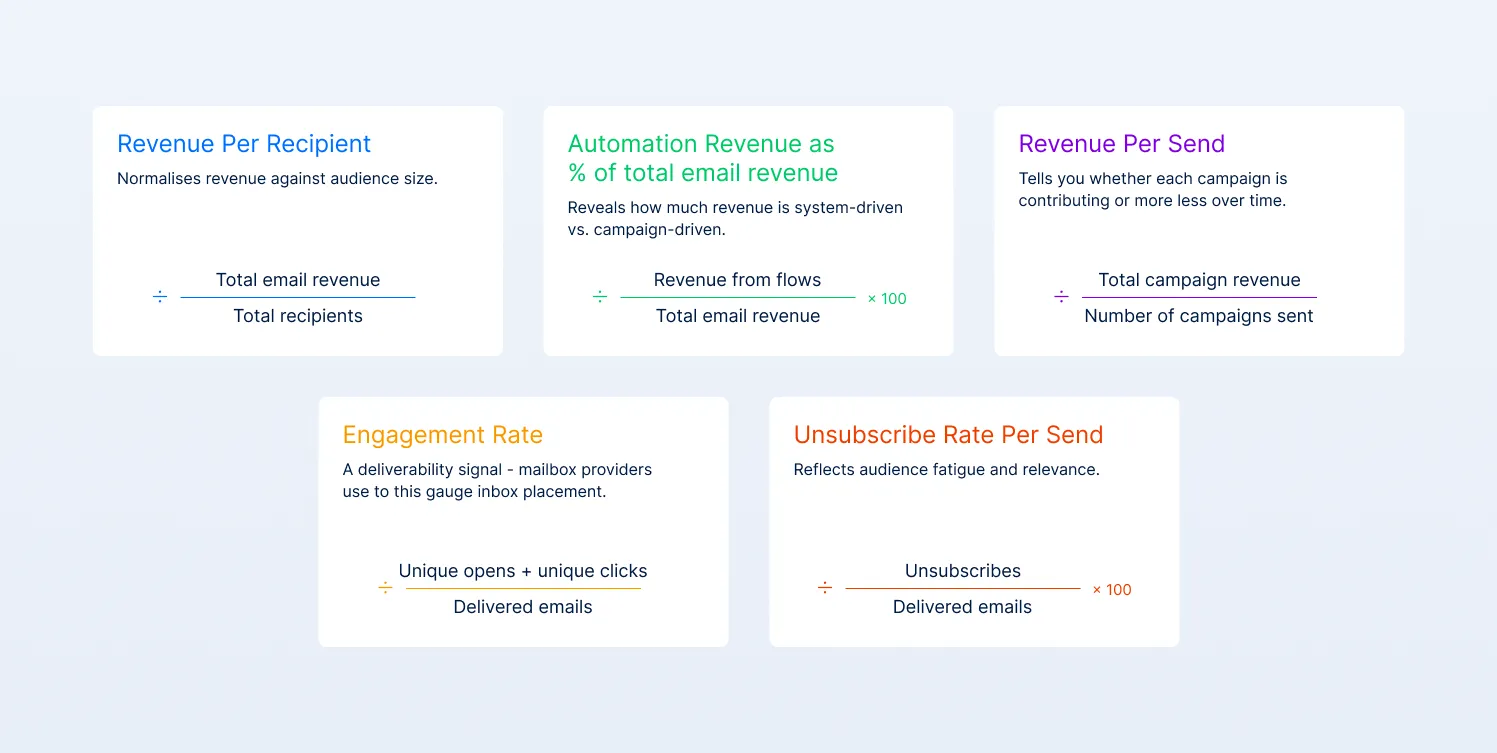
- Revenue per recipient (RPR)
Formula: Total email revenue ÷ total recipients
This is the core performance metric. It normalizes revenue against audience size, which makes it far more reliable than total revenue alone. A growing list can mask declining efficiency; RPR exposes that.
Klaviyo treats RPR as a primary retention metric because it captures both reach and conversion in a single number. If RPR is flat or declining, the issue is usually structural: low engagement, poor segmentation, weak offers, or deliverability constraints limiting visibility.
One important caveat: revenue per send can be misleading if looked at in isolation. If you only send to your most engaged users, this number will look strong, but overall revenue may suffer.
Always evaluate it alongside total reach to ensure you’re not optimizing for efficiency at the cost of scale.
- Automation revenue as % of total email revenue
Formula: (Revenue from flows ÷ total email revenue) × 100
This shows how much of your revenue is system-driven vs campaign-driven. Automated flows (welcome, abandoned cart, post-purchase) are behavior-triggered, which makes them inherently higher intent.
Automated emails generate a disproportionate share of conversions relative to volume. If this percentage is low (below 30%), your program is overly dependent on campaigns, meaning more effort for less predictable returns.
- Revenue per send
Formula: Total campaign revenue ÷ number of campaigns sent
This is your efficiency metric. It tells you whether each campaign is contributing more or less over time. If you increase send frequency but revenue per send declines, you’re scaling volume, not performance.
This typically leads to fatigue, lower engagement, and eventually deliverability issues.
- Engagement rate
Formula: (Unique opens + unique clicks) ÷ delivered emails
This is not a vanity metric; it’s a deliverability signal. Mailbox providers use engagement to determine inbox placement.
Campaign Monitor benchmarks show average open rates around 20–25% and click rates around 2–3%, depending on industry. What matters is direction, not absolute numbers. A declining trend usually precedes drops in reach and revenue.
- Unsubscribe rate per send
Formula: (Unsubscribes ÷ delivered emails) × 100
This reflects audience fatigue and relevance. Industry benchmarks typically fall between 0.1–0.3% per campaign. If this starts increasing, it’s rarely random. It usually points to over-sending, poor targeting, or misaligned messaging.
Final thought
Email revenue should be predictable. So why does it still feel inconsistent?
That’s usually a sign the system isn’t doing its job. Flows aren’t capturing intent consistently, campaigns are carrying too much weight, and parts of the lifecycle are underperforming quietly.
Fixing that comes down to how your program is built: how data connects, how automations run, and how decisions are made. That’s the difference we focus on at Magebit. Not just improving outputs, but fixing the structure behind them so email becomes consistent, not reactive.
If you want to see where your setup is falling short, start with an audit. We’ll show you where revenue is being lost and what needs to change.


Free tips to grow your store
eCommerce related news
New articles every month
Macaroni and cheese recipes
Check your inbox for tips.