For years, the “Shopify Plus wall” forced mid-market brands into a difficult trade-off: pay for an enterprise license you’re not ready for, or settle for a fragmented patchwork of B2B apps, manual workflows, and workarounds.
That wasn’t a feature gap. It was a structural limitation in how B2B was priced and delivered. Shopify’s April 2026 update has changed that equation.
B2B is no longer locked behind Plus. Core wholesale capabilities are now available across Basic, Grow, and Advanced plans, bringing what used to be an enterprise-only system into the standard Shopify stack. The intent is clear. As Samir Pradhan, VP of Product at Shopify, puts it:
“Merchants are telling us wholesale buyers are already asking to purchase their products. But too often, B2B tools have lived outside the systems they use to run their business.”
So yes, running B2B on Shopify without Plus is now a real option. But the trade-offs haven’t disappeared; they’ve shifted. The real question is no longer “can you run B2B without Plus?”
It’s: How far can you go before the system starts working against you?
What’s changed and why?
Shopify has taken its native B2B system (previously locked behind Shopify Plus) and made the core of it available across Basic, Grow, and Advanced plans.
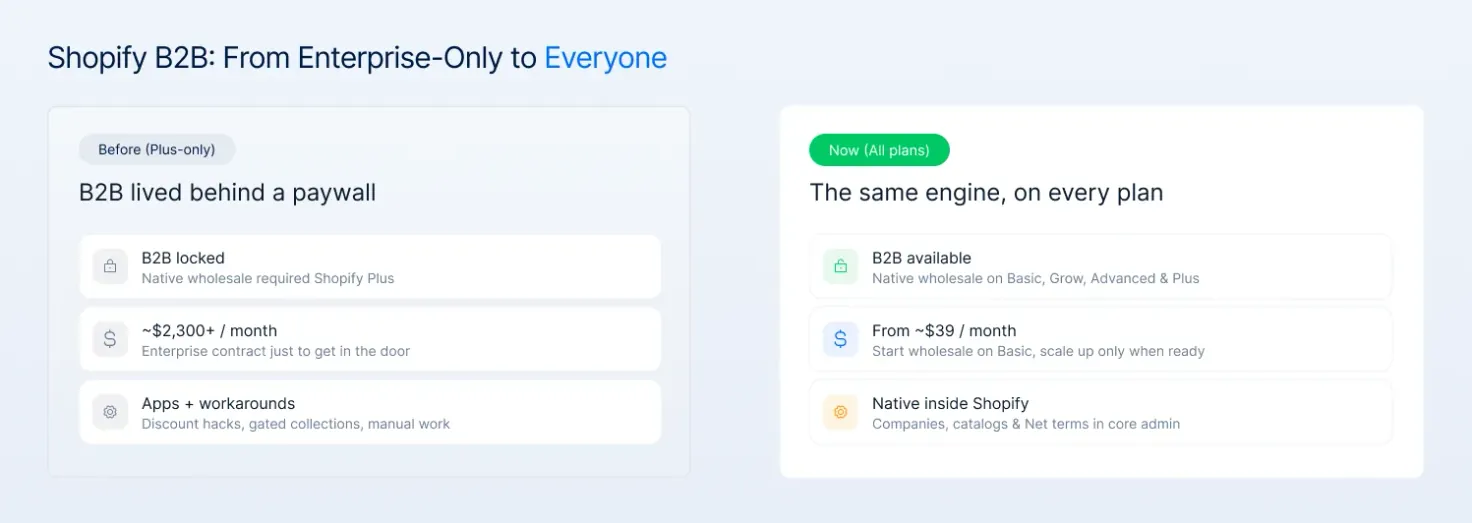
Shopify B2B before vs now comparison
That means B2B is no longer something you have to build around Shopify using apps, custom logic, or manual workflows. It now exists inside the platform itself, built around the same core structure: companies, catalogs, pricing rules, and account-based buying.
In practical terms, the entry point for native B2B has dropped from roughly $2,300/month on Plus to about $39/month on Basic.
This move reflects growing demand for self-serve B2B and lowers the entry barrier for smaller merchants who couldn’t justify Plus. It also helps Shopify stay competitive while pushing toward a unified B2C + B2B platform.
The B2B shift: Before vs. now
| Feature | Before (Plus-Only Era) | Now (B2B for Everyone) |
|---|---|---|
| Availability | Restricted to Shopify Plus | Available on All Plans (Basic and up) |
| Entry Cost | ~$2,300/month minimum | Starts at ~$39/month |
| Implementation | Heavy reliance on apps & workarounds | Native functionality built into the core |
| Workflow | Fragmented / Separate B2B setups | Unified backend for B2C and B2B |
| Maintenance | High manual oversight required | Automated, system-led operations |
This isn’t just a pricing change. It removes the need for what most non-Plus merchants relied on: workarounds like discount-based pricing, gated collections, or duplicate storefronts.
This also means you can now run B2C and B2B from the same backend, with shared data, pricing logic, and operations. But while the system is now accessible to everyone, it’s not identical across plans.
The same B2B model exists everywhere, but the level of control and flexibility still depends on whether you’re on Plus or not. That’s the part most merchants underestimate and where the real trade-offs start to show.
What’s now included on every Shopify plan?
The latest update brings enough B2B capability into standard plans to run wholesale seriously, while still leaving clear limits as complexity grows.
Core B2B features: Now on every plan
| Feature | What it means | The Magebit reality check |
|---|---|---|
| Company Profiles | Create business accounts with multiple buyers and shipping addresses. | Essential for self-serve. It stops your team from having to manually change shipping info for every repeat order. |
| Catalogs (Up to 3) | Show specific products and pricing to different customer groups. | The Bottleneck: Great for testing, but 3 slots disappear instantly once you add VIP or Regional tiers. |
| Volume Pricing | Offer tiered pricing (e.g., Buy 10, save 10%). | Automates the “How much if I buy more?” conversation. Crucial for protecting your sales team’s time. |
| Net Payment Terms | Set Net 15, 30, or 60 terms for trusted buyers. | This is simple credit. If you need deposits or partial payments, this native feature won’t be enough. |
| Vaulted Payments | Securely store buyer credit cards for repeat orders. | Removes the friction of B2B re-ordering. It makes buying from you as easy as buying on Amazon. |
| Draft Orders | Manage quotes and invoices directly inside Shopify. | The duct tape of B2B. It works for low volume, but lacks the professional Quote-to-Order workflow of Plus. |
| Bulk Ordering | Allow buyers to quickly add multiple SKUs and variants in one go. | This is how B2B actually works. Buyers don’t browse; they reorder in bulk. Without this, your store behaves like DTC, not wholesale. |
What Shopify Plus has that Shopify non-Plus doesn’t?
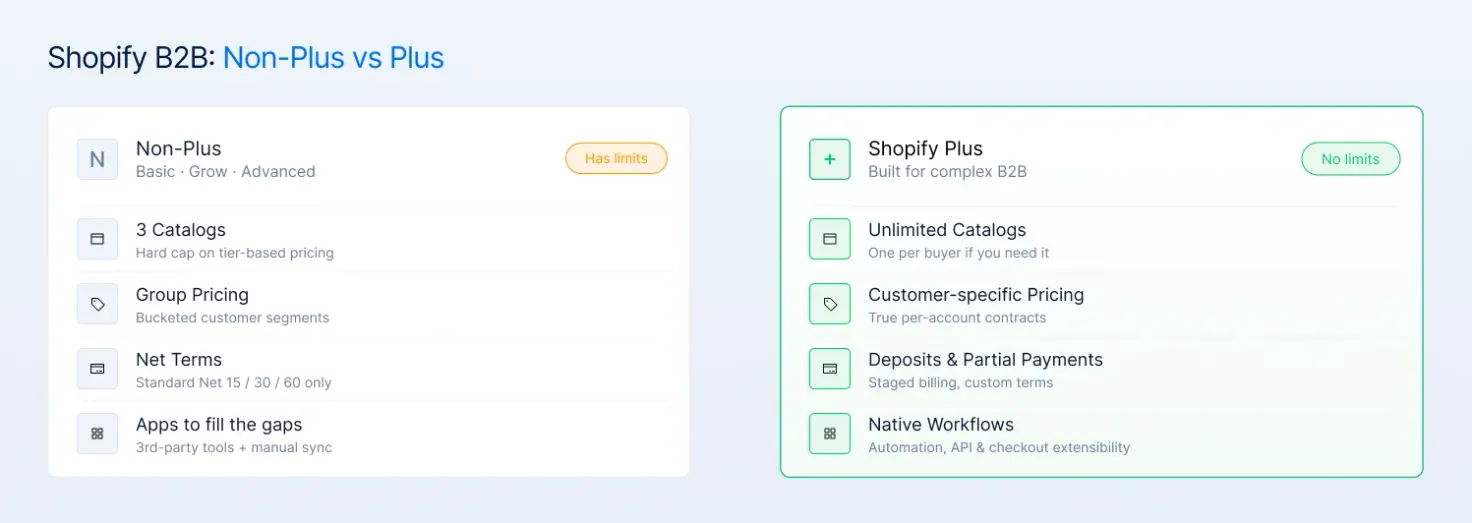
Comparison between the B2B features of Shopify Plus vs Non-Plus
On standard plans, B2B is a feature. But on Plus, it’s an ecosystem. Here is the comparison table, sharpened with Magebit’s frontline perspective on where the operational breaking points actually are.
| Feature | Non-Plus (Basic / Grow / Advanced) | Shopify Plus | Magebit’s take on the breaking point |
|---|---|---|---|
| Catalogs | Hard Limit: Up to 3 active. | Unlimited: One for every buyer if needed. | 3 catalogs = Retail, Wholesale, and VIP. If a 4th customer asks for a special rate, your system breaks. |
| Pricing Control | Group-based: “Close enough” pricing. | Negotiated: True customer-level pricing. | If your business relies on unique contracts per account, non-Plus plans will leak margin through bucketed pricing. |
| Catalog Assignment | Indirect: Assigned via customer groups. | Direct: Assigned to Company or Location. | On Plus, you can change a single customer’s price in seconds. On standard, you have to move them to a new group. |
| Payment Terms | Standard: Net 15/30/60 only. | Custom: Deposits, partials, & staged billing. | Net Terms are only half the story. If you need a 30% deposit to start production, you need Plus. |
| Checkout | Standard: Locked Shopify checkout. | Customizable: Checkout Extensibility. | B2B buyers often need custom fields (PO numbers, specific dates). Plus lets you build the checkout they actually want. |
| Automation | Basic: Standard Shopify Flow logic. | Advanced: Full API & B2B-exclusive triggers. | Plus allows for complex logic like “If Order > $5k AND New Customer, hold for Sales Rep approval.” |
| Account Structure | Simple: Works for owner-operators. | Enterprise: Built for multi-buyer teams. | On Plus, “Company Locations” can have different tax IDs and shipping rules. Standard plans treat them all as one. |
| Scalability | App-Heavy: Becomes a “patchwork” fast. | Native: Centralized, high-performance flows. | Apps slow down your site and create data silos. Plus keeps everything under one roof. |
What are the benefits of the B2B Shopify update?
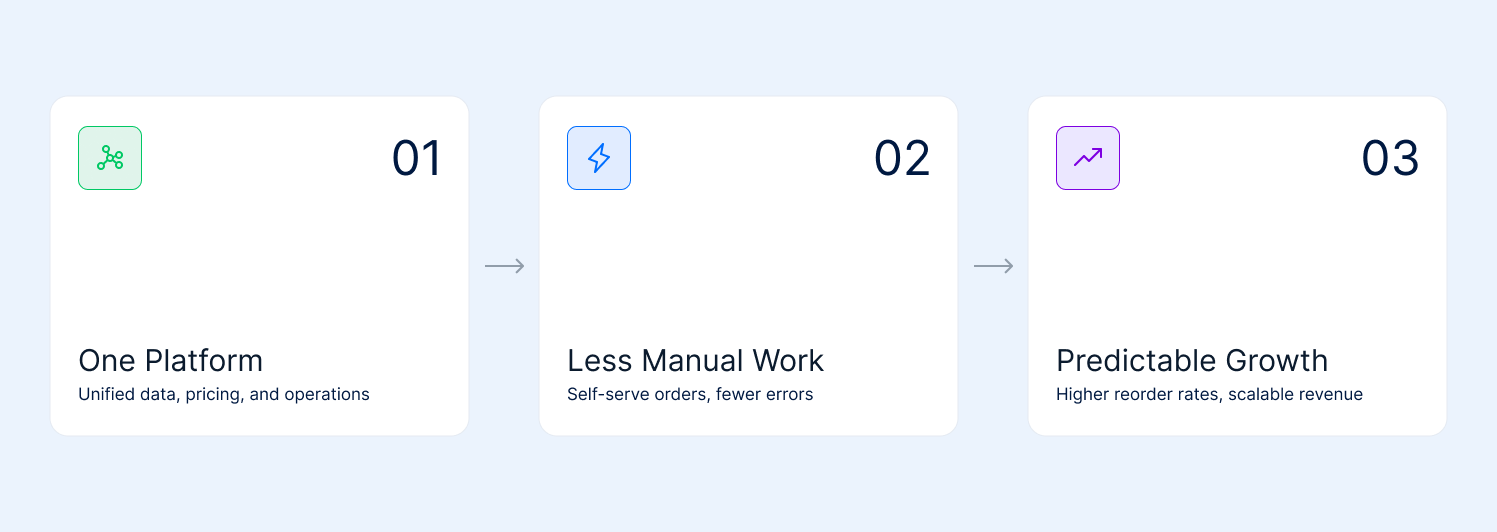
Benefits of the B2B Shopify April 2026 update
At its core, this update removes three long-standing barriers to B2B on Shopify: high entry cost, fragmented systems, and manual operations. What used to require a Plus contract and multiple tools can now be done inside a single platform, early, and with far less overhead.
- One platform instead of fragmented systems
Before this, most non-Plus merchants were running B2B across multiple layers: apps for pricing, email for orders, spreadsheets for tracking, and Shopify for fulfillment. It worked, but it wasn’t clean.
That fragmentation creates real problems. Data becomes unreliable, pricing can mismatch, and teams spend time verifying instead of operating.
A big Magebit client experienced this firsthand. While relying on workarounds, some buyers saw retail prices instead of their negotiated wholesale rates, which meant lost orders altogether.
With B2B now built into Shopify, that fragmentation disappears. You’re working from one backend, with shared product data, pricing logic, and customer records. The same tools you already use (like Shopify Flow, Markets, and Payments) now apply to B2B as well.
- Less manual work, more scalable operations
Wholesale tends to break not because of demand, but because of process. When every order requires manual handling (emails, calls, draft orders), you eventually hit a ceiling. Growth becomes tied to how much your team can process.
Snyder Performance Engineering had exactly this issue. Every B2B order required a phone call or email, limiting how many accounts they could manage.
Once they moved to Shopify’s native B2B setup, customers could log in, see their pricing, and place orders themselves. Orders flowed directly into their systems without manual entry.
The result was immediate:
- 25% reduction in back-office admin work
- Orders that could be processed and shipped within minutes
That’s the shift, from managing orders to letting the system handle them. This also changes how buyers interact with your store. B2B isn’t about browsing; it’s about speed. Bulk ordering and quick reorders remove friction from high-volume purchasing.
- Stronger, more predictable B2B growth
B2B isn’t just another sales channel. It behaves differently from DTC. Once a wholesale customer is onboarded, they tend to reorder consistently. That creates a more predictable revenue stream.
Shopify’s data reflects this clearly:
- Up to 4.1× higher reorder frequency
- 33% increase in self-serve orders within six months
- Around 20% lift in repeat purchasing
Shopify is also moving beyond card-based payments, with support for ACH and stored bank details. That brings the experience closer to how real B2B transactions happen, on terms, not cards.
How to choose the right plan for your B2B setup?
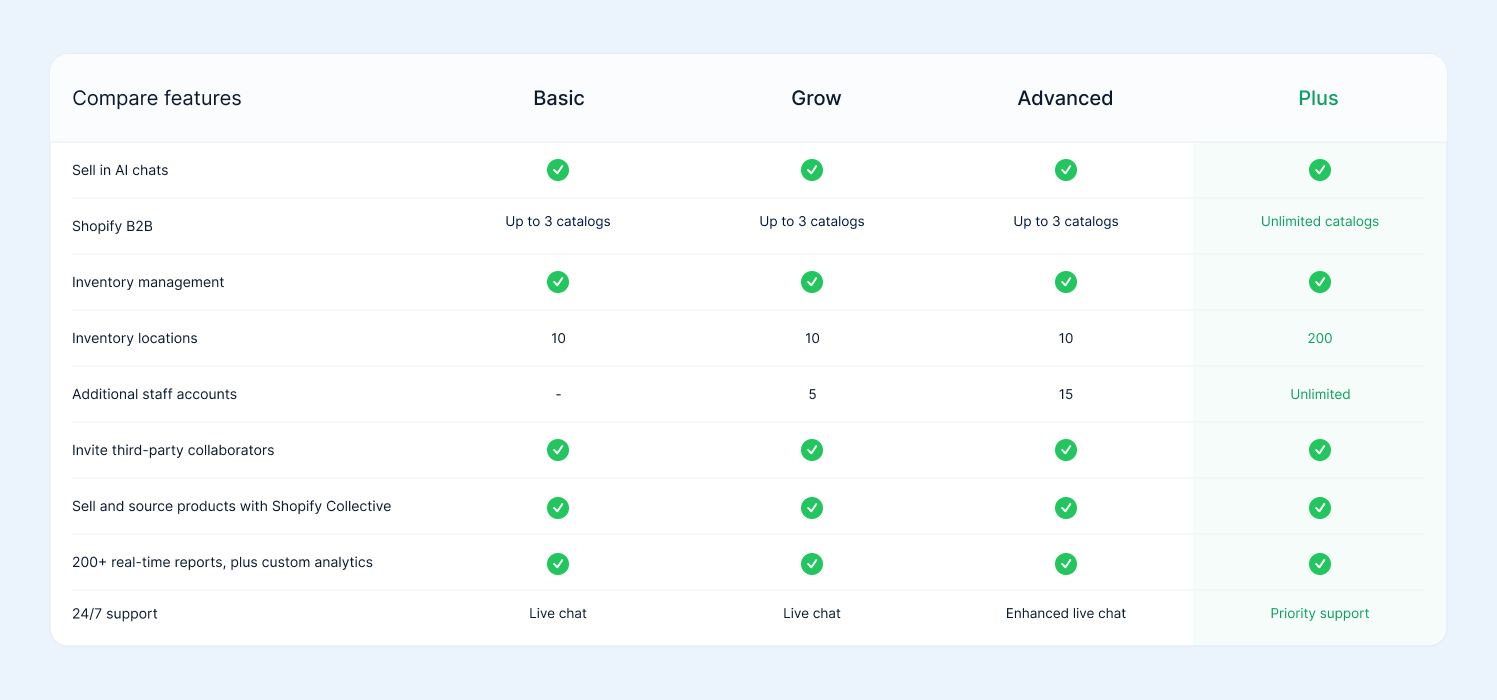
Feature comparison table for Shopify Basic, Grow, Advanced, and Plus plans
Now that B2B is available across all plans, the decision isn’t “Plus or nothing” anymore. It’s about matching the plan to how your B2B actually works today and how quickly it’s going to get complex.
From what we’ve seen working with merchants, most wrong decisions here come from either overcommitting to Plus too early or staying on standard plans for too long and patching things together.
Here’s how to think about each plan in a practical way.
- Basic — best for testing B2B, not running it seriously
Basic now gives you access to the core B2B engine, which is a big shift. You can set up company accounts, create catalogs, and start accepting wholesale orders.
But realistically, this is a testing ground. It works if:
- You have a handful of wholesale customers
- Pricing is simple (1–2 tiers)
- B2B is not yet a core revenue channel
Where it falls short is control and scale. The moment you start managing multiple customer types or larger orders, you’ll feel the limits quickly.
Use Basic if you’re validating demand, not building a system.
- Grow (Shopify) — early-stage B2B with some structure
This is where B2B starts to feel usable, not just experimental. You still get the same core B2B features, but with better performance and slightly more operational headroom. For small teams managing both DTC and a growing wholesale channel, this is often enough.
It works if:
- You’re starting to onboard regular wholesale buyers
- You have a few defined pricing tiers
- Your operations are still relatively simple
But the limitation remains the same: you’re still working within constraints, especially around catalogs and pricing flexibility.
Use Grow if B2B is growing, but still manageable without custom logic.
- Advanced — the practical ceiling for non-Plus B2B
This is where most serious non-Plus B2B setups sit. You get better reporting, lower transaction fees, and more operational capacity. If your wholesale channel is contributing meaningful revenue but still structured simply, Advanced can hold up well.
It works if:
- You have stable pricing tiers (within the 3-catalog limit)
- Your customers can be grouped logically
- You don’t need complex payment structures
Where it starts breaking is when B2B stops being “tiered” and becomes customer-specific. That’s usually the trigger.
Use Advanced if you want to scale B2B, but your model is still structured and predictable.
Magebit tip: Merchants often stay on the Advanced plan to save $2,000/month in subscription fees, but they end up paying a Workaround Tax.
If you are paying $400 for your plan, $600 for third-party B2B apps to bypass catalog limits, and your operations team spends 15 hours a week manually correcting sync errors between your CRM and Shopify, you are already paying for Plus.
You just aren’t getting the priority support or the 0.2% transaction fee savings that come with it.
- Shopify Plus — when B2B becomes operationally complex
Plus isn’t about unlocking B2B; it’s about removing the constraints around it. This is where the system starts to match how real wholesale businesses operate. You need Plus when:
- Every customer has different pricing
- You’re managing multiple company locations or buyer roles
- Orders require deposits, partial payments, or staged billing
- Your team relies on automation, integrations, or custom workflows
Plus gives you unlimited catalogs with direct company assignment, true customer-level pricing, flexible payment handling, and deeper automation and checkout control. In other words, you stop working around the system and start working within it.
Use Plus when B2B is no longer simple, and workarounds are slowing you down.
The cost side of this move: What changes, and who benefits?
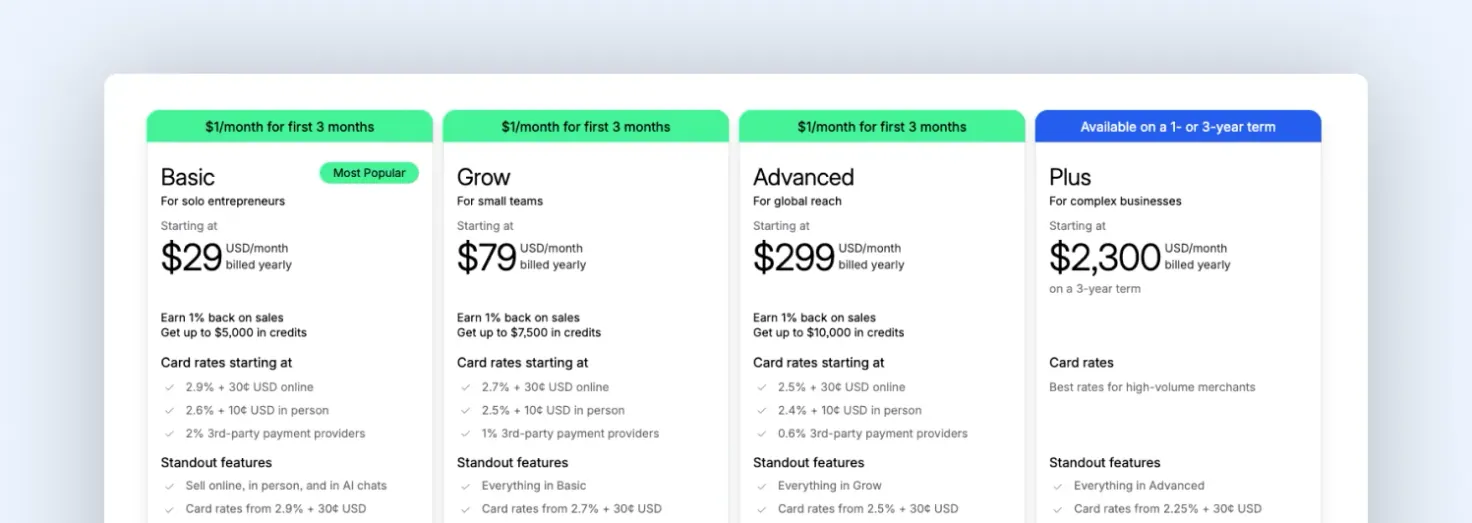
Shopify pricing plans showing Basic, Grow, Advanced, and Plus tiers with monthly pricing and feature comparisons
Finally, there’s the cost shift. The entry point for native B2B drops from roughly $2,300/month on Shopify Plus to ~$39/month on standard plans. That changes how merchants approach wholesale.
Instead of waiting until B2B is big enough, you can start early, test demand, and build gradually. And when complexity increases, you can move to Plus without replatforming or rebuilding your setup.
Before getting into opinions, it helps to look at how the cost structure has actually changed:
The evolution of Shopify B2B: 2026 cost & access shift
| Cost Layer | Before (Plus-Only B2B) | Now (B2B on All Plans) |
|---|---|---|
| Entry Cost | ~$2,300 - $2,500/month | ~$39 - $399/month |
| B2B Access | Gated; Plus was the “Wholesale Wall” | Native B2B engine included on all paid plans |
| Upfront Commitment | High: Required enterprise contract | Low: Monthly or annual SaaS billing |
| Transaction Fee (Plus) | 0.18% - 0.25% B2B Platform Fee | Still applies specifically to Plus users |
| Non-Plus Costs | Paid B2B apps + manual labor | Drastically reduced need for 3rd-party apps |
| Scaling Cost | Subscription-heavy: Fixed high base | Volume-sensitive: Hybrid model (Fee + Subscription) |
When we look at this shift for our clients, the table above tells two different stories depending on your size:
Option 1: Lower upfront cost (non-Plus)
On Basic, Grow, and Advanced, B2B is now included in the subscription. You’re paying ~$39–$399/month, with no additional platform fee on B2B orders.
For many merchants, this is a big shift. A brand doing ~$1M in B2B earlier had to justify ~$2,500/month for Plus. Now, that same business can run wholesale on Advanced (~$399). That’s a saving of over $2,000/month (~$24,000/year) just to get started.
But the cost doesn’t disappear; it moves. As B2B grows, you start relying on apps, manual workflows, or internal processes to handle pricing, orders, and exceptions. The platform stays cheap, but the effort to run it increases.
Option 2: Higher cost, but structured for scale (Plus + VPF)
On Shopify Plus, the model changes from fixed to partly variable. Along with the higher subscription, Shopify applies a 0.18% variable platform fee (VPF) on B2B orders, even if the payment happens outside of Shopify.
This isn’t a payment fee; it’s a platform usage fee. If your B2B orders are processed through Shopify, the fee applies regardless of whether the customer pays via card, bank transfer, or store credit.
| Monthly B2B Revenue | 0.18% Variable Fee (VPF) | Annual Cost (Fee Only) |
|---|---|---|
| $100,000 | $180 | $2,160 |
| $500,000 | $900 | $10,800 |
| $1,000,000 | $1,800 | $21,600 |
| $2,000,000 | $3,600 | $43,200 |
At higher volumes, this becomes a visible cost. At $2M/month, that’s $3,600/month (~$43,200/year) on top of the subscription.
But this is also where the system changes. Pricing can be assigned per customer, payment flows can be structured, and workflows stay inside Shopify instead of being managed across tools. Instead of absorbing cost through apps and manual work, you’re paying directly for a system that handles that complexity.
Final thoughts
Shopify has made B2B easier to start, but not simpler to scale. You can now launch wholesale on any plan, but as complexity grows, the decisions you make early start to matter more.
The real shift isn’t access; it’s a responsibility. You now have the flexibility to build B2B your way, but that also means you need to choose the right structure, workflows, and plan before things get harder to untangle.
If you’re figuring out how to structure your B2B, scale it, or decide when to move to Plus, it helps to get it right early before workarounds become your system.
Get in touch with Magebit—we’ll help you audit your setup and build capabilities that actually work as you grow.