Your Magento store could be losing search visibility before shoppers even reach your products. Duplicate URLs can split ranking signals, misconfigured settings can keep important pages out of search results, and slow storefronts can hurt the shopping experience.
Google rankings alone may no longer be enough. A Pew Research Center study found that users clicked a traditional search result in 8% of visits when Google displayed an AI summary, compared with 15% when it didn’t.
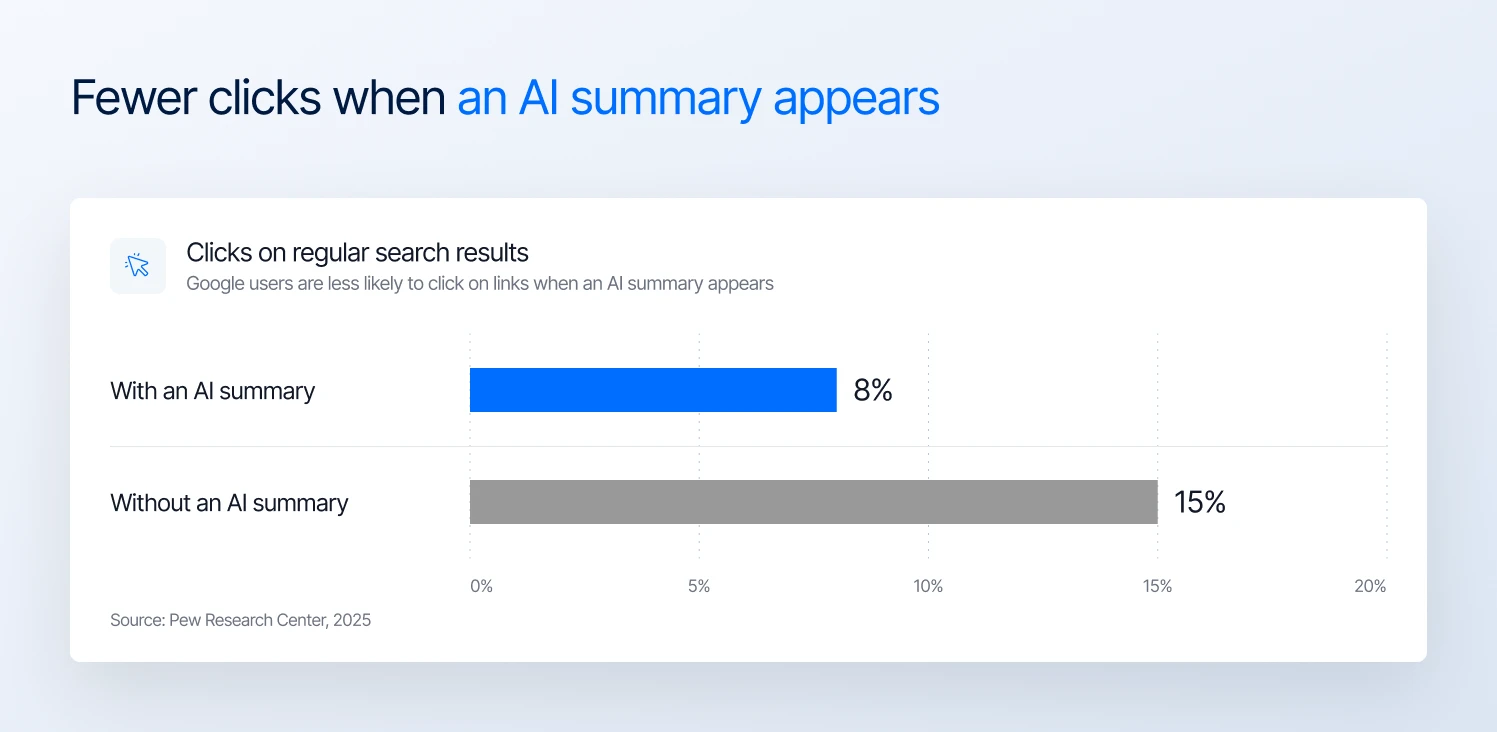
Google users click fewer search results when an AI summary appears (Pew Research Center, 2025)
That makes appearing in AI answers important alongside Google rankings. This guide covers the Magento SEO fixes that matter most: core settings, filter pages, speed, product and category content, multi-store setups, AI search, and how to measure results.
Key takeaways
- Get Magento’s core SEO settings right: turn on canonical tags, keep category paths out of product URLs, and set up the XML sitemap, robots settings, and redirects.
- Control duplicate URLs: decide which filter pages should rank, and handle sorting, pagination, and internal search URLs so Google doesn’t waste time on them.
- Fix what slows your store down: find the cause in Search Console and PageSpeed Insights before changing themes or hosting.
- Make product and category pages useful: match each page to the right searches, write your own product descriptions, and add short category intros.
- Support multi-store setups: add hreflang tags, since standard Magento doesn’t, and earn links from brands and industry sites.
- Get found in AI search: don’t block AI search crawlers, and keep product facts, prices, and stock clear and accurate.
- Measure results: track organic traffic in Search Console and GA4, and AI referral traffic in GA4.
Why Magento stores lose Google rankings and AI visibility
Magento can handle thousands of products, complex catalogs, and multiple store views. But that flexibility comes with SEO challenges that are easy to overlook until rankings start to suffer.
- Filter pages: each combination of filters, such as color, size, and price, can generate a separate URL. This can create thousands of similar pages within one category, using up Google’s crawl resources.
- Duplicate product URLs: Magento can create multiple URLs for the same product when it belongs to different categories. This can confuse Google about which URL to show in search results.
- Slow pages: large images, extensions that load code on every page, third-party scripts, and slow server responses can all push product and category pages past Google’s Core Web Vitals targets.
- AI search: tools like ChatGPT need clear, accurate product information. If your pages use the same manufacturer descriptions as dozens of other retailers, skip key specs, or have incorrect structured data, AI tools have little reason to mention your store.
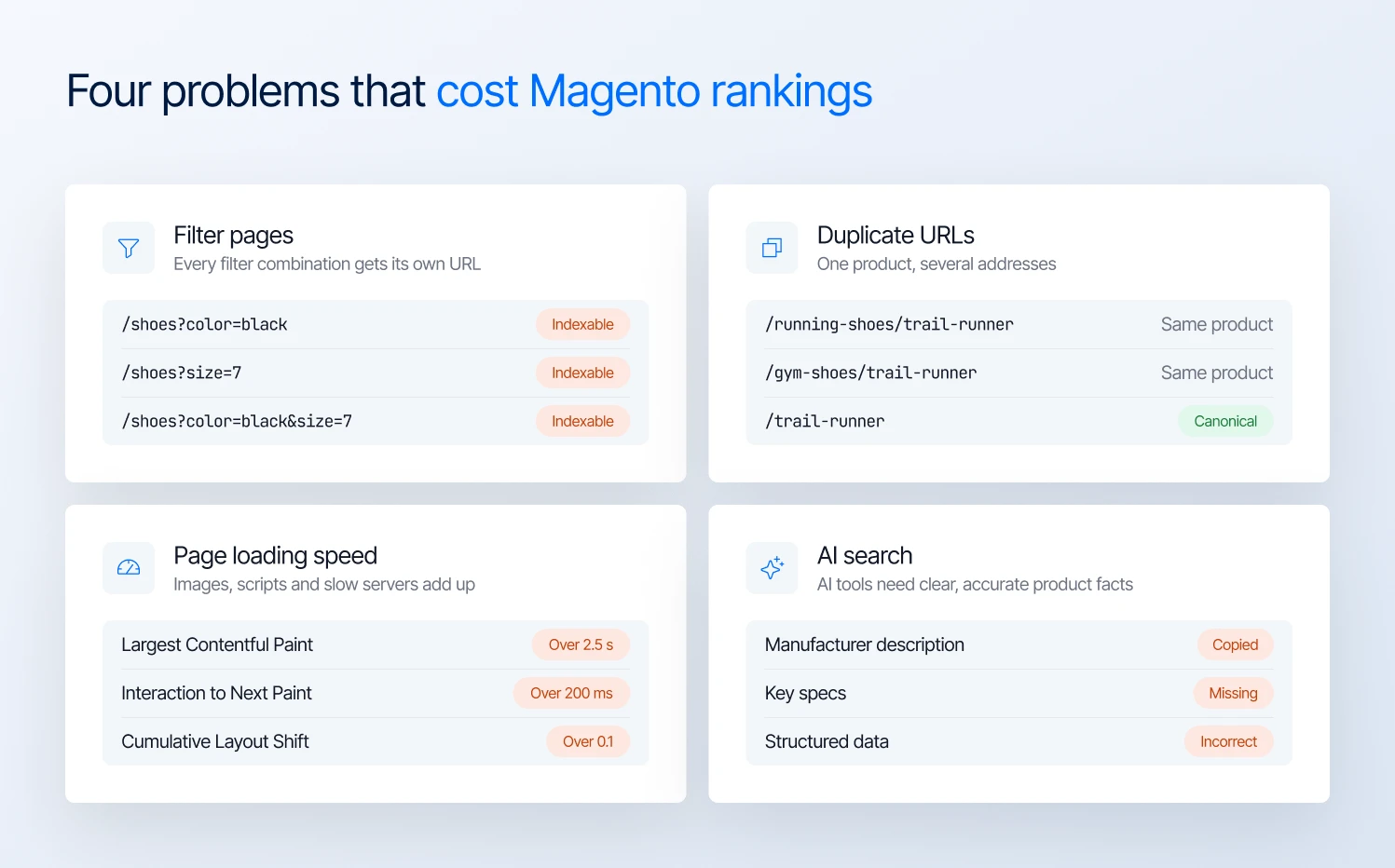
Four common Magento SEO problems that cost stores rankings and AI visibility
Magento 2 SEO best practices to set up first
Magento gives you control over URLs, metadata, indexing, and sitemaps. But the settings need to work together. Here are six settings to review in Magento Open Source and Adobe Commerce.
1. Canonical tags: tell Google which URL should take priority
Canonical tags identify the preferred URL when the same or similar content is available at multiple addresses.
For example, a shoe assigned to both Running shoes and Gym shoes may be accessible through category-based URLs. Magento’s canonical settings help you specify which version search engines should prioritize.
Go to Stores → Settings → Configuration → Catalog → Catalog → Search Engine Optimization and review:
- Use Canonical Link Meta Tag for Products
- Use Canonical Link Meta Tag for Categories
Adobe recommends enabling canonical tags for both. Also check Use Categories Path for Product URLs and keep this set to No, Magento’s default. This is the setting that creates the duplicate URLs described above.
Setting it to Yes makes Magento link to products through category paths, which multiplies those duplicate URLs. Even on No, category-path URLs can still load, so keep canonical tags turned on.
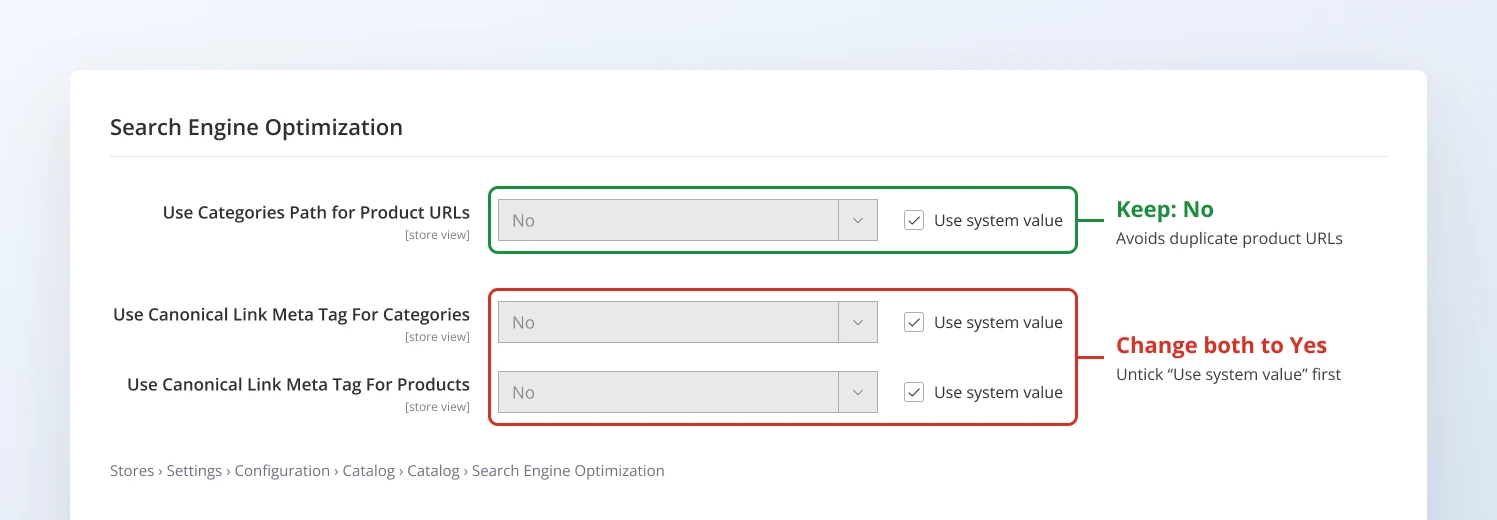
Magento canonical tag settings: keep category paths off and turn canonical tags on
2. XML sitemap: help Google discover the right pages
Magento generates an XML sitemap to help search engines discover your store’s product, category, and CMS pages. For large catalogs, the priority is ensuring Google can find important pages without wasting time on URLs that shouldn’t be indexed.
Go to Stores → Settings → Configuration → Catalog → XML Sitemap to configure sitemap generation.
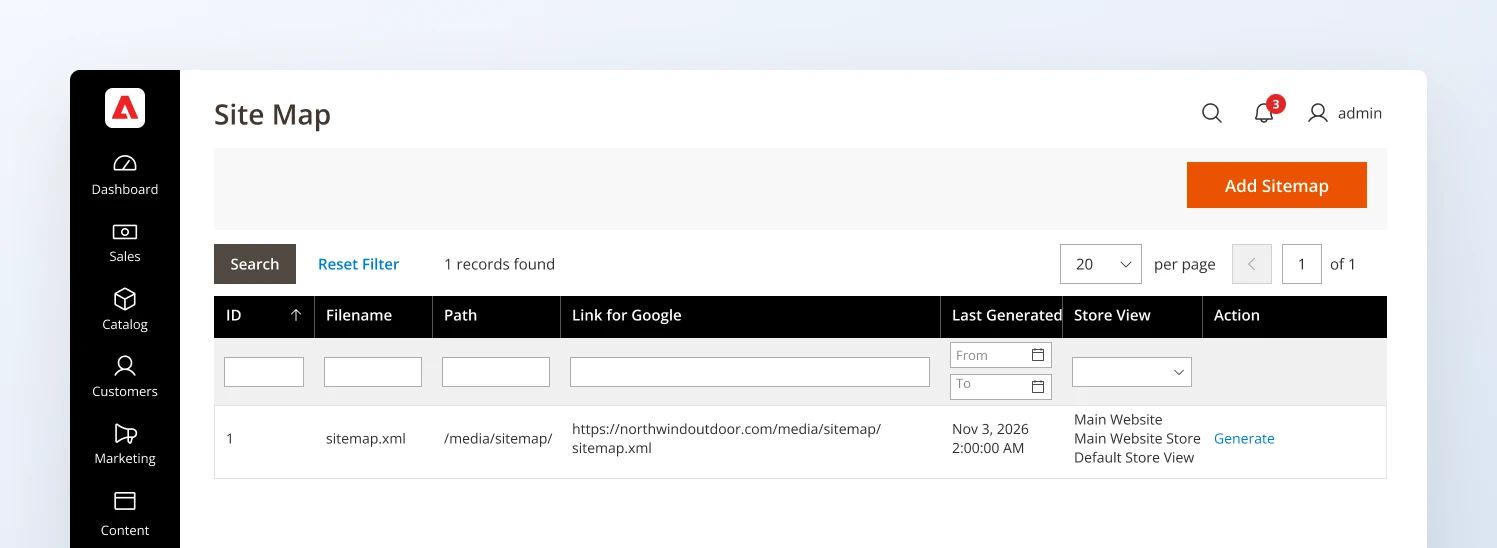
The Magento XML sitemap grid, where you add and generate a sitemap for each store view
Check these settings:
- Products and categories: Include the pages you want search engines to discover.
- CMS pages: Include useful pages, such as buying guides and other content you want indexed.
- Generation settings: Configure automatic sitemap generation so the sitemap stays up to date as your catalog changes.
- Sitemap location: Make sure the generated sitemap is accessible, then submit it in Google Search Console and Bing Webmaster Tools.
Remember, a sitemap helps Google discover URLs; it doesn’t guarantee indexing or improve rankings by itself.
3. Robots.txt and indexing: make sure important pages can appear in search
Magento’s default robots instructions block certain system paths from crawlers. That is useful, but custom rules or a site-wide indexing setting can accidentally prevent Google from accessing pages you want to rank.
Go to Content → Design → Configuration, edit your website, and open Search Engine Robots. Check the Default Robots setting and the custom robots.txt instructions. For a live store, the default should be INDEX, FOLLOW.
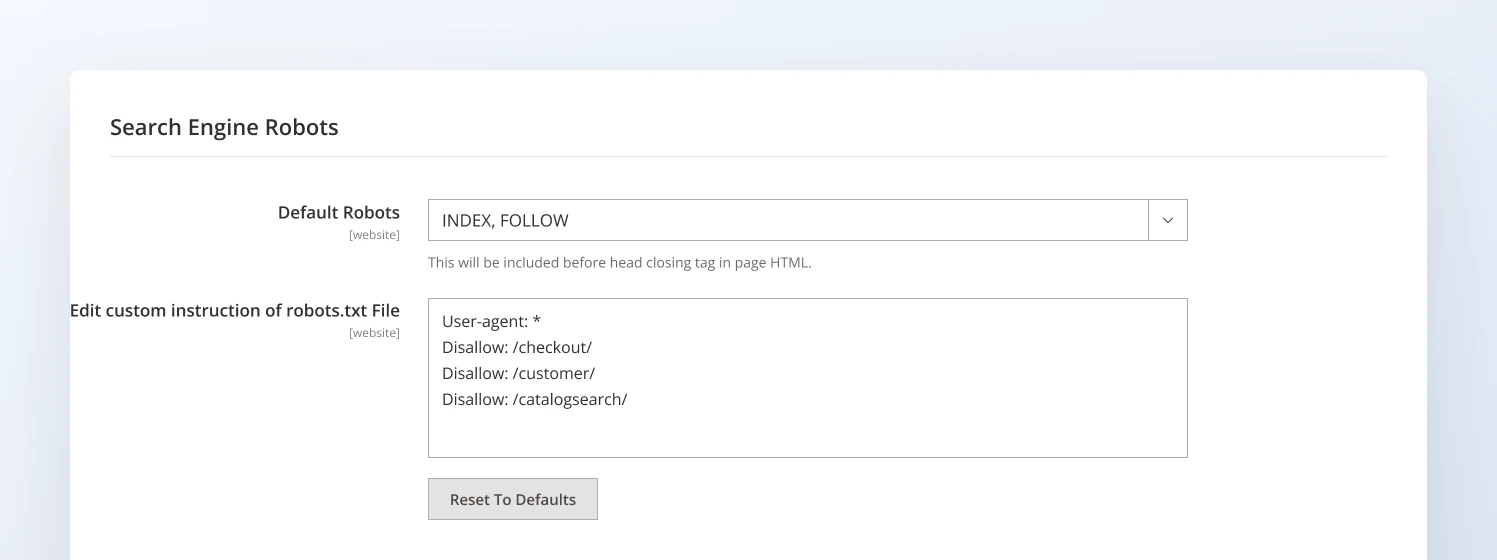
Magento Search Engine Robots settings: use INDEX, FOLLOW on a live store
Pay particular attention to these checks:
- Product and category pages: Make sure custom disallow rules don’t block important catalog URLs.
- Filtered URLs: Use crawl controls deliberately. Blocking a URL in robots.txt does not reliably remove it from Google’s index.
- Multi-store setups: Check the robots settings for each website.
4. Metadata templates: control titles and descriptions across your catalog
Magento lets you set default metadata for product and category pages, reducing the manual work involved in optimizing a large catalog.
The risk is that generic templates can leave hundreds of pages with identical titles or descriptions, making it harder for shoppers to distinguish relevant results in Google.
Go to Stores → Settings → Configuration → Catalog → Catalog → Product Fields Auto-Generation to review the default meta title and description templates for products.
These templates apply to all store views and only fill in new products, so existing products keep their current metadata. Magento has no templates for categories, so write category titles and descriptions on each category page.
What to check:
- Product pages: Use product names in page titles. Where useful, include distinguishing attributes such as model, material, or product type.
- Category pages: Write titles around the category’s search intent rather than using the same generic format across every category.
- Meta descriptions: Use templates as a starting point, but write custom descriptions for high-value categories and products where the extra detail can influence clicks.
Note: Meta titles and descriptions deserve a closer look on your most important pages. Adobe suggests keeping titles under 70 characters and descriptions between 150 and 160.
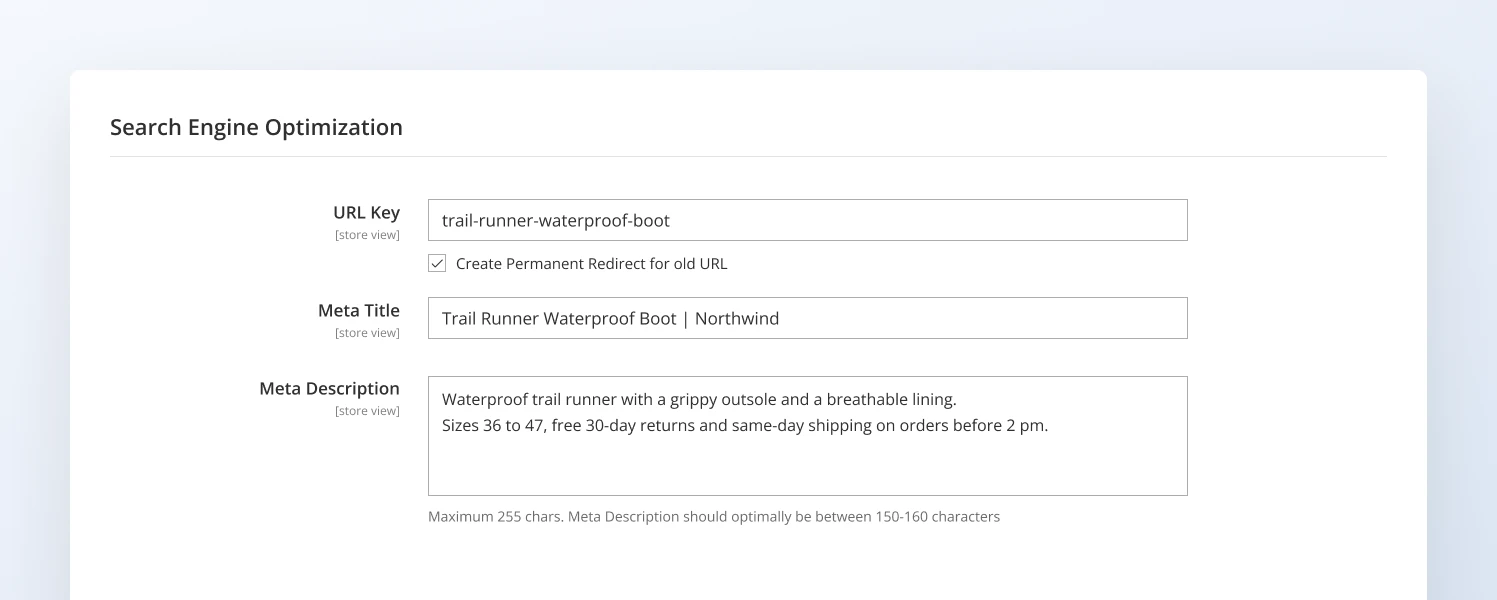
Product URL key, meta title, and meta description fields in the Magento admin
5. URL rewrites and redirects: preserve SEO value when URLs change
Magento’s URL rewrites let you change storefront URLs without leaving shoppers or search engines at broken addresses. This matters when products are renamed, categories are reorganized, or a store migrates to a new URL structure.
Go to Marketing → SEO & Search → URL Rewrites to review and manage URL rewrites.
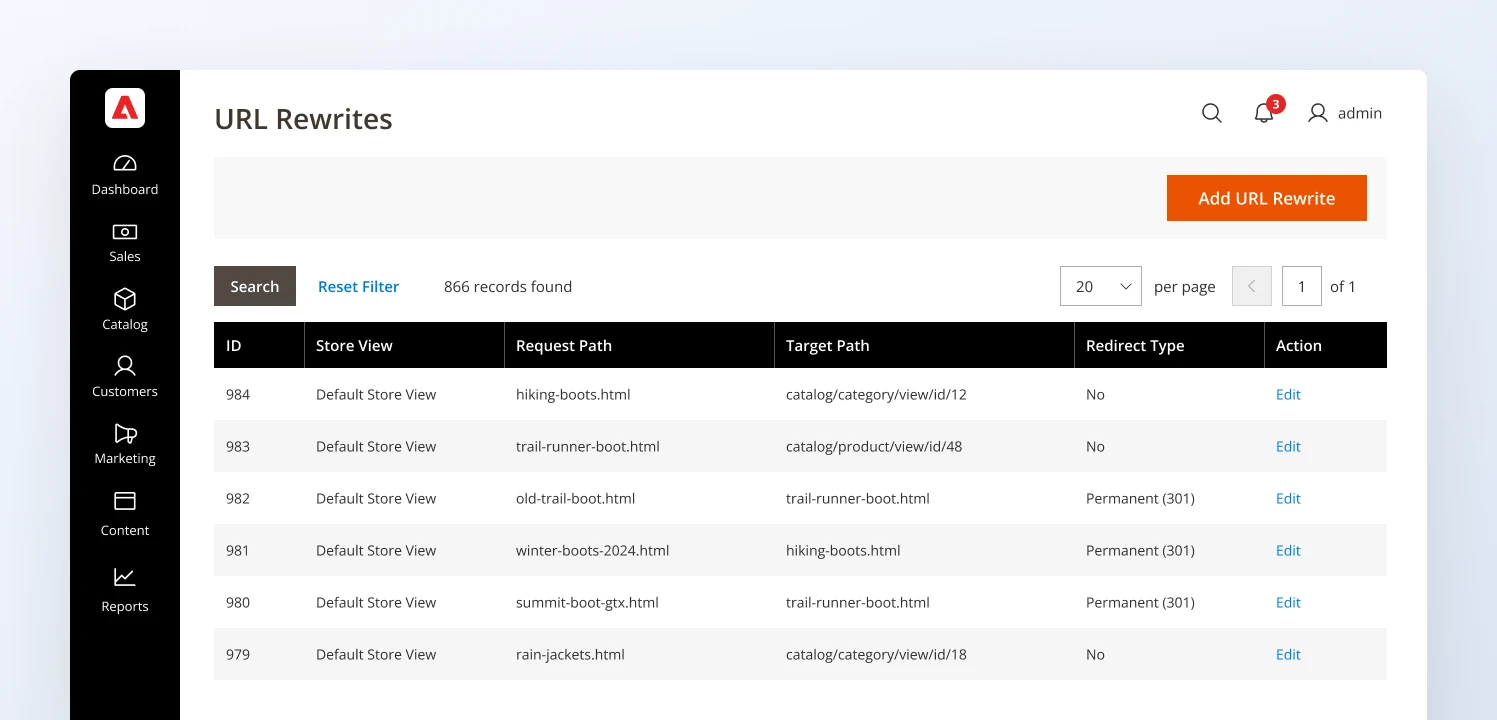
Magento URL rewrites keep old product and category URLs redirecting to the right page
What to check:
- Product and category changes: When a URL key changes, verify that Magento creates the appropriate permanent redirect. Check the Create Permanent Redirect for URLs if URL Key Changed setting in the catalog SEO configuration.
- Discontinued products: Redirect a discontinued product to a relevant replacement or category when there is a clear alternative.
- Store migrations: Map old URLs to their closest equivalent on the new site. Avoid redirect chains, loops, and redirects to irrelevant pages.
6. HTTPS and one preferred domain: keep all signals on one address
Your store should load on one address only, for example https://www.yourstore.com. If it also loads on http:// or without www, Google may treat them as separate sites.
Go to Stores → Configuration → General → Web and check:
- Base URLs (Secure): set “Use Secure URLs on Storefront” to Yes.
- URL Options: set “Auto-redirect to Base URL” to Yes (301 Moved Permanently).
Then ask your developer to confirm that every other version (http://, with or without www) redirects to your main address.
Fix faceted navigation and crawl inefficiency
Magento’s layered navigation creates a new URL for each filter or combination of filters, such as black shoes, size 7 shoes, and black shoes in size 7.
Google may spend its time crawling these instead of your new or updated pages. The goal is to decide which filter pages are useful for search and control the rest.
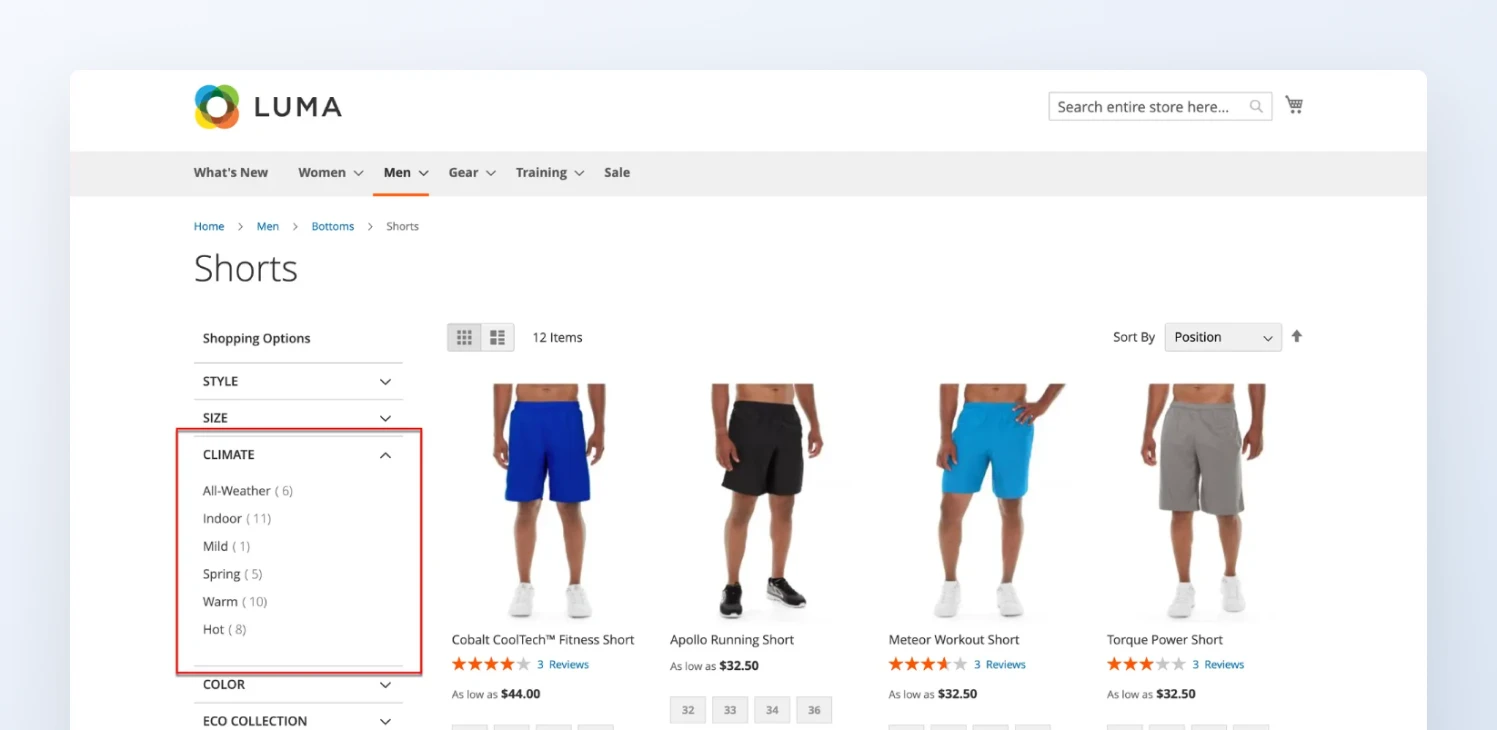
Layered navigation filters on a Magento category page, where each filter can create a new URL
1. Decide which filter combinations deserve to rank
Only make a filtered page indexable when it targets a useful search query and offers a strong selection of relevant products. For example, black running shoes may deserve their own landing page.
Check Google Search Console for impressions and clicks from filtered URLs, then compare them with keyword demand and product availability. For combinations worth targeting, create a dedicated landing page rather than letting every filter combination become an SEO page.
2. Choose the right control for each URL
Magento stores can use three main controls, depending on the purpose of each URL:
- Canonical tags: Tell Google which URL is preferred when duplicate or similar pages exist.
- noindex: Tells search engines not to include a page in search results.
- robots.txt: Controls which URLs search engine crawlers can access.
These controls serve different purposes. Google must be able to crawl a page to read its noindex directive. If robots.txt blocks the page, Google may not see that instruction, and the URL could still appear in search results.
Before applying rules to all filtered URLs, identify which pages should remain accessible to search engines and test the changes on representative URLs.
3. Handle sorting, pagination, and internal search URLs
Sorting options can create multiple URLs for the same product listing. Avoid making these variations independently indexable. Pagination is different: later pages may contain products that Google needs to discover.
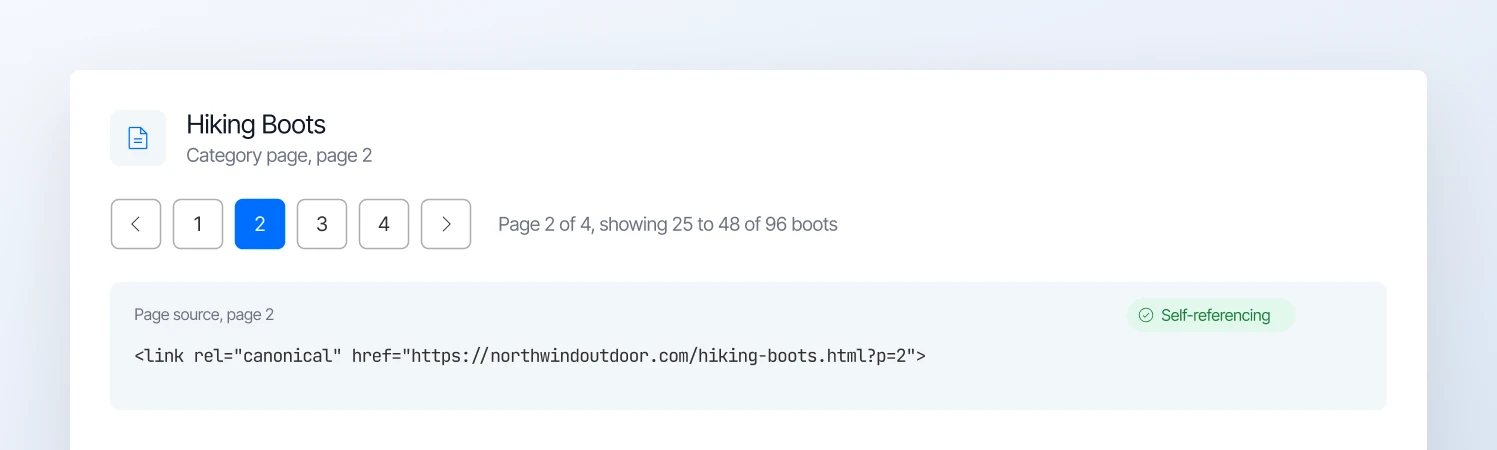
Each paginated category page should carry a self-referencing canonical tag
Check that pagination uses crawlable links and that each page (page 2, page 3, and so on) has a self-referencing canonical tag rather than pointing to page 1. Review internal search URLs too, as they can generate large numbers of low-value pages.
4. Audit the URLs Google has discovered
Use Google Search Console’s Page indexing report to identify unexpected indexed or excluded URLs. Group filtered URLs by parameters such as brand, price, sorting, and pagination to spot patterns.
Start with the URL patterns that Google crawls most but that bring no search traffic. Before applying a rule across your catalog, test a few URLs to make sure important category and product pages stay indexable.
Improve Magento storefront performance
A slow storefront frustrates shoppers and makes Google’s Core Web Vitals targets harder to meet. Before paying for a new theme or new hosting, find out what’s actually slowing your store down.
1. Measure Core Web Vitals first
Google uses three Core Web Vitals to assess loading, responsiveness, and visual stability. Aim for these thresholds at the 75th percentile of real user visits.
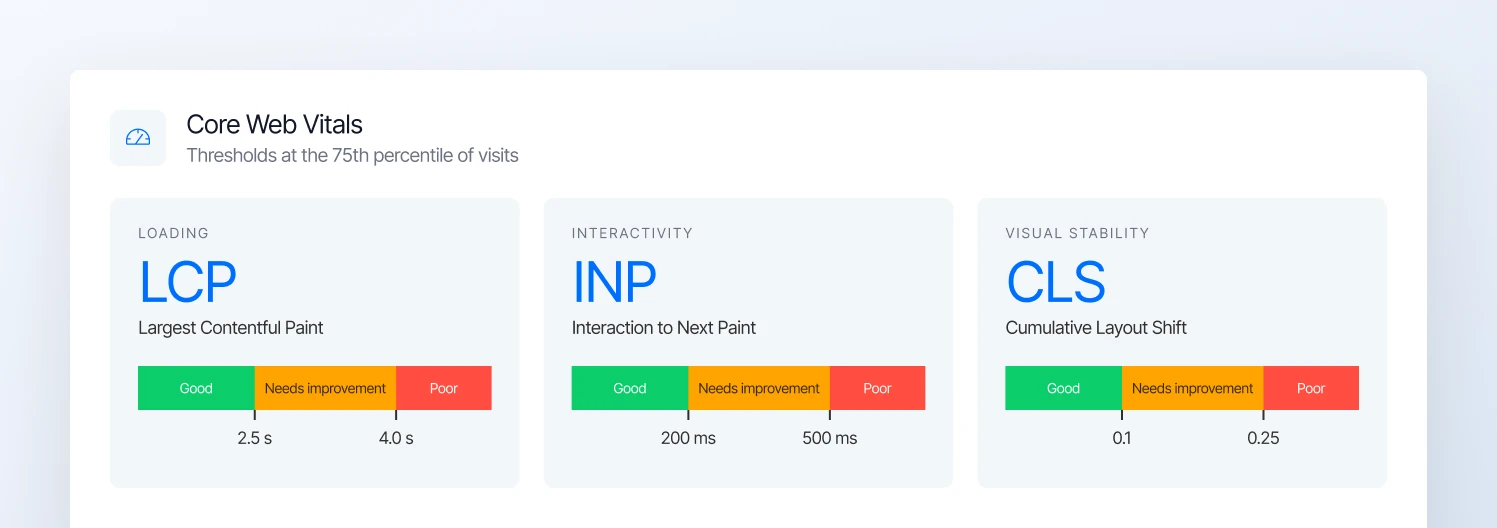
Google’s Core Web Vitals thresholds for good, needs improvement, and poor scores
| Metric | What it measures | Good score |
|---|---|---|
| LCP | How quickly the main content loads | 2.5 seconds or less |
| INP | How quickly the page responds to interactions | Under 200 ms |
| CLS | How much the layout shifts unexpectedly | 0.1 or less |
Start with the Core Web Vitals report in Google Search Console to identify problem URLs. Then use PageSpeed Insights to investigate individual pages.
Search Console shows what real visitors experience. PageSpeed Insights helps you find the cause on a single page. Use both, and don’t judge your store on one speed test score.
2. Find the bottleneck before fixing it
Different performance problems need different fixes:
- Poor LCP: Check the main product or banner image, server response time, and resources that delay rendering.
- Poor INP: Investigate heavy JavaScript, long-running tasks, and third-party scripts that slow interactions.
- Poor CLS: Check whether images, banners, fonts, or dynamically inserted content cause elements to move after loading.
Test representative product, category, and homepage templates on mobile as well as desktop. A homepage score won’t necessarily reveal problems on complex product pages.
3. Optimize the resources that cause the delay
Once you identify the bottleneck, prioritize the fixes that address it.
- Images: Serve appropriately sized, compressed images in modern formats. Make sure the main above-the-fold image loads promptly, and lazy-load images further down the page.
- JavaScript and CSS: Remove scripts you no longer need, and check which extensions add code to every page.
- Caching and delivery: Check Magento’s full-page cache, Varnish or Fastly configuration where applicable, and CDN delivery for static assets.
- Server response: Investigate slow database queries, uncached requests, and infrastructure capacity if the server takes too long to return a response.
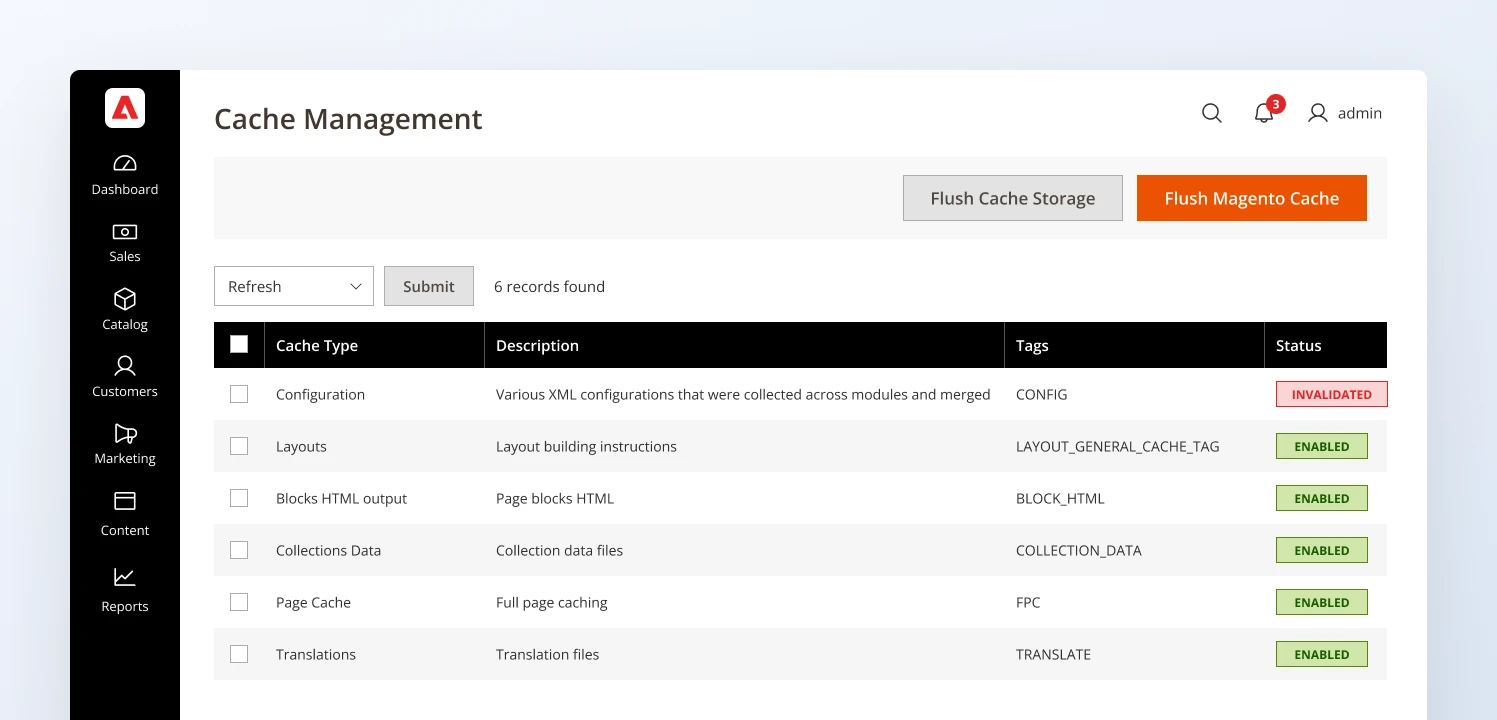
The Magento Cache Management page, where you check full-page cache and other cache types
Adobe recommends Varnish for full-page caching in production on-premises deployments. Adobe Commerce on cloud infrastructure uses Fastly for its CDN and caching layer.
4. Decide whether a theme change is worth it
Luma’s frontend architecture can carry substantial JavaScript and CSS overhead, but changing themes isn’t automatically the right fix. The actual impact depends on the store’s customizations, extensions, integrations, and infrastructure.
Hyvä offers a leaner frontend architecture that can reduce the amount of code a storefront needs to load and execute. However, it doesn’t automatically fix slow server responses, oversized images, poorly configured caching, or scripts added by third parties.
Before changing themes, check where the slowdown comes from. In PageSpeed Insights, look at the JavaScript warnings and which files they list.
If most of the heavy code comes from the theme, a theme change can help. If it comes from extensions, tracking scripts, or the server, a new theme won’t fix it.
5. Test performance after releases and migrations
Performance can deteriorate when developers add extensions, change templates, introduce tracking scripts, or migrate storefronts.
Run repeatable performance tests before and after significant releases. Compare Core Web Vitals, test key templates on mobile, and check that caching, product images, filtering, and interactive elements still work as expected.
Testing on a staging site before launch helps you catch slowdowns before real visitors see them.
Optimize Magento product and category pages
Category pages help shoppers browse and compare. Product pages help them decide on one item. Each needs different content to rank.
1. Find the right searches for each page
Start with your existing data. In Google Search Console, the Performance report shows which searches already bring visitors to your categories and products. Then use a keyword tool such as Semrush to check how often people search for related phrases.
Match each phrase to the right type of page:
- Category pages for broad searches, such as “women’s waterproof hiking boots.” The page should help shoppers compare the options.
- Product pages for specific products or models. The page should explain what makes that product right for the shopper, such as its waterproofing, grip, fit, and terrain.
- Buying guides for questions, such as “how to choose hiking boots.”
If a phrase has real search demand but no page that matches it, it may deserve its own category or filter landing page.
2. Make category pages useful beyond the product grid
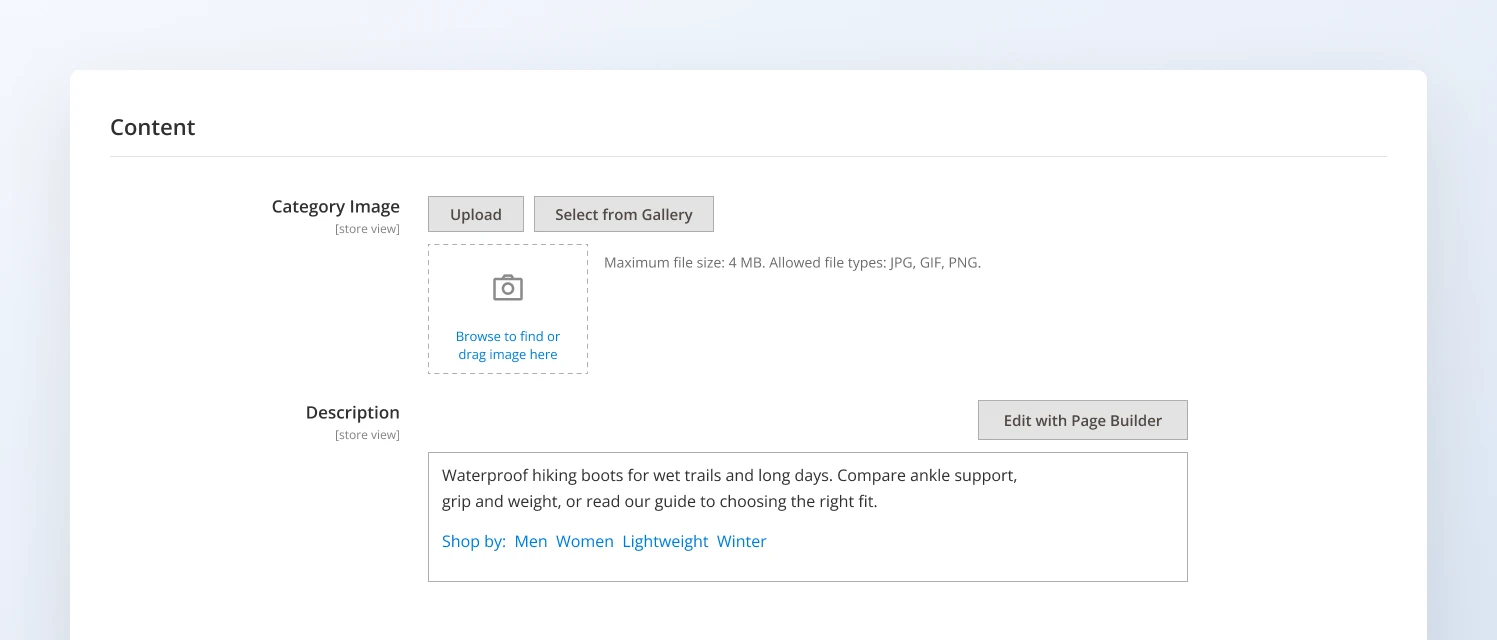
A short category description with subcategory links helps shoppers choose
A category page needs to help shoppers choose, not just list products. Add a short introduction that explains what the category includes, who the products suit, or how to choose between options.
Use subcategory links to help shoppers narrow their choices. For example, a hiking equipment category might link to hiking boots, trekking poles, and waterproof jackets.
Avoid adding generic SEO paragraphs to every category. The content should answer a question or help with a buying decision.
3. Write product descriptions that distinguish your store
Manufacturer descriptions often appear across multiple retailers. Add information that helps shoppers evaluate the product, such as dimensions, materials, compatibility, care instructions, sizing, limitations, or intended use.
Prioritize products with strong sales potential, organic impressions, or important differences that competitors fail to explain.
Customer reviews add unique content that manufacturer descriptions can’t. In Marketing → All Reviews, check that reviews are approved and showing on product pages, and that review ratings are included in your product schema.
4. Handle product variants and unavailable products carefully
Magento configurable products can offer multiple sizes, colors, or other options. In Magento, each size or color of a configurable product is a separate simple product.
Usually, only the main product page should appear in Google, so set the individual variants to Visibility: Not Visible Individually.
Where variants have distinct URLs, ensure each URL loads the correct variant and displays consistent product information. Google supports ProductGroup and Product structured data for describing product variants.
For out-of-stock products, keep the page available if the item is expected to return and the page remains useful. If a product is permanently discontinued, redirect it to a relevant replacement when one exists; otherwise, consider whether the page should remain accessible or return a 404 or 410 response.
5. Improve product images and internal discovery
Product images help shoppers assess items and provide additional context to search engines.
- Image optimization: Use descriptive filenames and meaningful alt text.
- Internal links: Link related products, relevant categories, and buying guides where they genuinely help shoppers.
- Breadcrumbs: Show the product’s position in the site hierarchy so users can navigate back to broader categories.
- Orphan pages: Products can lose all their internal links when they’re removed from categories. Crawl your store, compare the results with your catalog, and link any orphaned products from a relevant category or related products.
Note: For product images, describe what is shown rather than stuffing keywords into alt text. For internal linking, prioritize important products that are difficult to reach through the main category structure.
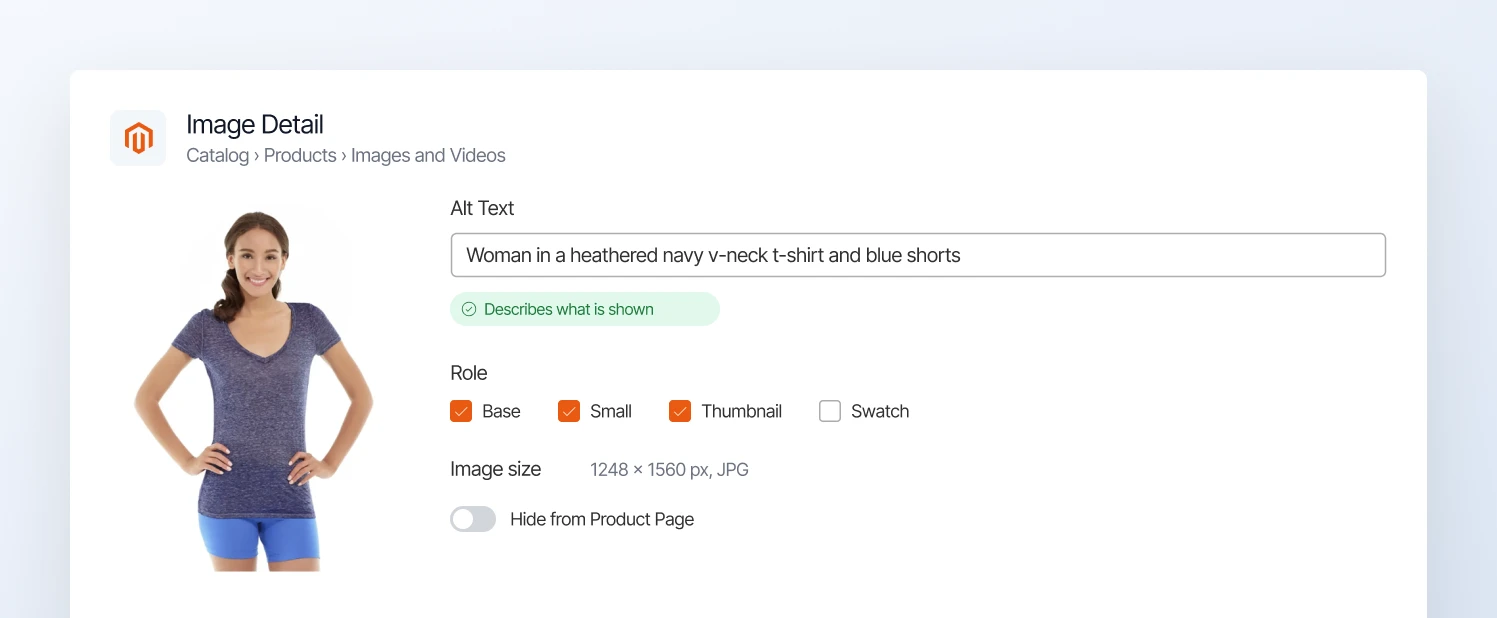
Add descriptive alt text to product images under Images and Videos in Magento
Build authority and manage multi-store setups
Two things matter beyond your own pages: links from other websites, and making sure each store view shows up in the right country.
1. Links from other websites
Internal links tell Google which pages matter on your store. Links from relevant websites help Google find your pages and judge how trustworthy they are. Quality and relevance matter far more than quantity, and the most useful links usually come from people you already work with:
- Brands you stock. Many manufacturers have a “where to buy” page. Ask to be listed on it.
- Industry sites and associations in your niche, which often list trusted suppliers and retailers.
- Buying guides and “best of” lists. Being included earns links, and these lists are a common source for AI answers about which stores to buy from.
- News about your business, such as a new product line, a local award, or useful data you can share.
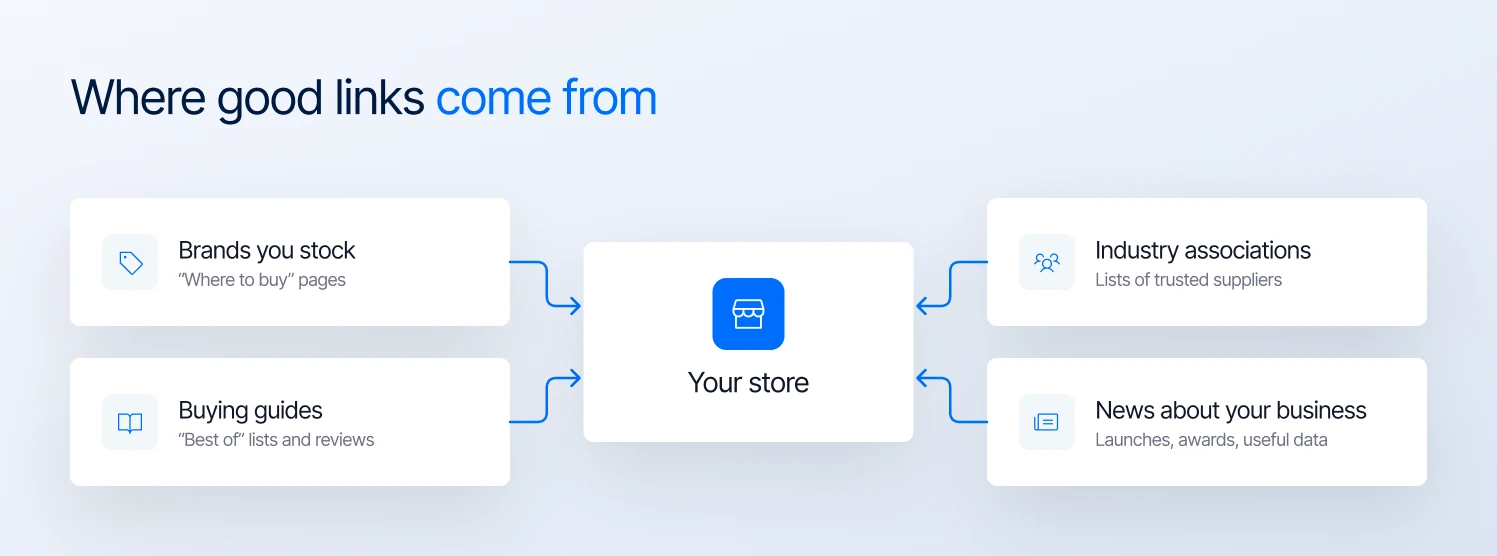
Where good links to an e-commerce store usually come from
Avoid buying links or swapping them in bulk. Google treats that as spam, and it can hurt your rankings instead of helping them.
2. Manage multiple store views and languages
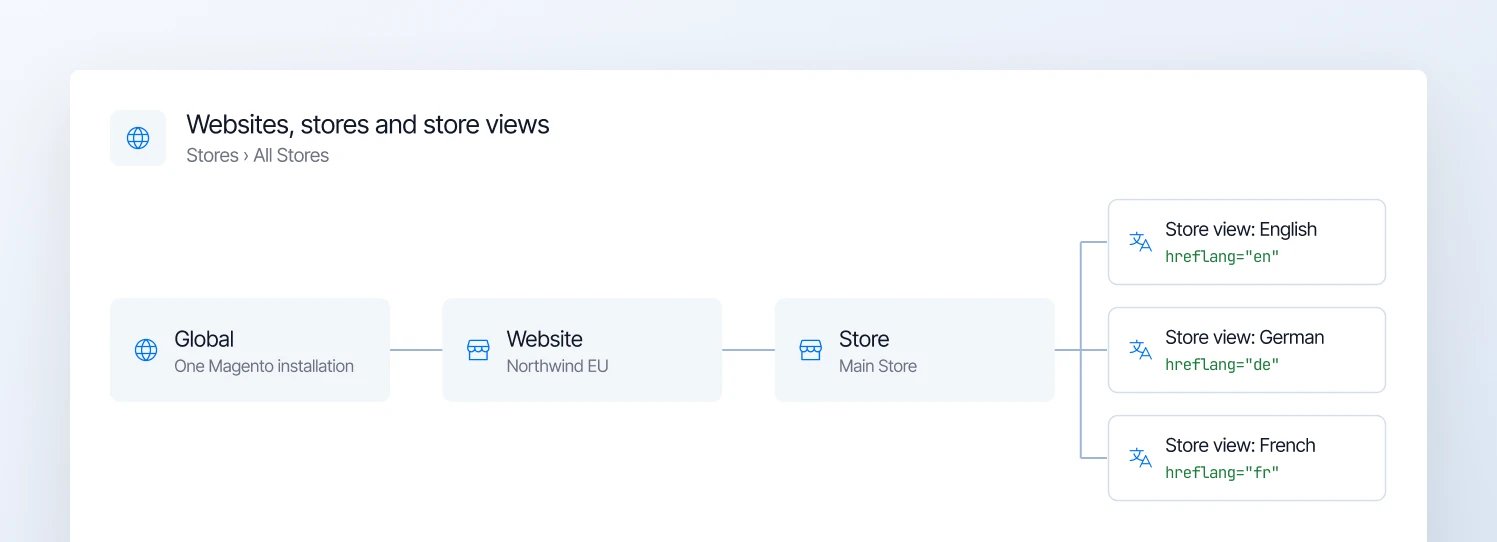
One Magento installation with a store view per language, each needing its own hreflang tag
Magento stores serving different countries or languages need clear signals about which version should appear for each audience.
Hreflang tags tell Google which version of a page is for which language or country. Standard Magento doesn’t add them, so you’ll need an extension or custom development. Each version should list all the other versions, including itself.
Add an x-default version for visitors whose language or country doesn’t match any of your store views.
Don’t rely only on automatic redirects based on a visitor’s location or browser language, as search engines may not discover every version. Also check that localized pages have appropriate currency, product availability, shipping details, and translated content.
If the same product loads on two store views with identical content, choose one preferred URL. If the versions are genuinely different (another language or currency), keep both, and don’t point all of them to one global URL with canonical tags.
Magento AI search optimization: 3 ways to get cited by AI
The good news about AI search is that it rewards the same store you’ve just built. Google says no special optimization is needed for AI Overviews and AI Mode, and the usual SEO basics still apply.
For Google’s AI Overviews and AI Mode, a page has to be indexed in Google before it can appear as a link, so everything in the sections above is the entry ticket. Other AI tools, like ChatGPT, use their own crawlers, which is why the next step matters.
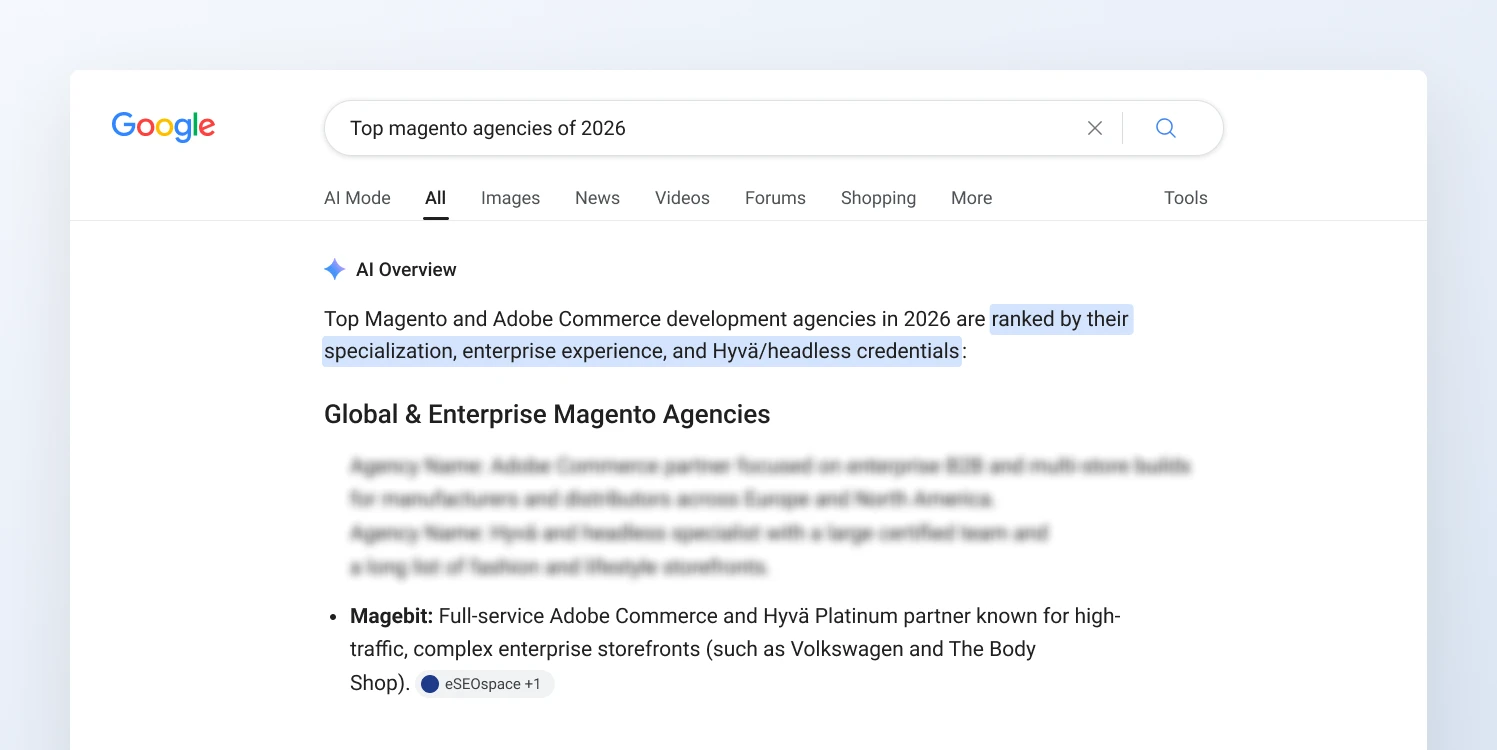
Google’s AI Overview for “top Magento agencies of 2026” describes Magebit using several sources
1. Make sure AI tools can reach your store
AI tools can only quote pages they’re allowed to read. ChatGPT, for example, uses a crawler called OAI-SearchBot to find pages for its search answers, and OpenAI says sites that block it won’t be shown in ChatGPT search answers.
In your custom robots.txt instructions in the Magento admin, check that there’s no Disallow rule for AI search crawlers such as OAI-SearchBot, PerplexityBot, or Claude-SearchBot.
There’s a separate choice about AI training. OpenAI uses a different crawler, GPTBot, for that, so you can block training while still appearing in ChatGPT search.
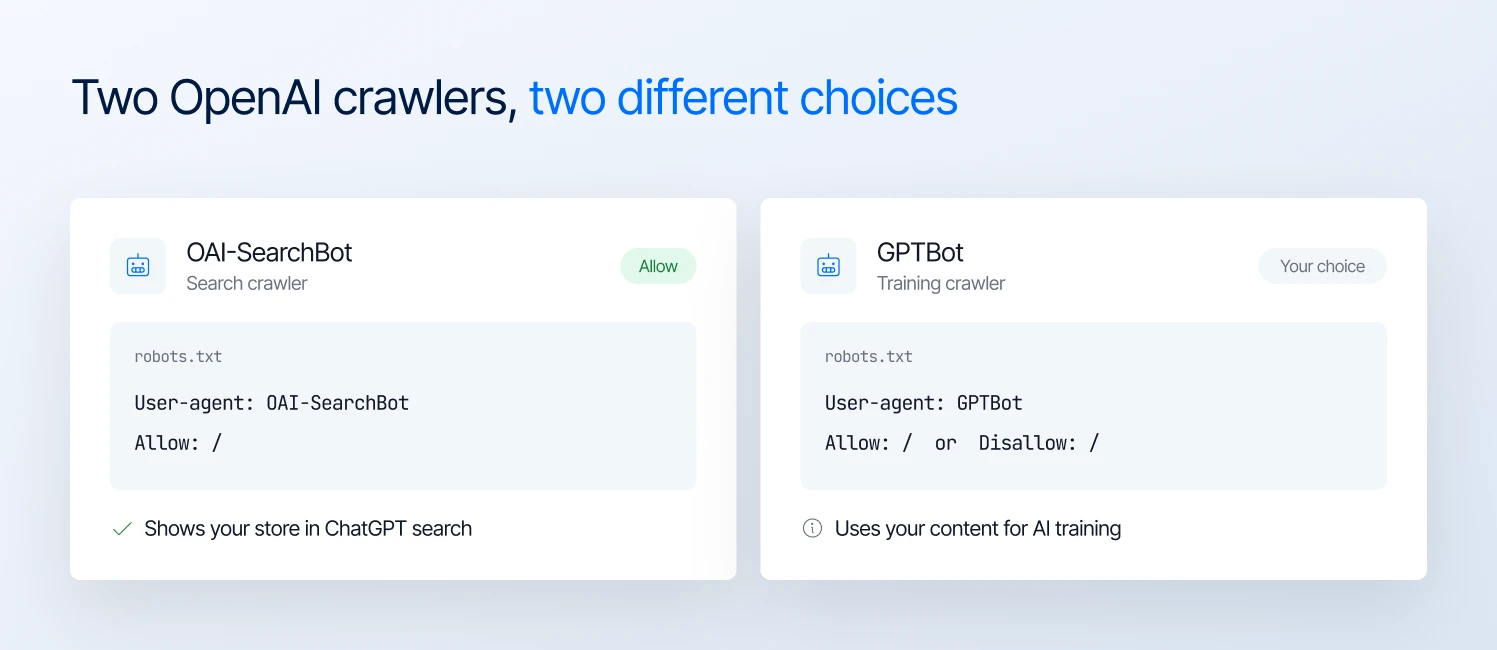
Allow OAI-SearchBot to appear in ChatGPT search, and decide separately on GPTBot for AI training
For Google, check one more setting. In Search Console, make sure Search generative AI is set to Include. If it’s set to Exclude, your pages won’t appear in AI Overviews or AI Mode, even if they still rank in regular results.
2. Improve Magento schema markup
Schema markup, also called structured data, helps search engines interpret product information such as price, brand, availability, and ratings.
Product structured data can help Google understand product pages and make them eligible for enhanced search results, but it doesn’t guarantee rich results or AI citations.
For Magento stores, check what your theme and extensions already output before adding more markup. Where applicable, ensure product pages include accurate brand, GTIN or other identifiers, price, availability, and review information.
Add shipping and return policy markup where supported, and use breadcrumb markup to describe site navigation.
Keep it accurate: the markup should always match what the shopper sees on the page. After any change, test a few product pages in Google’s Rich Results Test to check the markup is valid.
In Search Console, the Product snippets and Merchant listings reports show schema errors across your whole catalog, not just one page.
3. Optimize Magento SEO for ChatGPT and other AI assistants
AI tools answer questions, so pages that answer questions clearly are more likely to be used. Focus on these four things:
- Put key facts in plain sentences or tables, such as dimensions, materials, compatibility, and what’s in the box.
- Add a short FAQ to important product and category pages, using questions your customers actually ask. Google stopped showing FAQ dropdowns in search results in May 2026, so FAQ schema won’t make your listing bigger anymore. The FAQ itself is still worth adding, though, because AI tools look for clear questions and answers to quote.
- Publish buying guides and comparisons that help people choose, such as “how to choose a hiking backpack”, and link them to the matching categories.
- Keep prices, stock, and delivery details up to date, because an AI answer that quotes an old price sends the shopper somewhere else.
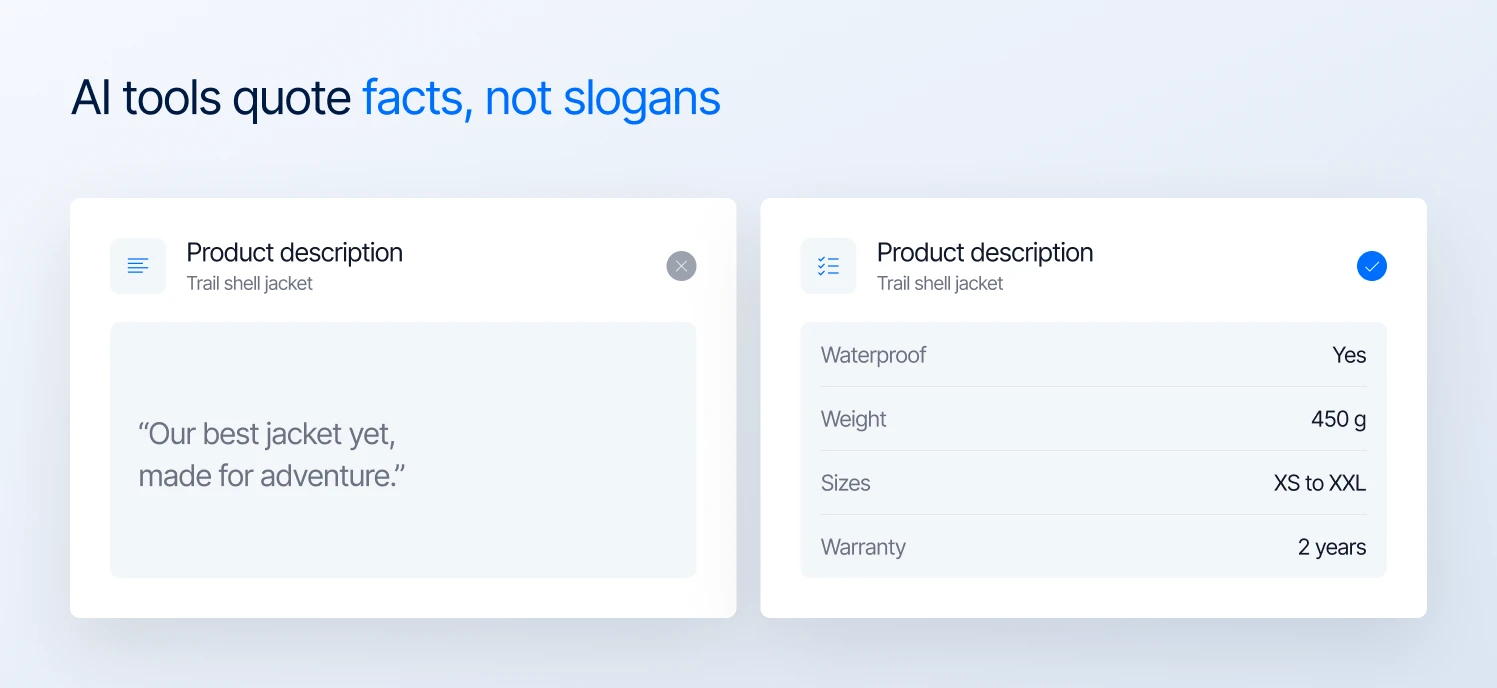
AI tools are more likely to quote clear product facts than marketing slogans
Measure Magento SEO performance
Measuring Magento SEO performance means looking beyond rankings. Track clicks, impressions, and click-through rate in Google Search Console, and conversions and revenue in GA4, to see which pages attract visitors and generate sales.
1. Track organic search performance
Use Google Search Console to monitor organic clicks, impressions, click-through rate (CTR), average position, queries, and landing pages. Compare date ranges to identify changes after technical fixes or content updates.
Clicks and impressions from Google’s AI Overviews and AI Mode are included in this same Performance report.
2. Measure traffic and revenue
In Google Analytics 4 (GA4), go to Reports → Engagement → Landing page and filter by the Organic Search channel.
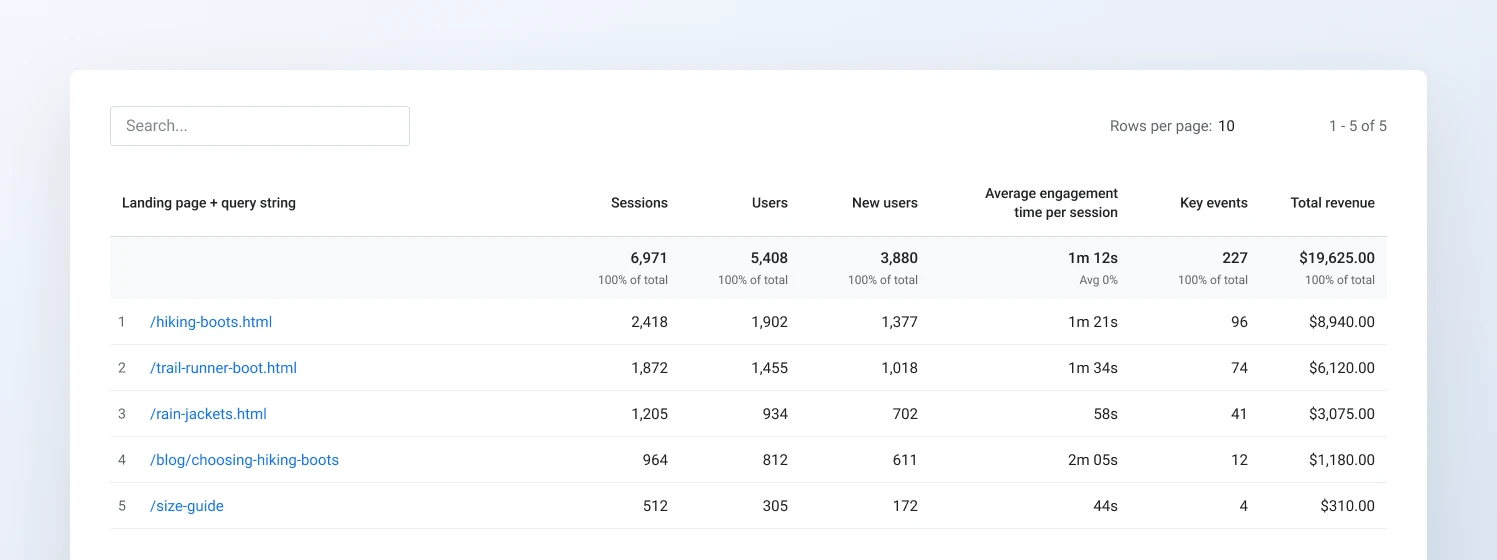
The GA4 Landing page report shows which pages bring in visitors and how much revenue they generate
This shows which pages bring in search visitors, and whether those visits lead to sales. Compare results before and after big changes, such as fixing indexing issues, improving category pages, or switching themes.
3. Monitor AI search visibility
In GA4, visits from ChatGPT, Gemini, Perplexity, and similar tools now appear under the AI Assistant channel. Ask your developer to check server logs too, to confirm AI crawlers like OAI-SearchBot are visiting your product pages.
Once a month, ask ChatGPT, Gemini, and Perplexity the same questions your customers ask, and note whether your store is mentioned.
None of these checks catch every AI mention or visit, but together they show whether you’re moving in the right direction.
Magento SEO checklist: what to fix first
Start with issues that can prevent important pages from being indexed, then address crawl efficiency, performance, and content.
| Priority | What to fix | Why it matters |
|---|---|---|
| 1 | Check indexing settings and confirm search crawlers can access important pages | Prevents accidental blocking of key pages |
| 2 | Configure canonical tags and choose a preferred URL for each product and category | Helps consolidate duplicate or competing URLs |
| 3 | Redirect alternate domain and HTTP versions to the preferred HTTPS domain | Consolidates signals and avoids unnecessary URL variations |
| 4 | Generate an accurate XML sitemap and submit it in Google Search Console | Helps Google discover important product and category URLs |
| 5 | Control faceted navigation and exclude low-value filter combinations, internal search results, cart, checkout, and account pages from indexing where appropriate | Reduces crawl waste and keeps low-value URLs out of search results |
| 6 | Optimize title tags and meta descriptions for priority categories and products | Makes search listings more relevant to the page and its target queries |
| 7 | Diagnose Core Web Vitals and fix the biggest performance bottlenecks | Improves loading speed, responsiveness, and visual stability |
| 8 | Validate product and breadcrumb structured data against visible page content | Helps Google interpret eligible product information and display supported rich results |
| 9 | Improve product descriptions and category copy with useful, specific information | Gives shoppers and search engines clearer reasons to choose your pages |
| 10 | Publish useful buying guides and link them to relevant products and categories | Connects informational searches with relevant products |
| 11 | Evaluate Hyvä if storefront performance remains a problem after optimization | May reduce frontend overhead, depending on the existing implementation and migration scope |
How Magebit approaches Magento SEO
Magebit’s SEO program combines technical SEO, content strategy, and answer engine optimization (AEO) in one ongoing engagement.
The team tracks search performance, analyzes competitor visibility, and identifies opportunities to improve how brands appear in traditional search results and AI-generated answers.
For Ambler Surgical, which sells more than 20,000 surgical instruments, this work helped increase organic search clicks by 223% and ChatGPT referral traffic by 872% year over year. Ambler also became the first recommendation in ChatGPT and Gemini for the query “who repairs diamond surgical knives.”
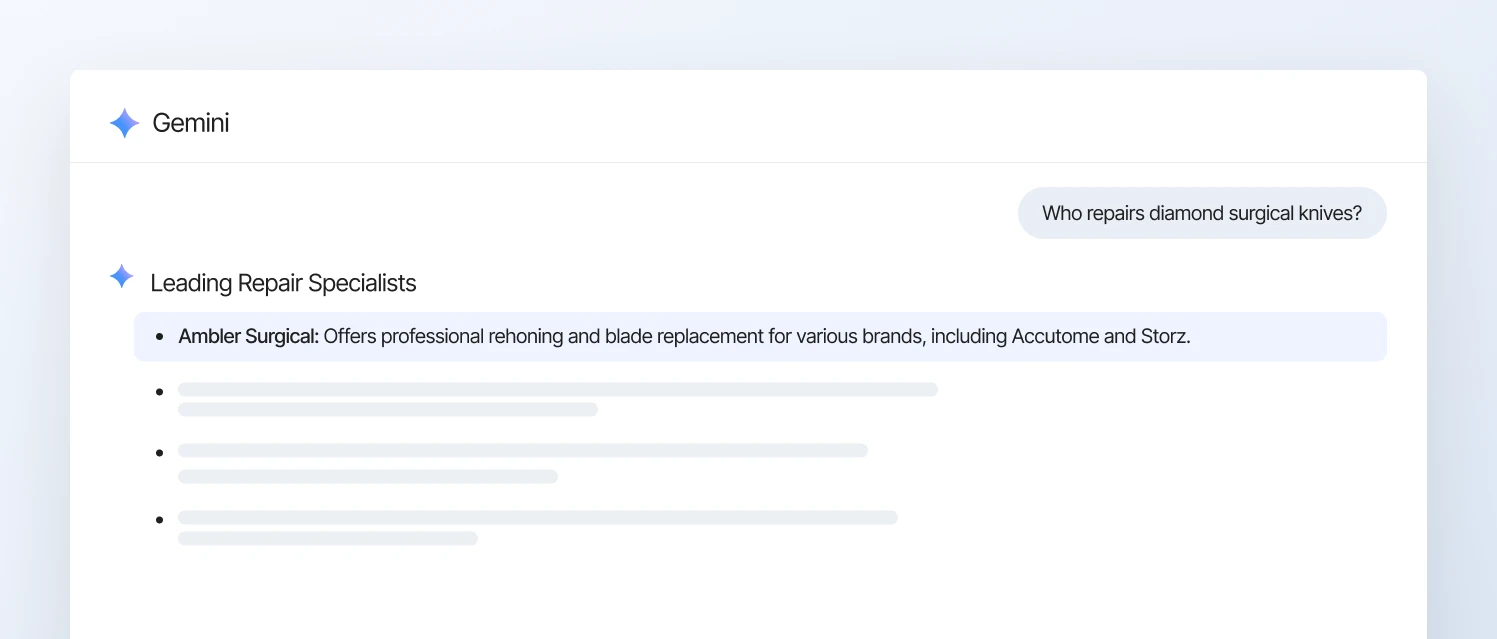
Gemini recommends Ambler Surgical first for “who repairs diamond surgical knives”
The program is delivered by SEO specialists working alongside Adobe Commerce and Hyvä engineers, with technical findings translated into practical changes to the store. Magebit’s in-house AI tools monitor rankings, citations, and competitors, helping the team identify where further work could improve visibility.
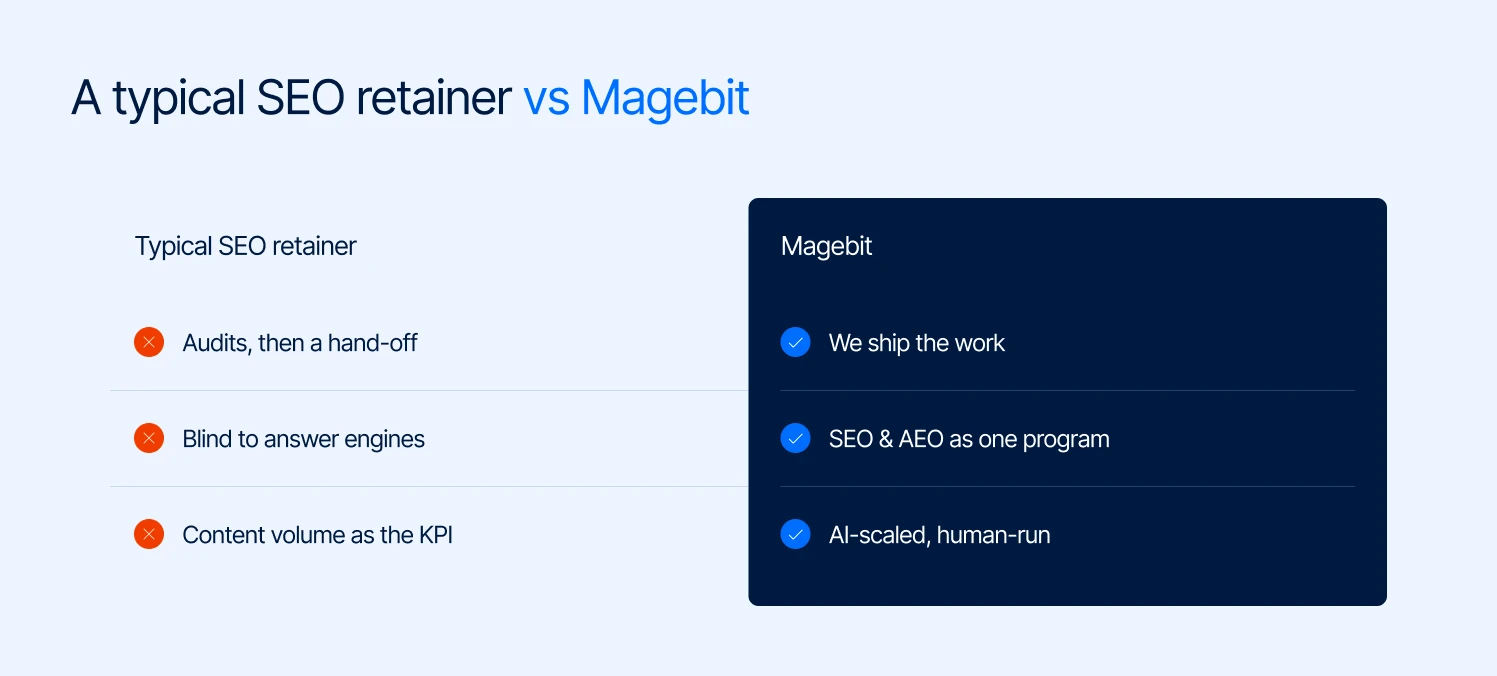
How Magebit’s SEO and AEO program differs from a typical SEO retainer
Final thought
Magento SEO works best when technical decisions are tied to how people search for and buy your products.
Focus on helping Google find important pages, making product and category pages more useful, and checking whether these changes bring more visitors and sales.
For stores with complex catalogs, multiple store views, or performance issues, the right fixes depend on how the store is built and configured. A technical audit can help identify where to focus first.
Want to find out what’s holding your store back? Get a free SEO and AEO audit from Magebit.