Most Magento stores don’t lose Black Friday on the homepage. They lose it at checkout, in the part of the site their speed test never measured.
The stakes keep rising. Cyber Week 2025 brought in $44.2 billion in US online sales, and Cyber Monday alone drove $14.25 billion, the biggest e-commerce day of the year. A checkout that stalls for twenty minutes on that day costs real money.
Whether Black Friday and Cyber Monday (BFCM) is two months away or a few weeks out, there’s still time to optimize your e-commerce store performance so it doesn’t crash. The earlier you start, the more you can fix.
This guide walks through it week by week, so you can start at the stage that matches your calendar.
Quick answer
To prepare your Magento store for Black Friday and Cyber Monday, load test your checkout above last year’s peak, set fallbacks for payment, shipping, and other outside services, block bad bots, apply every security patch, test every discount rule, start testing your ads early, and freeze non-urgent changes the week before your sale starts.
Why do Magento stores crash on Black Friday?
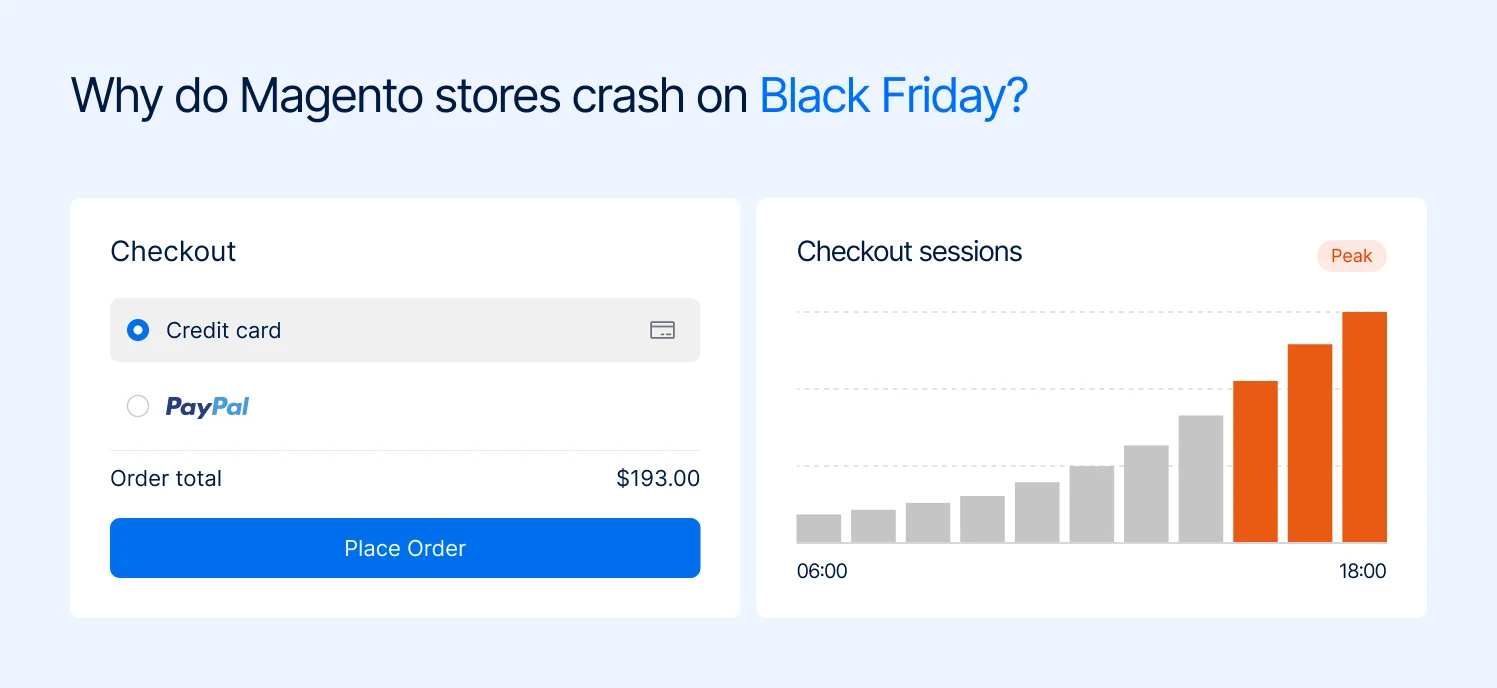
Checkout sessions climb through the day, and every one is built from scratch
Most teams check speed the same way. They run a test on the homepage and a product page, see a decent score, and move on. Those are the pages that were never at risk.
Your store runs at two speeds. Product and category pages look the same for every visitor, so Magento’s full page cache saves a ready-made copy and serves it instantly, whether ten people ask for it or ten thousand.
Cart, checkout, login, and account pages are different. Every shopper’s cart is unique, so those pages are built from scratch on every click. Each click also waits on your payment provider, tax service, shipping rates, and stock system.
On a normal Tuesday, nobody notices. On Black Friday, thousands of shoppers hit those pages at once, and that’s where stores slow down or stop. This is why a store can look healthy on every dashboard in October and still fall over at 8 p.m. on Cyber Monday.
The front of the store matters too. Only 48% of websites deliver a good Core Web Vitals experience on mobile, so many stores enter peak season already slow on the device most shoppers use. Speed and stability are separate problems, and a BFCM plan has to cover both.
The 9-week BFCM performance plan
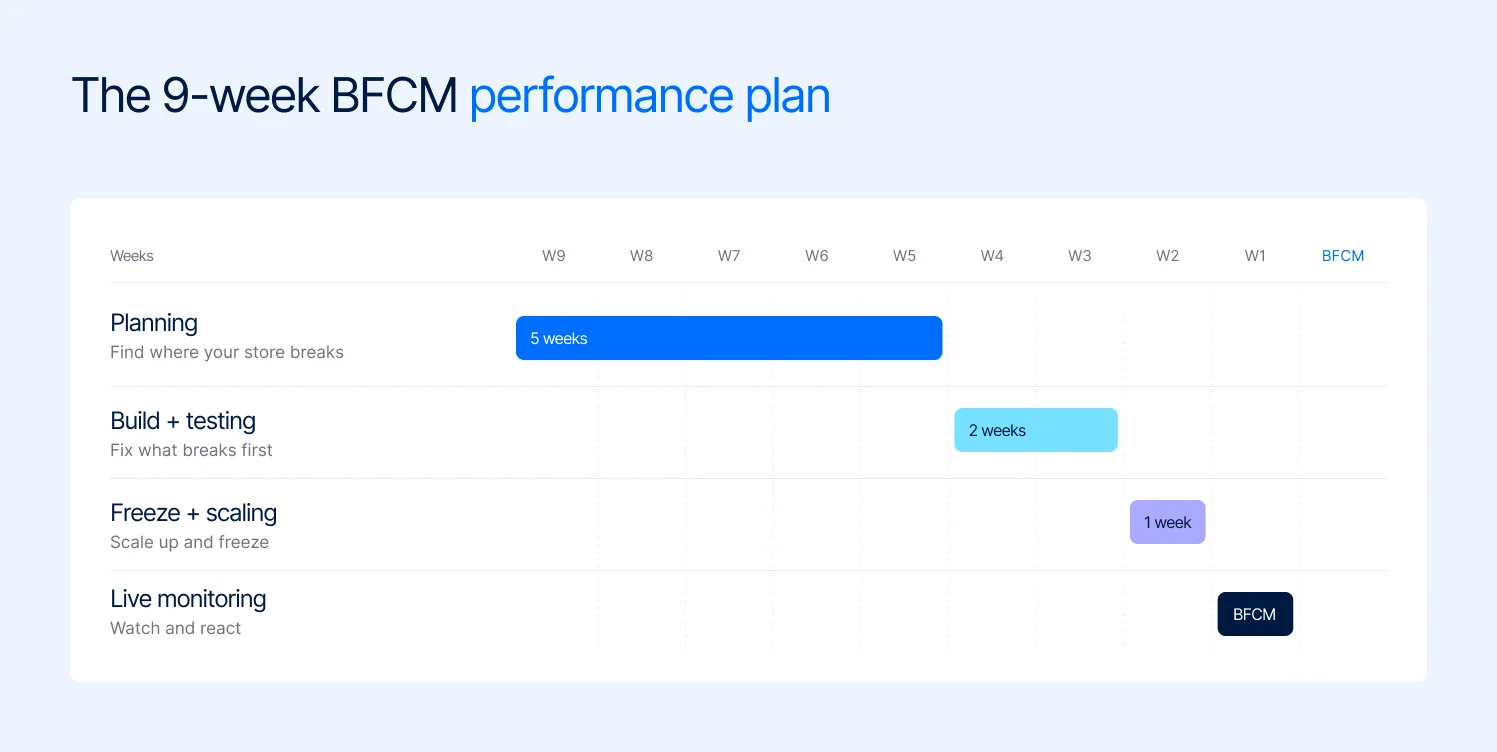
The 9-week BFCM plan, from finding weak spots to live monitoring
| Weeks before Black Friday | Focus | Who owns it | What “done” means |
|---|---|---|---|
| 9 to 7 | Find where your store breaks | E-commerce lead and dev team | You know your slowest checkout step and your breaking point |
| 6 to 4 | Fix what breaks first | Dev team and marketing | Partner services have fallbacks, promo tools are trimmed, discount rules are tested |
| 3 to 2 | Patch and finish the build | Dev team | Security updates are live, campaign pages are built, and the whole sale is tested on a copy of the store |
| Final week | Scale up and freeze | Dev team and hosting | Extra capacity is scheduled, the freeze is in place, monitoring is booked |
| Cyber Week | Watch and react | On-call developer and e-commerce lead | Someone is actively watching the store, with authority to act |
| January | Clear the deferred list | Everyone | The post-BFCM review is done, and big projects are scheduled |
Pro tip: Count back from the day your sale actually starts, not from Black Friday. Many campaigns now open a week or more early, and your freeze has to begin before your first discount goes live.
Weeks 9 to 7: find where your store breaks
Last year’s data, your customers’ devices, and a proper load test will give you a much clearer picture than a homepage speed score.
Start with last year’s peak
Before planning anything new, look back at last year. Every business is different, so your own results are the best guide. Pull these from Google Analytics 4, your Magento admin, and your support inbox:
- Your busiest hour and how many people were on the site
- Where shoppers dropped off
- Whether checkout abandonment jumped compared with a normal week
- What customers told support
Complaints like “the site kept loading” or “my payment didn’t go through” are data. They point to the first place to look.
Test your ads now
Don’t count on extra search traffic alone to lift sales. Invest in advertising, and test your ads at least one to two months before BFCM, so you know which ones convert before ad prices peak.
Building awareness of your store before the sale also makes it easier to stand out once every competitor is advertising. Our past client data showed the highest sales spikes between 10 and 11 PM EST on Black Friday, and between 9 and 11 PM on Cyber Monday.
Check your own analytics for your peak hours. Put more ad spend behind them, and plan your monitoring around them.
Test on the phone your customers actually use
Mobile drove a record 56.4% of online holiday spend in 2025, and on Thanksgiving the mobile share reached 61.6%. Most of those phones aren’t the latest iPhone on office wifi.
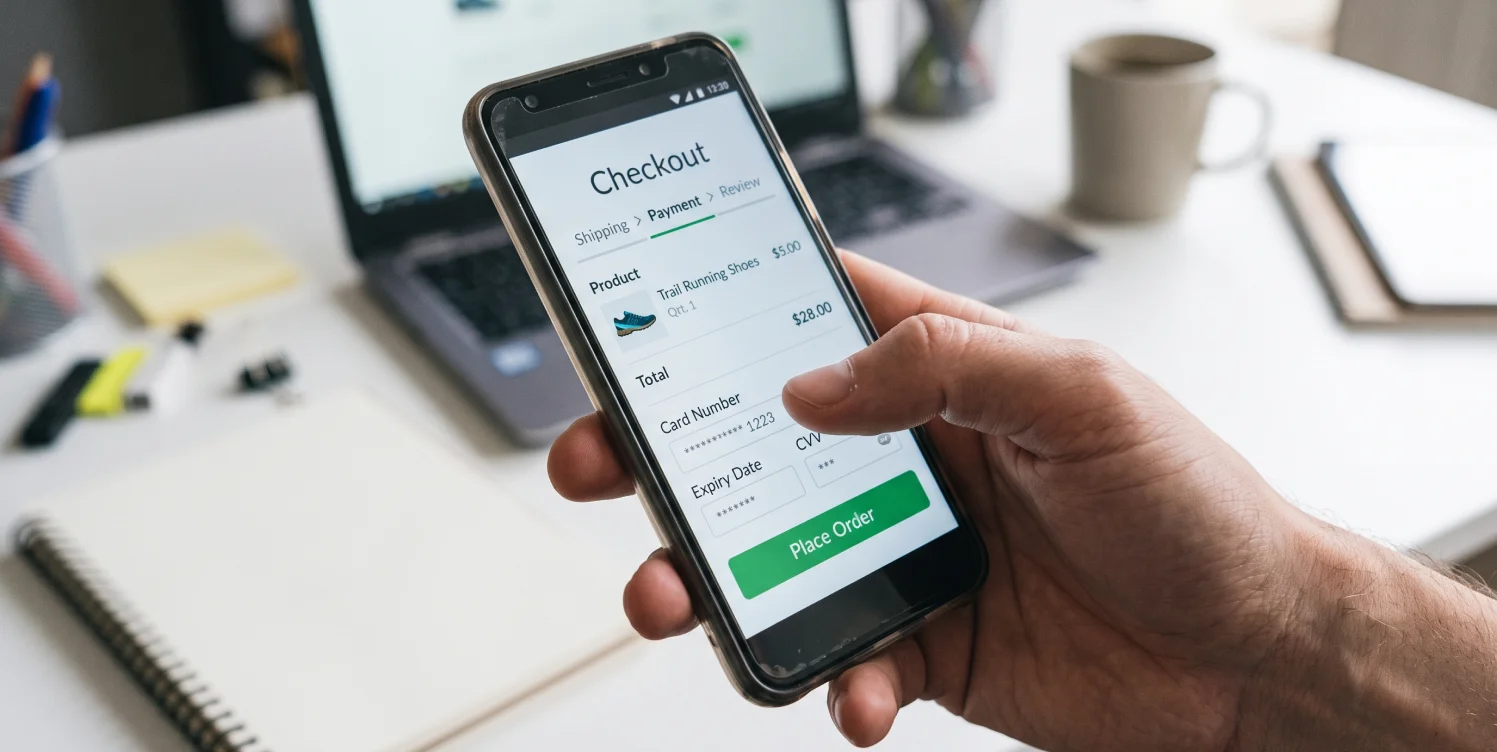
Most holiday spend now goes through a mobile checkout
Test on a mid-range Android phone over mobile data. Walk the whole journey: land from an ad, search, add to cart, apply a code, and pay.
Pro tip: Record a full checkout on a budget phone and play it in your next team meeting. It settles priority debates faster than any report.
Load test your checkout, not your homepage
A load test sends a crowd of simulated shoppers to your store to see how it behaves at your expected peak. A stress test keeps pushing until something fails, so you know where the limit is. Adobe calls stress testing essential ahead of high-traffic periods like Black Friday.
What gets tested matters more than the tool. A useful BFCM test follows the journeys that make money:
- Adding to cart and viewing the cart
- Applying your actual Black Friday discount codes
- Checking out with every payment method you offer, including buy now, pay later
- Logging in and checking out as a returning customer
Test above last year’s peak, especially if you’re spending more on ads this year. Budget a few days of developer time for the test itself, plus time to fix what it finds. That’s why this belongs in early October, not the week before.
What’s different on Adobe Commerce Cloud and self-hosted Magento
On Adobe Commerce Cloud, Adobe asks merchants to open a support ticket before testing, stating which environments, tools, and timeframe they plan to use.
Adobe also asks for holiday capacity requests at least 48 business hours ahead, and as early as possible for BFCM, because capacity is limited. Build both into your timeline.
On Magento Open Source or self-hosted Adobe Commerce, planning extra server capacity for peak, and when to remove it, is on you and your hosting provider.
Extensions are the other thing to check on either setup. Each one adds code to your store, and a single slow extension can hold up every checkout.
Weeks 6 to 4: fix what breaks first
Once you know where the weak spots are, this is the time to deal with them. Don’t try to improve everything at once. Focus on the changes that could affect sales during the busiest days of the year.
The services you don’t control
Your checkout depends on other companies. When one of them slows down at peak, your shoppers see your store slow down. You can map every outside service in the checkout path and decide how the store should respond to delays, errors and outages.
| Service | What the shopper sees when it slows | Fallback to agree now |
|---|---|---|
| Payment provider | Spinning pay button, failed orders | A second payment method ready to switch on |
| Shipping rates | Checkout stuck on delivery options | A flat-rate backup shipping option |
| Fraud screening | Good orders held or declined | Adjusted rules and a manual review plan |
| Site search | Empty or slow results | Curated collections and category pages |
| Stock and ERP sync | Overselling, then cancelled orders | Delay non-urgent syncs, hold buffer stock on best sellers |
The discount rules that misfire
In our experience, the commerce setup fails more often than the servers do. A discount that stacks with another offer costs you margin on every order. A code that silently stops working after its usage limit kills the campaign.
Schedule discounts to switch on automatically instead of turning them on by hand at midnight. Then test every rule on a copy of your store with the full campaign active. That means stacking with existing offers, coupon limits, and every currency you sell in.
The page weight you added for the sale
Popups, countdown timers, spin-to-win wheels, chat widgets, and tracking tools can all make your store slower. Most are provided by third-party companies, so adding them means your pages have to load extra code as well.
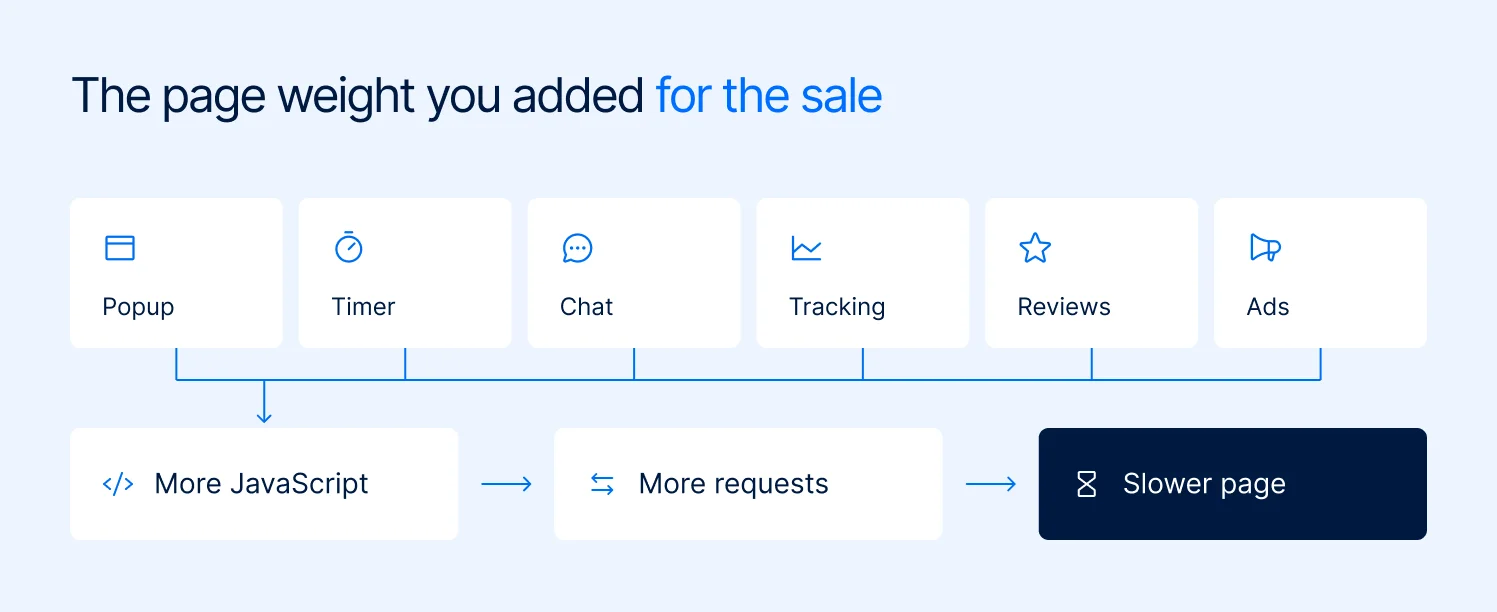
Every promo tool added for the sale adds code your pages have to load
The 2025 Web Almanac notes that controlling JavaScript and third-party scripts is still the hardest part of making sites respond quickly. The tools meant to lift conversion can slow the store on the day speed matters most.
Use a one-in, one-out rule for anything added for BFCM. Then audit what’s already there in an afternoon:
- List every tool running on the site
- Note who asked for it and what it’s for
- Remove anything nobody can defend for the sale period
- Test any new promo tool on a copy of the store and measure speed before and after
During BFCM, every script has to earn its place. If a tool doesn’t help shoppers buy, or slows down the path to checkout, take it off.
Bot traffic and AI-powered attacks
Not all BFCM traffic is human. Clicks to US retail sites from generative AI tools grew 693.4% year over year during the 2025 holidays. Some of that traffic sends buyers.
But attackers also use AI to make their bots behave like shoppers, and according to Kasada data, retailers face 2.5 to 3 times more bot-driven login traffic during the holiday months.
These bots aren’t random visitors. They carry out specific attacks:
- Account takeover: Bots test stolen passwords on your login page, then use stored cards, loyalty points, and gift card balances. Thales recorded a 283% increase in account takeover attacks on Black Friday 2024.
- Card testing: Bots run stolen cards through checkout in small orders to find the ones that still work, leaving you with the fees and chargebacks.
- Promo abuse and scalping: Bots create fake accounts to reuse first-order discounts, or buy up limited stock the second a deal goes live.
- Traffic floods: Even bots that steal nothing use the capacity your shoppers need.
They also start early. KasadaIQ found attack scripts being deployed 10 to 14 days before peak sales. Ask your team to put these in place before your campaign starts:
- Bot protection and rate limits on login and checkout
- Per-customer coupon limits
- Alerts for spikes in failed logins and small failed payments
- Two-factor authentication for admin users
Keep these protections running after Cyber Monday too. Holiday bot activity can continue through December.
Get the business side ready
A fast store doesn’t help if orders can’t leave the warehouse. Check stock levels on your best sellers, agree shipping cutoffs with your carriers, and plan support coverage for the extra questions BFCM brings.
If you sell higher-priced products, offer 0% financing or buy now, pay later options to give shoppers another reason to buy. Add any new payment method now, so it’s included in your load test and has a fallback in place.
Weeks 3 to 1: patch, then freeze
You’re getting close now, so the rules change. New work needs a good reason to go live, and anything that can wait should wait. The closer you get to launch, the more valuable stability becomes.
What to ship before the freeze
Ship the changes that protect performance, security, and the customer journey before the freeze, and leave anything non-essential for later.
- Security updates: Adobe released Adobe Commerce and Magento Open Source security updates in July 2026, including high-severity fixes, followed by another release in August. Unpatched stores are an easy target for automated attacks.
- Fixes from your load test: These are the changes that earn their place this late.
- Campaign pages and banners: They should be built, reviewed and tested in full.
- Discount rules: They should be scheduled and tested on a copy of the store.
If you run Adobe Commerce on your own servers, check your database version as well. MySQL 8.0 reached end of support in April 2026, and Adobe advises affected installations to move to a compatible MariaDB version.
If that work hasn’t started, talk to your team now about whether it fits before the freeze or waits until January.
Make the store look like it’s having a sale
Shoppers buy on Black Friday because the deals feel urgent. If your store keeps its everyday look, that urgency disappears, and shoppers assume they can buy later.
Changing your homepage banner to a holiday one is the minimum. Ideally, the whole store should look like it has far more deals than usual, with targeted holiday landing pages for your main offers. Build all of it before the freeze, and test it on mobile so the new look doesn’t slow the store down.
What to leave until January
Leave anything that adds unnecessary risk this close to BFCM, especially changes that need more time to test or roll back.
| Ship now | Ship only with a tested rollback plan | Wait until January |
|---|---|---|
| Security patches | Checkout fixes found in the load test | Redesigns and new templates |
| Performance fixes | A new payment method | New extensions |
| Campaign pages and banners | Changes to search or merchandising rules | Replatforming or a frontend rebuild |
| Tested discount rules | Major integration changes |
A frontend rebuild such as a move to Hyvä is the clearest example. Done in Q1, it can be built, tested and load tested well before next year’s peak. Started in October, it’s a risk.
How to set your freeze date
Our position is simple. Stop shipping new features in November. Two weeks before your sale starts, everything should be built and tested with the campaign settings active. The week before, lock the freeze in, schedule any extra server capacity, and book monitoring.
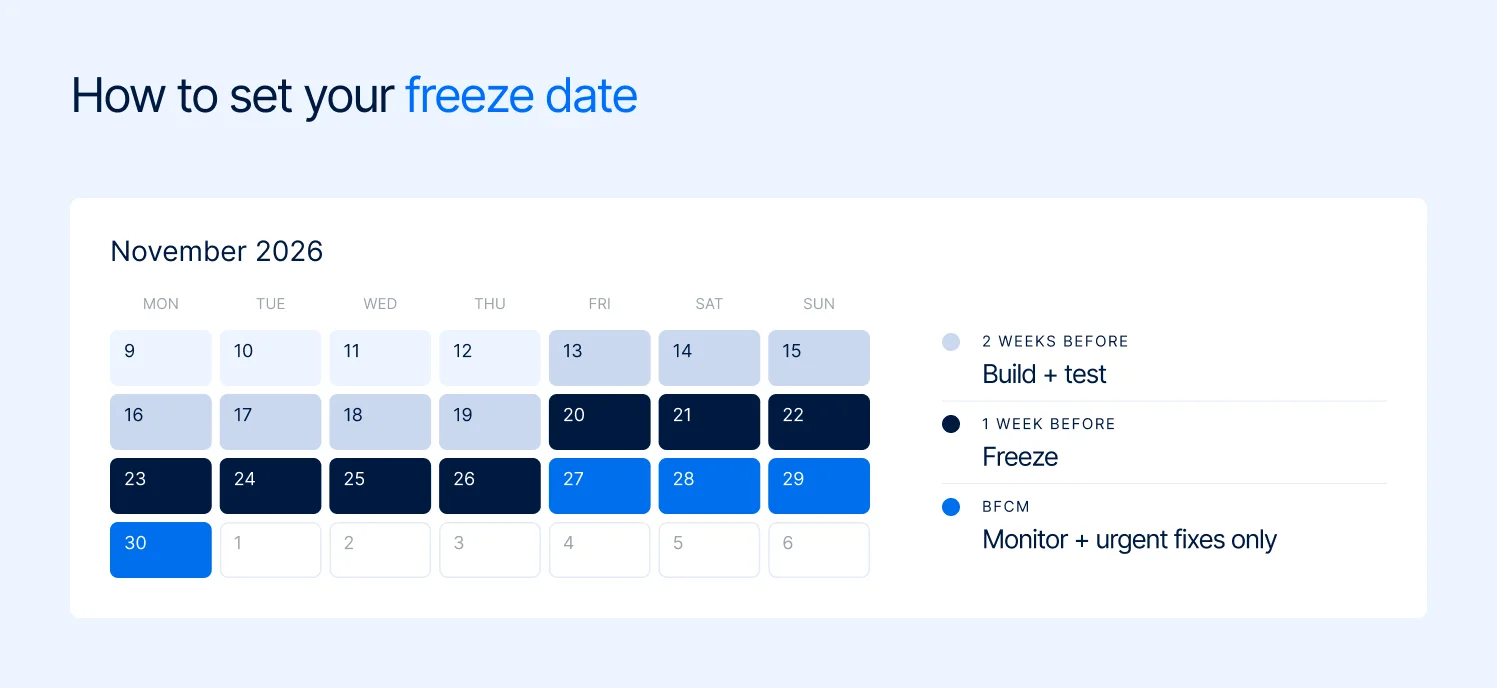
A November 2026 code freeze calendar counted back from Black Friday
From then until the campaign ends, only urgent fixes go live, and each one needs a named person to approve it. Agree now on who that person is, how a rollback works, and who is reachable at 2 a.m.
Make emergency security patches the one exception. Adobe released the SessionReaper fix outside its regular schedule, and a freeze that blocks an emergency patch leaves the store exposed at the worst possible time.
Pro tip: When you schedule extra server capacity for the sale, schedule the scale-down at the same time. A forgotten scale-down means paying for peak-sized servers well into December.
Cyber Week: watch the right numbers
Normal monitoring tells you whether the site is up. During Cyber Week, you need to know whether it’s making money.
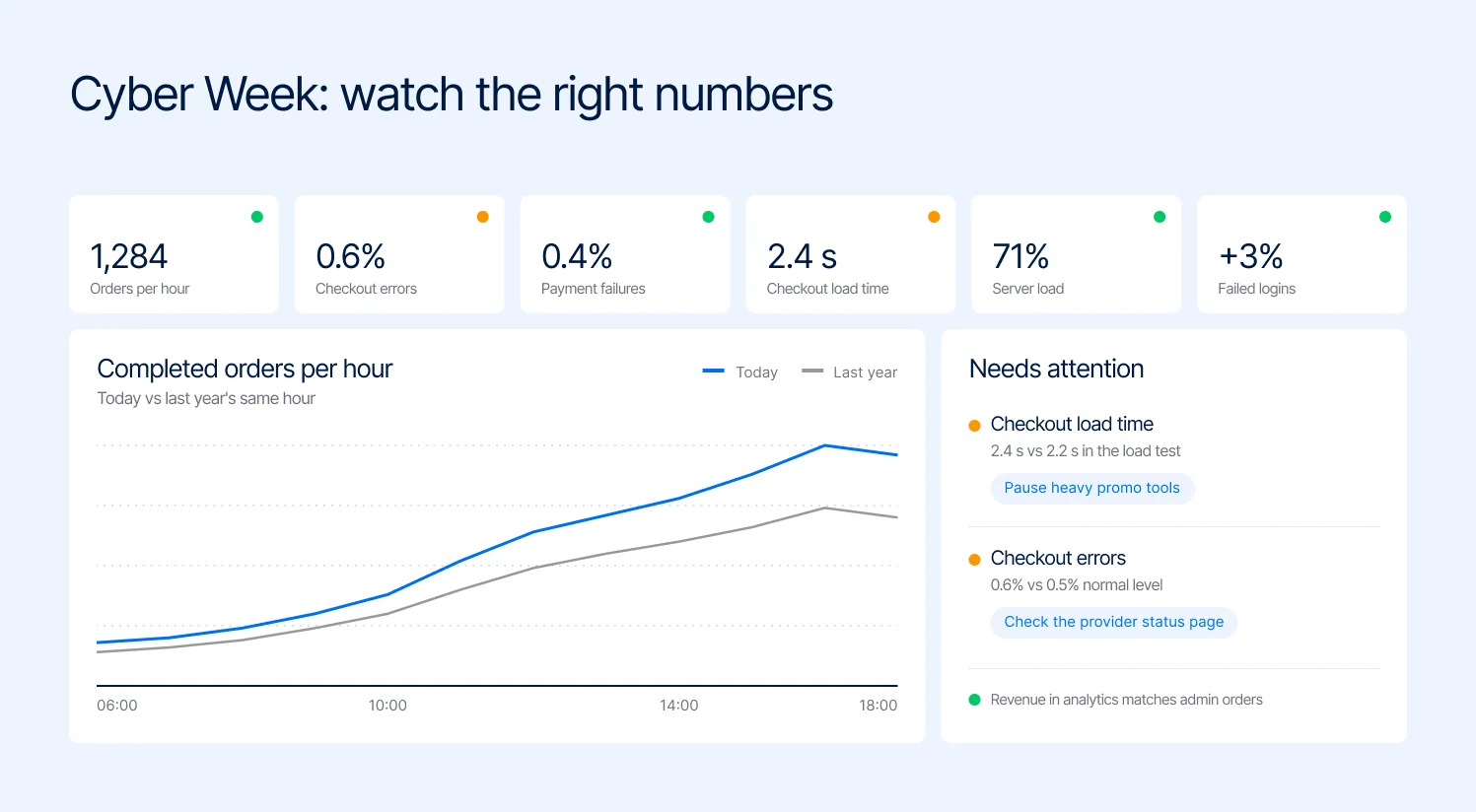
A Cyber Week dashboard that tracks revenue, not just uptime
| Metric | Compare against | What to do if it slips |
|---|---|---|
| Completed orders per hour | Your forecast and last year’s same hour | Check checkout and payments first, then ad delivery |
| Checkout errors and payment failures | Your normal daily level | Check the provider’s status page and switch to the backup method |
| Checkout load time | Your load test results | Pause heavy promo tools and check outside services |
| Revenue in analytics vs orders in your admin | Each other | Fix tracking before making campaign decisions on it |
| Server load | The limit your load test found | Add capacity before you reach it |
| Failed logins and small failed payments | Your normal daily level | Tighten bot rules, since a spike can point to credential stuffing or card testing |
Set alerts at the limits your load test found, not at round numbers someone guessed. For launch hours, book a developer to actively watch the store rather than just be reachable by phone.
A problem caught in two minutes is an incident. The same problem caught in forty minutes is a lost evening of sales.
Black Friday doesn’t end on Friday
Many shoppers who browse on Black Friday come back to buy on Cyber Monday or later in the week.
Have retargeting ready to bring them back: key events in Google Analytics 4 to spot your most valuable visits, Google Ads retargeting for visitors and cart abandoners, and at least two follow-up emails.
Schedule campaigns to run hardest on Black Friday and Cyber Monday, with some spend over the weekend in between.
How Magebit prepares Magento stores for peak season
We run BFCM prep as a dated project, not a November scramble. For our clients, the work runs backwards from the campaign start:
- The plan is agreed upon about five weeks out.
- The build and discount rules are finished and tested two weeks out.
- Scaling and the freeze are locked the week before.
- A developer is booked to actively watch the store through launch hours.
- Nothing deploys during the campaign window unless it’s urgent.
Katie Loxton shows what this looks like in practice. The UK gifting brand was running on a heavy legacy frontend with more than 40 stylesheets, a mobile performance score around 36, and failing Core Web Vitals. Its personalization tools, which are central to how the brand sells, had to keep working through any change.
We moved the store to Hyvä Enterprise and Venta. That took mobile performance from 36 to 90+ and moved Core Web Vitals from failing to passing. Ahead of Black Friday, the store went through dedicated stress and load testing. The result was a record-breaking Black Friday 2024, with best-ever peak sales.
The rebuild paid off in November because it was finished and tested well before November.
Final thought
Don’t wait until Black Friday week to find out your checkout can’t handle the traffic. Test it now, fix what breaks, put your fallbacks in place, and give the store some breathing room before the sale starts.
If you’re not sure where to start, or you need help testing and preparing your store for BFCM, talk to Magebit. We can help you identify performance bottlenecks, test the store under peak traffic, and make sure your e-commerce setup is ready before the sale begins.