The $5 million rule for Magento is outdated. For years, revenue was the shortcut for choosing between Magento Open Source and Adobe Commerce: stay on Open Source while the store is small, then move to Commerce when the business is big enough to justify the license.
That made more sense when the two editions had a cleaner feature divide. Today, both continue to get platform updates, and Adobe is moving some capabilities that were once Commerce-only into Open Source.
Here’s where the two editions still differ, what the Commerce license buys you, and when the additional cost makes sense.
What is the difference between Magento 2 Open Source and Adobe Commerce?
| Capability | Magento Open Source | Adobe Commerce | Why it matters |
|---|---|---|---|
| B2B suite | Not available natively. Requires extensions/ custom development. | Included | Company accounts, shared catalogs, negotiated quotes, purchase orders, requisition lists, and company credit. Confirm provisioning and commercial terms in your Adobe order form. |
| Live Search | Not included | Included | Adobe provides AI-powered search, semantic matching, and merchandising capabilities without requiring a separate search platform. |
| Product Recommendations | Not included | Included | Adobe AI provides product recommendations without adding a separate recommendation engine. |
| Content Staging | Not included | Included | Teams can prepare, preview, and schedule coordinated storefront changes. |
| Customer Segments | Not included | Included | Merchants can create dynamic customer audiences for targeted promotions and content. |
| Reward Points & Gift Cards | Not included natively | Included | Loyalty and gift-card functionality is available without separate extensions. |
| Store Credit | Not included natively | Included | Merchants can issue account credit and let customers use it at checkout. |
| Returns Management (RMA) | Not included natively | Included | Customers can initiate returns and merchants can manage the workflow within Magento. |
| Admin Action Logs | Not included natively | Included | Provides an audit trail of changes made by Admin users. |
| Commerce Intelligence | Not included | Available as a paid add-on | Provides e-commerce-focused dashboards and deeper analysis across customers, products, marketing, and revenue. |
| Page Builder | Included since 2.4.3 | Included | Not a differentiator. Page Builder is available in both editions. |
| Multi-Source Inventory | Included | Included | Not a differentiator. Both editions support multiple inventory sources and stock management. |
| GraphQL & REST APIs | Included | Included | Not a differentiator. Both editions can support integrations and headless storefronts. |
| Payment Services & Catalog Service | Included | Included | Not a core edition differentiator; both are available across the Magento ecosystem. |
| Extended security support | Not available | Available | Gives merchants additional security coverage when they need more time to upgrade from an older Commerce release. |
Both editions are the same platform
This is the part most comparisons skip, and it is one reason the edition decision can be confusing.
Magento Open Source and Adobe Commerce 2.4.9 were released on the same day, May 12, 2026. Both moved to PHP 8.5 support and OpenSearch 3.x, and both received the broader platform updates in the 2.4.9 release.
The important distinction is therefore not that Commerce is a completely different Magento platform. It is the commercial functionality, services, support, and licensing around the shared foundation that create the real difference.
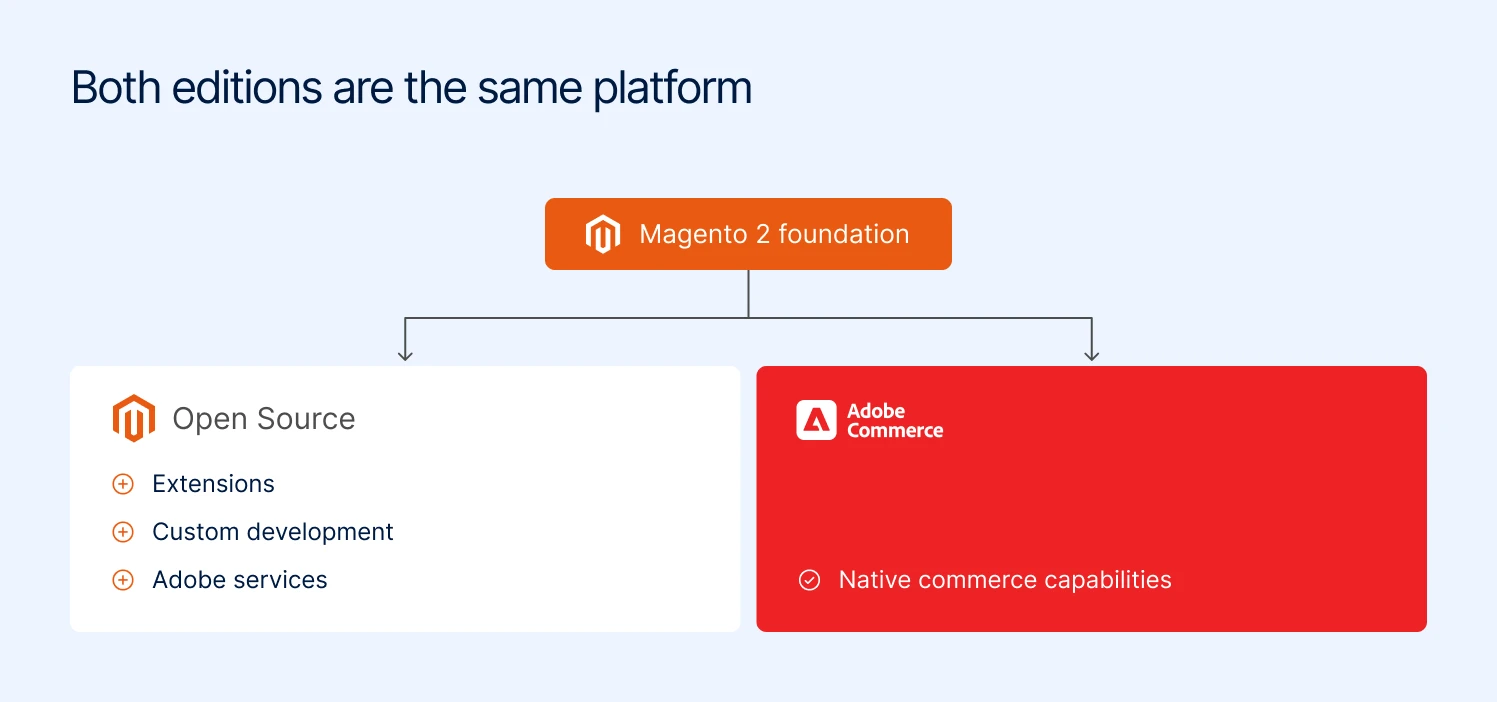
Open Source and Adobe Commerce are built on the same Magento 2 foundation
When someone tells you Adobe Commerce is “more scalable” or “more secure,” ask which specific capability they mean. The edition choice should be based on what your business actually needs from that commercial layer.
What you only get with Adobe Commerce
Adobe Commerce includes the Magento e-commerce foundation plus a set of capabilities designed for more complex B2B, merchandising, customer, and operational requirements.
The features below are the ones worth considering when deciding whether the additional Commerce investment makes sense for your store.
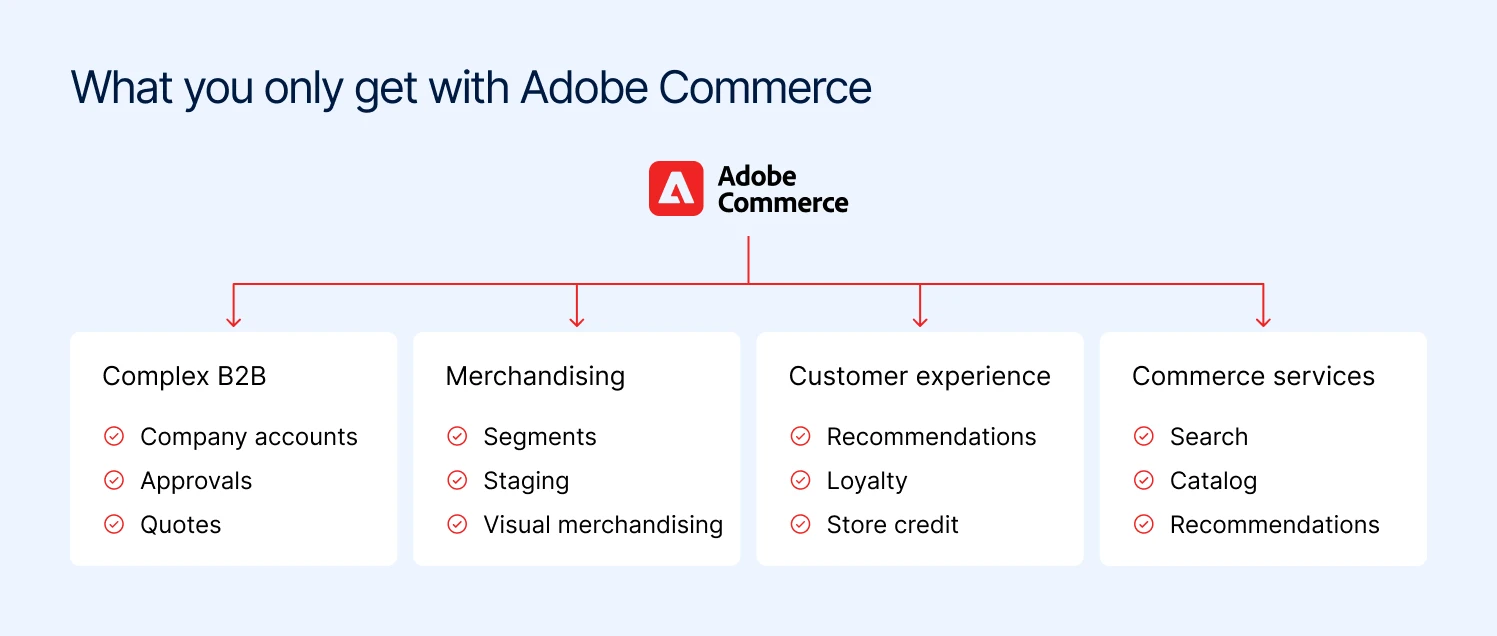
The four areas where Adobe Commerce adds capabilities on top of Open Source
1. B2B commerce
Adobe Commerce has a native B2B suite covering company accounts, buyer roles and permissions, shared catalogs, company-specific pricing, negotiable quotes, purchase orders, quick orders, requisition lists, and company credit.
This is one of the strongest reasons to consider Commerce if you sell to businesses. The features work together around the way a company buys, rather than treating B2B as a customer group with a different price list.
If B2B is one of the reasons you’re buying Commerce, confirm its provisioning and commercial terms in your Adobe order form. Don’t treat “Adobe Commerce includes B2B” as enough detail when comparing quotes.
2. Merchandising and personalization
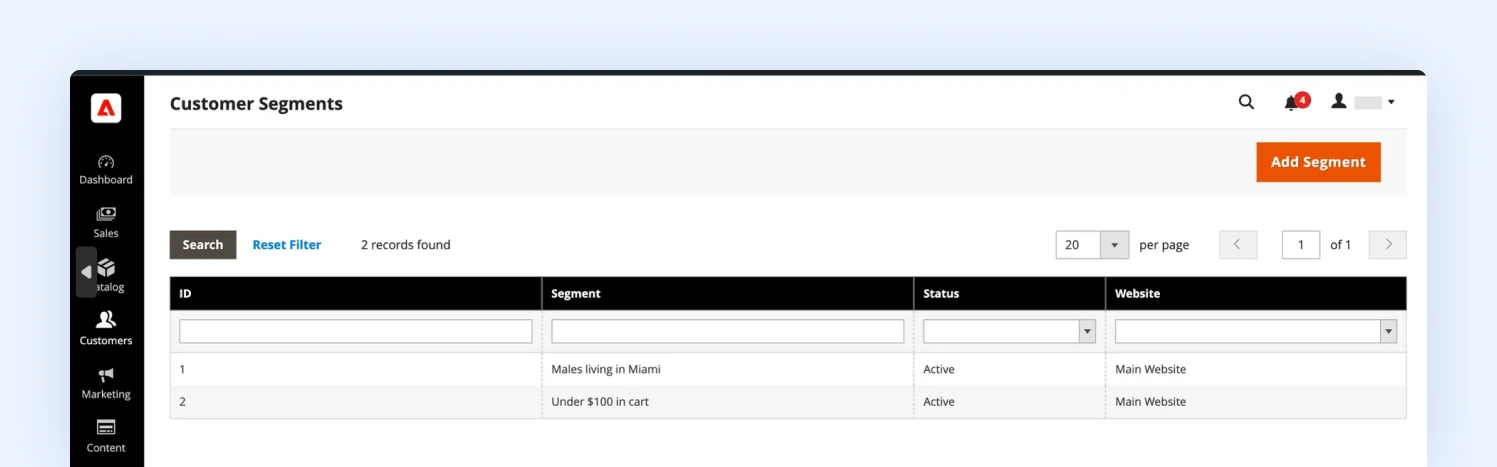
Customer Segments in Adobe Commerce let you target promotions and content at dynamic audiences
Commerce gives merchants more ways to control what different customers see and how products are presented.
Customer Segments lets merchants create dynamic audiences based on customer attributes and behavior for targeted promotions and content. Content staging lets teams prepare, preview, and schedule coordinated changes across products, categories, prices, and content.
Commerce also includes automated product relationships and a visual merchandiser, which can reduce the manual work involved in managing related products, upsells, cross-sells, and category positions.
For a large catalog or a store running frequent campaigns, these tools can save more time than any single feature suggests.
3. Rewards, gift cards, and store credit
Adobe Commerce includes native reward points, gift cards, and store credit. These features cover common retention and customer-account use cases without requiring a separate extension for every function.
Reward points can support loyalty programs, gift cards provide an additional payment mechanism, and store credit can be used for refunds, goodwill credits, or customer balances.
4. Returns management
Adobe Commerce includes Return Merchandise Authorization (RMA), giving merchants a structured workflow for customer returns.
Customers can submit return requests, while merchants can manage return reasons, statuses, and the associated order information from the Admin.
For merchants with significant return volumes, having returns connected to the e-commerce order and customer records can be much more useful than managing the process entirely through customer service tools.
5. Private sales and customer-specific access
Private sales and events allow merchants to create restricted sales and events for selected customers or customer segments.
This can be useful for VIP sales, membership programs, invitation-only promotions, and B2B businesses that need to expose specific products or offers to selected customers.
6. Administration and audit controls
Adobe Commerce includes Admin Action Logs, which record activity performed by Admin users. For a small e-commerce team, this may not matter much.
For a larger organization with separate marketing, merchandising, operations, and customer-service teams working in the same Admin, having an audit trail of who changed what can be important for security and accountability.
7. Commerce services
Adobe Commerce has also expanded beyond the functionality installed directly in the Magento application.
Services such as live search, product recommendations, and catalog service add search, recommendations, and catalog delivery capabilities through Adobe-managed services.
This matters when evaluating the Commerce stack as a whole. A merchant choosing Commerce is not only choosing a different set of PHP modules. Depending on the implementation, Adobe’s services can become part of the architecture as well.
8. Assisted selling and omnichannel commerce
Adobe Commerce also includes capabilities for businesses that sell through more than a standard online checkout. Seller Assisted Shopping lets sales representatives or administrators assist customers with their shopping experience.
Commerce also supports capabilities such as BOPIS and store fulfillment for merchants connecting e-commerce orders with physical locations. These features become relevant when e-commerce is part of a wider sales operation rather than a standalone website.
9. Commerce Intelligence
Commerce Intelligence is a separate analytics offering that can be added to Adobe Commerce. It includes dashboards covering areas such as marketing ROI, customer lifetime value, cohort analysis, merchandising, and executive KPIs.
It is particularly useful when you need to connect questions around customer retention, product performance, revenue, and marketing rather than looking at each metric separately.
What Magento 2 Open Source offers just as well
Magento Open Source includes the core platform used to run a complex e-commerce store. Catalog, checkout, inventory, APIs, multiple storefronts, and customization are not reserved for Adobe Commerce.
For many merchants, that is enough. The important part is knowing what you can get without the Commerce license.
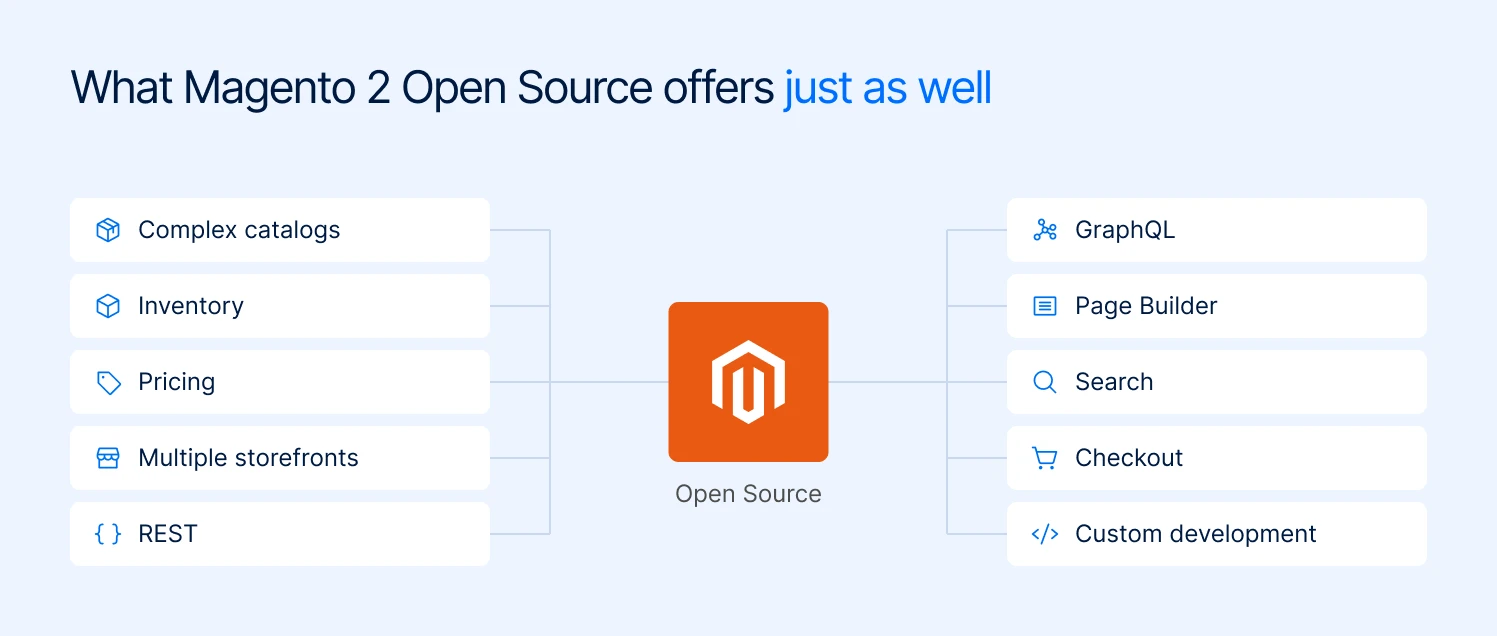
Core capabilities that Magento Open Source covers without a Commerce license
1. Complex catalogs
Magento Open Source supports configurable, grouped, bundled, virtual, downloadable, and simple products, along with custom attributes, categories, pricing, and multiple websites and store views.
A large catalog does not automatically require Adobe Commerce. Open Source can support thousands of products and complex catalog structures; the question is what you need to do with that catalog.
2. Multi-source inventory
Inventory Management is available in both Magento Open Source and Adobe Commerce. It supports multiple sources, inventory reservations, salable quantities, and Source Selection Algorithms.
Adobe’s current documentation confirms that these capabilities are available out of the box in both editions. So if your requirement is simply to manage stock across warehouses, stores, or fulfillment locations, you do not need Commerce for it.
3. Flexible pricing and promotions
Magento Open Source includes catalog price rules, cart price rules, tier pricing, group pricing, special prices, and other standard promotion tools.
This covers a lot more than basic discounting. You can build rules around products, categories, customer groups, quantities, cart values, and other conditions.
Where pricing becomes a Commerce consideration is when it needs to work with Commerce-specific B2B functionality such as company accounts, shared catalogs, and negotiated quotes.
4. Multiple websites and storefronts
Open Source supports multiple websites, stores, and store views from the same Magento installation.
That means you can run different brands, regional storefronts, languages, currencies, or catalogs without buying Commerce simply because you have more than one storefront.
5. GraphQL and REST APIs
Magento Open Source includes both REST and GraphQL APIs, so you can connect the platform to ERP, PIM, OMS, CRM, marketplaces, custom applications, or a separate frontend.
The API layer is also still evolving. In 2.4.9, Open Source gained the clearCart GraphQL mutation, which had previously been available only in Adobe Commerce. The release also added clearWishlist and improved REST handling for product media inheritance.
For merchants considering a headless build, the important point is that Open Source is not locked into a traditional Magento storefront.
6. Page Builder and content management
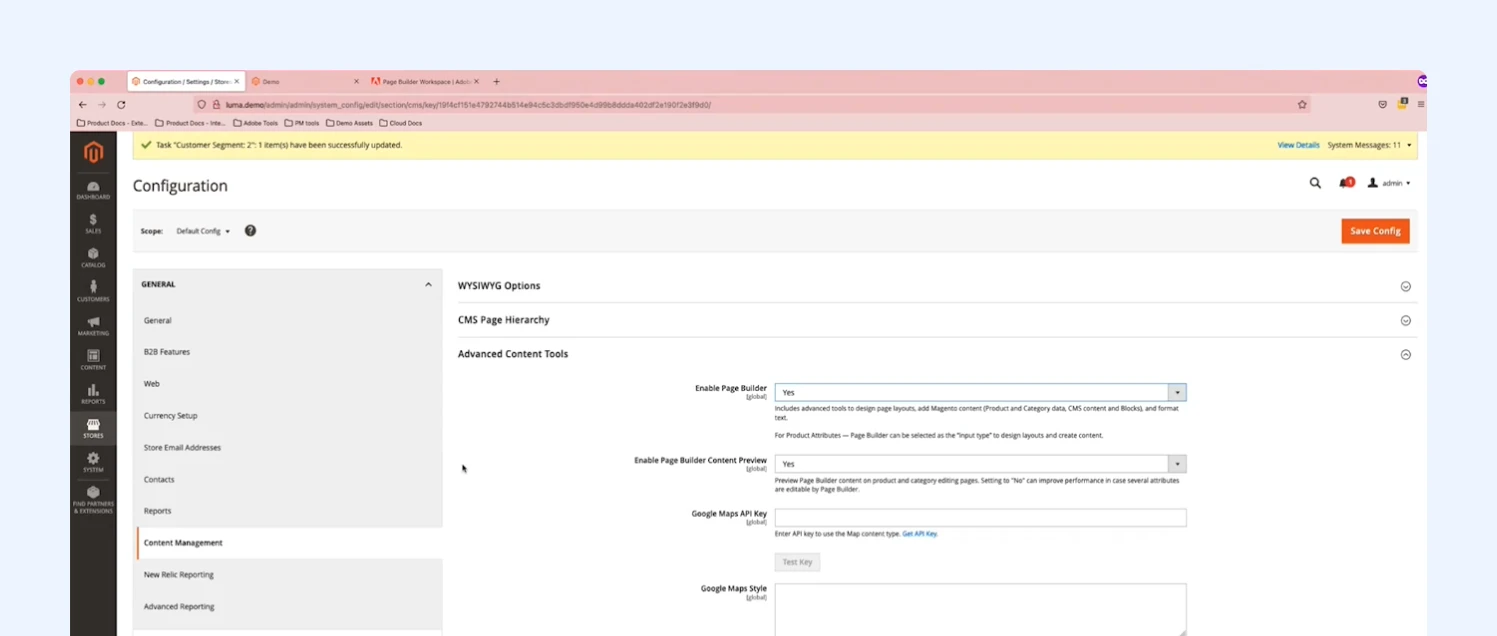
Page Builder is enabled under Stores, Configuration, Content Management in both editions
Page Builder is available in Magento Open Source, so merchants can create and manage CMS pages and blocks through a visual editor without relying on developers for every content change.
Open Source also includes Magento’s CMS, widgets, URL rewrites, media management, and standard content tools.
Content Staging is where the editions diverge. The ability to prepare and schedule larger sets of storefront changes remains a Commerce capability.
7. Search and layered navigation
Open Source includes catalog search and layered navigation for filtering products by attributes and other catalog data.
The underlying search stack has also moved forward. Magento Open Source 2.4.9 supports OpenSearch 3.x.
You can also replace or extend the native search experience with third-party search solutions if your catalog requires more advanced relevance, merchandising, or AI capabilities.
8. Checkout and order management
Open Source includes Magento’s core checkout and order-management functionality, including carts, customer accounts, shipping, tax configuration, invoices, shipments, credit memos, and order management.
The checkout is also highly customizable. For merchants with unusual pricing, shipping, product configuration, or ERP requirements, that flexibility can be more important than having a longer list of out-of-the-box features.
9. Security and access controls
Magento Open Source includes role-based Admin permissions, two-factor authentication, CAPTCHA/reCAPTCHA, ACL controls, and ongoing security updates.
The 2.4.9 release also added CAPTCHA validation for customer account creation through REST and GraphQL and updated Admin 2FA behavior.
That does not remove the merchant’s responsibility for securing hosting, extensions, integrations, and deployment processes, but the core security controls are there.
10. Custom development
This remains one of Open Source’s biggest advantages. Because you have access to the codebase, you can build custom checkout logic, product types, integrations, pricing mechanisms, storefronts, and backend workflows around Magento.
For a merchant with a capable development team, this can make Open Source a very different proposition from a typical “free edition” of an enterprise platform.
11. Extensions
Open Source can be extended through third-party Magento modules for functionality that is not included in the core platform.
That includes areas such as payments, search, subscriptions, marketplaces, ERP integrations, PIM integrations, loyalty, and B2B.
The trade-off is maintenance. Every extension becomes part of your stack, so compatibility, security, testing, and upgrades become your responsibility.
The choice is no longer just Open Source vs. Commerce
For years, the Magento decision was simple: Open Source or Adobe Commerce. That is no longer the full picture.
You can run Magento yourself, use Adobe’s managed cloud, or move to Adobe Commerce as a SaaS product where Adobe manages the application for you. Mage-OS is another community-led option.
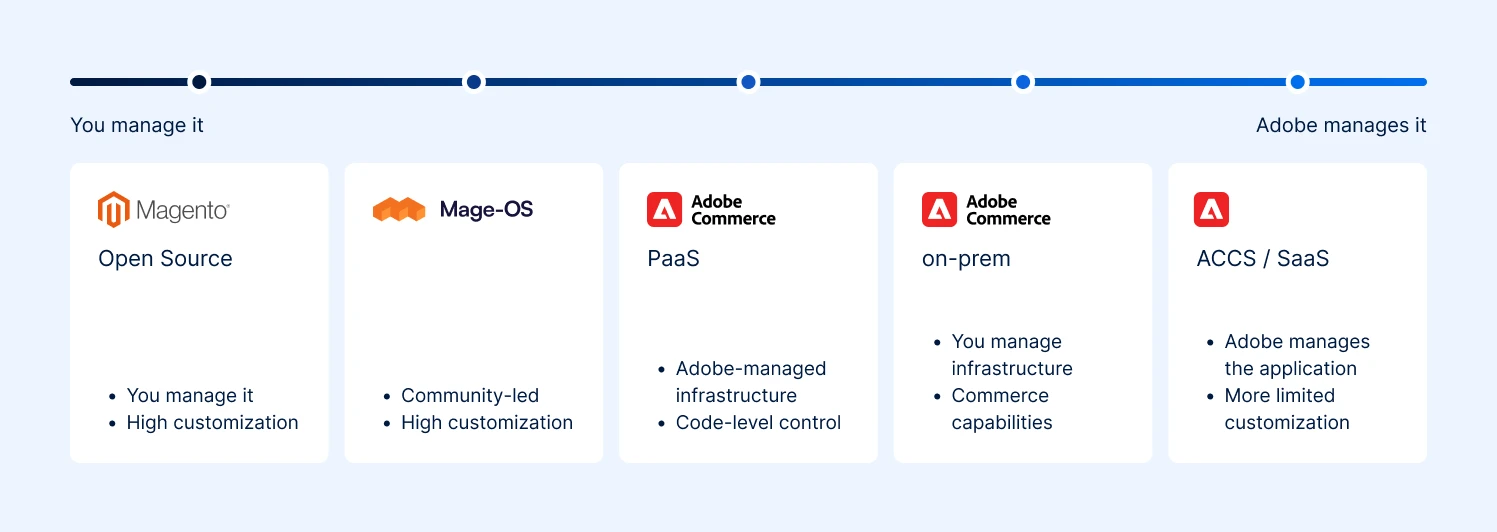
Magento options range from fully self-managed to fully Adobe-managed
| Option | Who runs it? | Customization | Best for |
|---|---|---|---|
| Magento Open Source | You or your agency | High | Merchants who want Magento without the Commerce license |
| Mage-OS | You or your agency | High | Teams that want a community-led Magento distribution |
| Adobe Commerce on-premises | You or your agency | High | Enterprises that need Commerce features and control over hosting |
| Adobe Commerce on Cloud (PaaS) | Adobe manages infrastructure | High | Enterprises that want managed infrastructure but retain code-level control |
| Adobe Commerce as a Cloud Service (SaaS) | Adobe | More limited | Merchants that want Adobe to handle the platform and upgrades |
The biggest change is Adobe Commerce as a Cloud Service (ACCS). It is not simply Adobe Commerce hosted somewhere else. Adobe manages the application and updates it continuously, while custom code is moved outside the Commerce core.
That can remove a lot of upgrade and maintenance work. But if your store relies heavily on custom PHP modules or big changes to Magento, moving to ACCS can mean reworking that architecture rather than simply migrating it.
So there are now two separate decisions: which Commerce capabilities you need, and how much of the platform you want to manage yourself.
What does Magento Open Source vs Adobe Commerce cost?
Adobe does not publish a standard price for Adobe Commerce. The license is quoted privately and is based largely on the size of the business, including GMV. The figures below are 2026 industry estimates, so use them for budgeting, not as an Adobe price list.
| Cost | Magento Open Source | Adobe Commerce on-premises | Adobe Commerce on Cloud |
|---|---|---|---|
| License | $0 | ~$22,000–125,000+/year | ~$40,000–190,000+/year |
| Hosting | You pay separately | You pay separately | Included with the Cloud offering |
| Build | ~$20,000–150,000+ | Similar, depending on complexity | Similar, depending on complexity |
| Extensions | Depends on requirements | Usually fewer for Commerce-specific features | Usually fewer for Commerce-specific features |
| Maintenance | You or your agency | You or your agency | Adobe manages the infrastructure, but application maintenance remains |
The biggest mistake is comparing $0 Open Source with the Adobe license and calling that the cost difference. Open Source is free to license, not free to run. You still pay for hosting, development, extensions, security, upgrades, and ongoing maintenance.
The Adobe license is also not a fixed number. Current industry estimates put on-premises licensing at roughly $22,000 to $125,000+ per year, with Cloud estimates starting around $40,000 and reaching $190,000+ for larger merchants.
Your actual quote depends on your contract and business metrics. That makes three-year cost more useful than year-one cost. If your GMV grows significantly, your Adobe license can move into a higher pricing tier.
Open Source has no equivalent license fee, although your infrastructure and development costs will still increase as the store grows. So before choosing an edition, model the cost of running the store for at least three years, not just the cost of launching it.
What to consider before deciding?
The strongest reasons to choose Adobe Commerce are not the number of features on the product page. They are the parts of your business that would be expensive to recreate on Open Source.
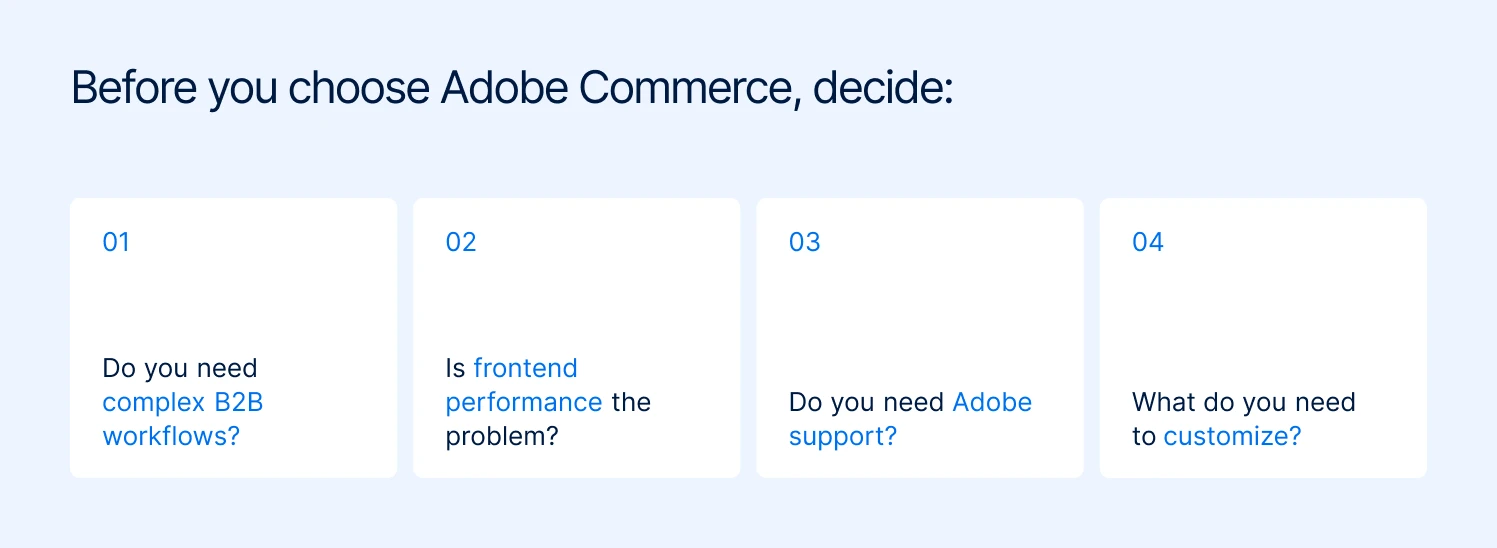
Four questions to answer before you commit to Adobe Commerce
When B2B buying rules become complicated
For B2B, the question is not whether Magento can sell your products. It is whether it can model how your customers buy:
- A buyer can request an order but not approve it
- A regional manager can approve purchases up to a set limit
- Different companies have different prices
- Credit limits apply at the company level
- Buyers need requisition lists for repeat orders
Adobe Commerce has these workflows built into its B2B functionality, including company accounts and hierarchies, roles and permissions, shared catalogs, negotiable quotes, purchase orders, requisition lists, and company credit.
Open Source can handle straightforward wholesale with customer groups, pricing rules, and extensions. Once the buying process itself becomes organizational, you are either adding several extensions or building those workflows yourself.
A simple test: write down the rules that determine who can buy, what they can see, what they pay, and whose approval they need. If it fits into a few straightforward rules, Open Source may be enough. If it starts looking like your company’s organizational chart, Commerce deserves serious consideration.
When frontend performance is the only reason you’re considering Commerce
In November 2025, Hyvä made its Theme open source and free to use, releasing it under OSL 3.0 and AFL 3.0. That means Open Source merchants can now use the same modern Magento frontend without paying the previous Hyvä Theme license.
That changes the calculation. You do not need Adobe Commerce just to get a fast Magento storefront. Open Source plus Hyvä can give you a modern frontend without a headless rebuild or a separate theme license.
It does not replace Commerce-specific capabilities such as B2B workflows, customer segmentation, or Adobe’s Commerce Services. But if frontend performance is your main reason for considering the upgrade, it is worth separating that problem from the platform decision.
Magebit is a Hyvä Platinum Partner, and we build with Hyvä across both editions. The practical takeaway is simple: choose Commerce for the business capabilities you need, not because you think you need it to get a better Magento frontend.
When you want added technical support
The Commerce license also gives you access to Adobe’s commercial support. Your agency still handles your custom code, extensions, and integrations, but Adobe provides another technical support layer when an issue sits with the Commerce platform itself.
The level of support depends on your agreement. For a business where e-commerce is revenue-critical, that added support can matter.
If a platform issue appears during a major launch or peak trading period, having Adobe involved gives your team another place to escalate the problem rather than relying entirely on your internal team and implementation partner.
How to choose between Magento Open Source and Adobe Commerce
Choose Magento Open Source if
- Your buying rules are simple enough that customer groups and tier pricing cover them
- You have in-house development capacity or a retained agency, and you want that budget in features rather than license fees
- You want platform cost decoupled from revenue growth
- Data residency, hosting choice, or code-level control is a hard requirement
- You are comfortable owning patching, PCI compliance, and upgrade testing
Choose Adobe Commerce if
- Company accounts, negotiated quotes, purchase orders, or shared catalogs are core to how you sell
- You want AI search and personalization inside the platform rather than as separate subscriptions
- An SLA and an escalation path during peak season have measurable value against your revenue at risk
- Your GMV is high enough that the license is a small percentage of platform spend rather than a large one
- You already run Adobe Experience Cloud and want the data to connect
Look elsewhere if
- Your store is under roughly $1 million a year with a simple catalog and no development capacity. Shopify will cost less and launch faster, and you will spend your time on merchandising instead of on infrastructure.
- Your only reason for wanting Adobe Commerce is one feature, such as gift cards or reward points. Buy the extension.
- You need a launch in under eight weeks. Adobe Commerce implementations commonly run four to eight months, and complex B2B builds exceed twelve.
- You want the license to substitute for operational capacity. It does not. Adobe Commerce still expects a competent team behind it, and merchants who buy it hoping the platform will run itself are the ones who end up unhappy with both the platform and the invoice.
Final thoughts
There is no shortcut to this decision, and the old revenue thresholds are not useful anymore. The right question is whether the Commerce license solves enough of your specific operational problems to justify its cost and reduce the amount of custom work you would otherwise own.
At Magebit, we assess the store, its architecture, integrations, and roadmap before recommending an edition. If you’re weighing Open Source against Adobe Commerce, talk to our Magento experts before you commit.