






Magebit truly understands our business needs and proactively provides solutions that simplify our work and improve our customer experience.

Szilárd Baróti
Ecommerce Project Manager
Move from WooCommerce to Magento 2 (Adobe Commerce) without losing data, rankings or a single day of sales.
















WordPress is a brilliant publishing platform. But if your store is plugins from twenty vendors that don't know each other, you've outgrown the architecture.
WooCommerce
Publishing core
Products plugin
Orders plugin
Tax plugin
+18 more plugins
Magento
Commerce core
Catalog, orders, checkout
The core, designed as one
ERP
PIM
3PL
Payments
One was designed to publish content. The other was designed to run heavy commerce.
Great WordPress sites exist
If yours were one of them, you wouldn't be reading this page

WordPress's core is posts; Magento's core IS the catalog.

Magento expects heavy customization: defined extension points.

REST & GraphQL APIs, queues and indexers, built for ERP and PIM sync.

Multi-store, multi-currency and pricing built in, full B2B on Adobe Commerce.

Magento assumes big catalogs; WordPress assumes articles.

Magento extensions share one framework; plugins share only the database.

Most WooCommerce stores weren't designed, they accumulated.


#1 Adobe Commerce partner worldwide


Shopify Plus Partner55+ certifications

Top-tier partner status on both destinations
#1 Adobe Commerce partner worldwide and Shopify Plus Partner. The consultation maps your catalog and operations to the right one.
Nothing you rely on gets lost in translation. Every WooCommerce concept has a Magento home, usually a more capable one.
WooCommerce
Where you are now (WordPress)

Magento 2
Where you're moving to

Each row is WooCommerce → Magento 2
WooCommerceProduct attributes & variations
Magento 2Configurable products with real attribute sets
WooCommercePlugins, licenses and conflicts that add up
Magento 2Native features plus extensions you own
WooCommerceYour WordPress theme
Magento 2Hyvä storefront with Venta, our production-ready theme
WooCommercePage-builder content
Magento 2CMS pages, blocks and a proper content workflow
WooCommerceMultilingual plugins
Magento 2Native multi-store, multi-language, multi-currency
WooCommercePayment gateway plugins
Magento 2Integrated PSPs of your choice, one coherent checkout
WooCommerceCoupon plugins
Magento 2Cart & catalog price rules, far more granular
WooCommerceSEO plugin metadata
Magento 2Native SEO, metadata carried over, not recreated by hand
WooCommerceBlog posts & pages
Magento 2Migrated into Magento, or WordPress kept as your blog, connected
WooCommerceB2B plugins
Magento 2Native B2B: company accounts, quotes, contract pricing, punchout
WooCommerce's biggest migration advantage: it's open source. We get full database access, so nothing is locked inside a SaaS vault.

Full catalog with variations, media and custom fields, mapped cleanly.

Accounts, addresses and consents, straight from the database.

Complete, so support and reporting don't lose their memory.

Recreated as cart and catalog price rules.

Posts and pages moved, or your WordPress blog kept connected.

Record-by-record reconciliation, run by our AI migration agents.

WooCommerce hides nothing from us: we extract everything directly from your database. Even sign-in continuity is a deliberate audit decision, a compatibility layer or a clean first-login flow.
 First login after launch
WordPress lets you design your permalinks, and so does Magento. That changes the whole SEO story of this migration.
A Magebit migration
 Permalinks often mirrored 1:1, so there's less to redirectSEO-plugin metadata and structured data carried overA Core Web Vitals leap off a plugin-heavy frontend
A careless migration
 Permalinks thrown away for a new URL structure404s pile up as old links and bookmarks dieRankings earned over years reset to zero
Full crawl of the WordPress site, current rankings, traffic and top-earning pages recorded as the baseline.
Magento's free URL structure means your permalinks can often be mirrored 1:1. The fewer URLs change, the less there is to redirect.
Where URLs do change, each gets its own 301. No chains, no blanket redirects.
SEO-plugin metadata, canonicals and structured data carried over, not rebuilt from memory. Core Web Vitals passing on staging.
Redirects live at the moment of switch, new sitemap submitted, Search Console updated. Then daily rank and 404 monitoring against a 30/60/90-day benchmark.
FLOW (Frame, Lay Groundwork, Output, Win) is our 12-year delivery framework. Here's each phase when the store you're leaving runs on WooCommerce.
Everything is figured out before anything is touched, and on a WooCommerce migration “everything” has a specific shape.
Attribute sets, variations and media inventoried, ready to map straight into Magento 2Every extension and custom module catalogued and given a destination: port or rebuildDirect extraction planned: what we take, how, and what gets cleaned on the way outAging PHP, undocumented code and accumulated technical debt, each risk namedTeam assigned, you meet your project manager, everyone aligned on what and why Discovery & planning
Data audit
12,480 products
Tools & connections
24 extensions: 18 reused
Risk register
7 risks

Clarity
of next steps

Reduced
risks

Time
efficiency
A fresh Magento 2 is installed and environments are verified. The landing zone is designed before anything moves.
Attribute sets and store structure mapped from WooCommerce, confirmed before importMagento 2 extensions and rebuilt functionality go in first, so every record has a homeHyvä / Venta foundation stood up, so design starts immediatelyQuote Workshops lock plugin-replacement decisions item by itemCloses with kick-off: timeline agreed, no open questions
2.4.7
The store runs, verified and empty. Data lands next
Environments
LocalDevStagingExtensions
Fresh Magento 2
Installed, environments set up and verified
Attribute sets
Mapped from WooCommerce, confirmed before import
Plugins given destinations
Native, extension or rebuild, so every record has a home
Hyvä + Venta foundation
Stood up, so the design track starts immediately
Data and design run side by side, reviewed with you as they go.
Track 1 · Data & functionality
Short iterations with regular client reviewsQA every day, not at the endWeekly progress, hours, budget & blockersPlugin-replaced features built before cutoverTrack 2 · Design
Storefront rebuilt on Hyvä for portabilityVenta foundation, branded for youRuns in parallel with the data work, not after itYour WooCommerce store keeps selling
Your Store
Data & functionality
SubscriptionsrebuiltB2B pricing tiersrebuiltERP syncconnectedProducts · 12,480importedLaunch day is the least dramatic day of the project.
UAT runs on your real, migrated data, and you sign it off before anything shipsA full go-live rehearsal, including the redirect map for every URL that changesGo-live is a DNS switch away from WordPress, with rollback standing byThrough hypercare, rankings are monitored, 404s triaged and orders keep flowingThe WooCommerce store stays warm through hypercare, retired once the new store is provenGO
4 of 4
Checks passed
UAT signed offDry run cleanChecklist completeTeam on callAfter launch
Hypercare, then SLA
Standing by
Rollback plan
The same FLOW, proven
The same FLOW that's run 100+ migrations, with every step translated into WordPress's language before we start.
Leaving a plugin stack shouldn't mean starting from a blank page. With us, it doesn't: the storefront foundation is already built.
Hyvä replaces Magento's default frontend with a radically faster one: Core Web Vitals in the green, pages that load like the SaaS store you're leaving promised to.
40+ Hyvä projects delivered


 +52
+5255+ certified developers
We kept rebuilding the same foundations, so we perfected one. Your migration starts from a proven store that we brand and extend for you.
Conversion-ready storefront, branded in one configMagebit extensions: SEO, GDPR, tracking, feedsCompatible with the whole Hyvä ecosystemPerformance patterns from 40+ Hyvä projects baked inConfigure-first and cleanly upgradeable after launchdemo.ventatheme.com
Magebit’s production-ready theme on Hyvä



Configure and brand a proven foundation instead of coding from scratch.

While data migrates, the Venta storefront is branded and extended in parallel.

The speed comes from starting further ahead, not from cutting corners.








By improving site speed and user experience, Hyvä helps your store meet Google's Core Web Vitals, leading to better SEO rankings and increased visibility in search results.
Read more about VentaThe move is one project. The team behind it is the same one running stores for brands you know.







100+
Migrations in 12 years
40+
Hyvä projects delivered
100+
Brands' stores actively managed

Maxim Van Broeck
CEO

Magebit truly understands our business needs and proactively provides solutions that simplify our work and improve our customer experience.
Szilárd Baróti
Ecommerce Project Manager

Within just two to three months, they resolved issues that previously seemed unresolvable.

Tim Johnson
CTO

Appreciate everyone's hard work and effort in getting us there!

Alex Brynou
Director of Systems Architecture

The top-ranked Adobe Commerce agency on the planet, by Adobe themselves.





The most certified Hyvä agency in the world. Confirmed by Hyvä themselves, twice.

Innovator, World Traveler, and eCommerce Excellence awards across Meet Magento NYC and HIVE London, and more. Recognized year after year for global, high-performance Hyvä, Magento and Adobe Commerce builds.

The most-certified Hyvä agency worldwide and the first Hyvä Platinum Partner in the USA. 55+ certified developers and 40+ projects delivered.

ISO 9001 & 27001 for quality and security.

Truly agile team that moves and adapts faster than your typical agency.

UX grounded in large-scale ecommerce research.
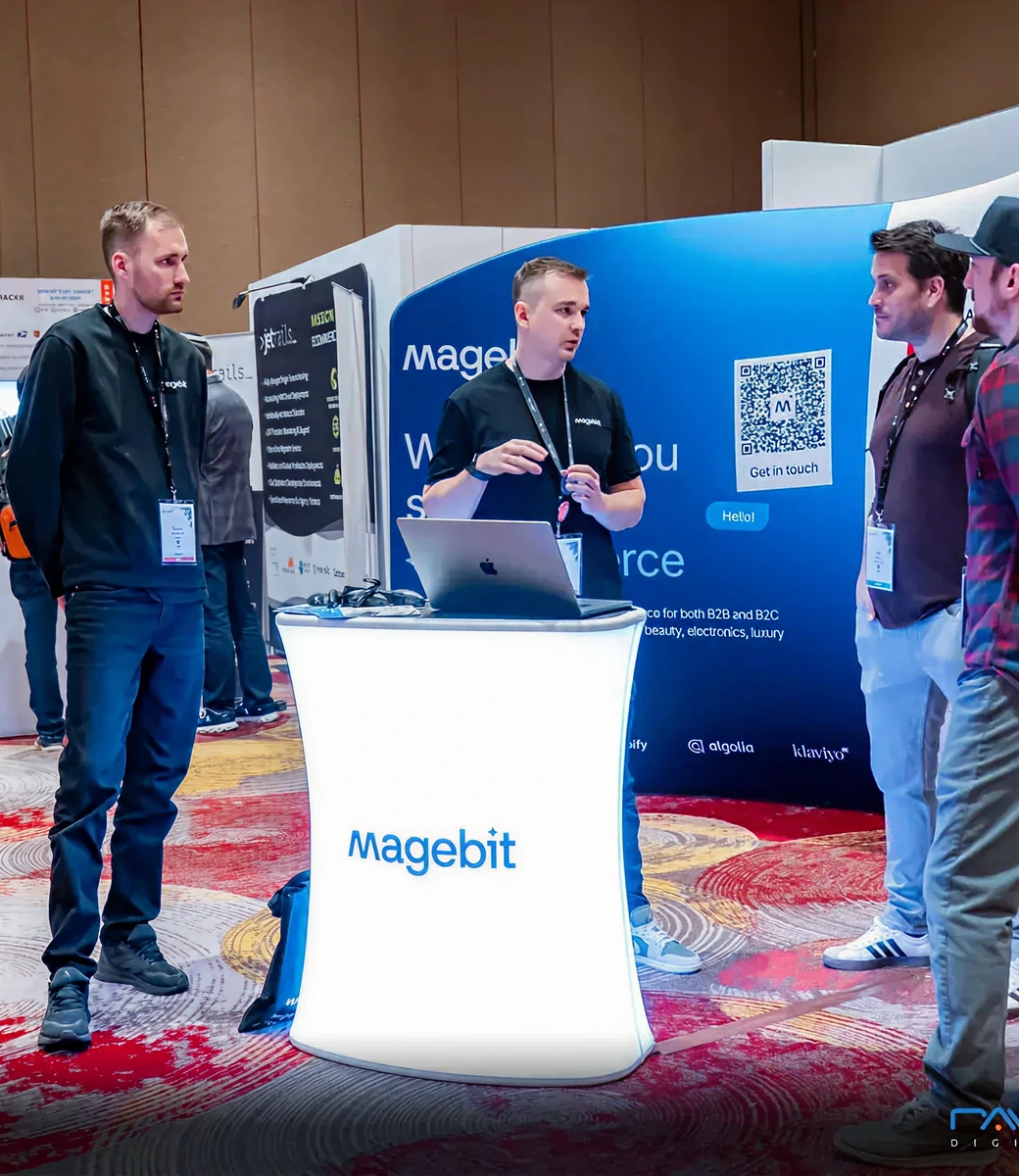
Magebit team at Meet Magento, #1 Adobe Commerce agency worldwide.
By certified developers, Magebit holds the number-one spot among Adobe Commerce agencies worldwide, and we’re the most certified Hyvä agency on the planet. Proof that the depth is real, not a logo on a page.

#1 Adobe agency worldwide
200+ Adobe certifications
Most certified Hyvä agency

Adobe Subject Matter Expert
Leaving WooCommerce is rarely the question, the destination is. Tell us what you run on WordPress, and we'll map your catalog, operations and roadmap to the right platform, with no thumb on the scale.
Reviewed by Kristaps Rjabovs
Managing Director

If you can't find the answer you're looking for, feel free to reach out to us. We're here to help!
Accounts, yes, fully, because we extract directly from your database. Sign-in continuity is decided in the audit: either a compatibility layer or a clean, well-communicated first-login flow. Unlike SaaS platforms, nothing here is dictated by a platform limitation.
Each plugin gets a destination in the audit: a native Magento feature (most common), an extension, or a custom build. Most brands end up with far fewer moving parts, because Magento covers natively what WooCommerce needs a plugin for.
Not if it’s done properly, and a WooCommerce move has an advantage: Magento’s free URL structure means your existing permalinks can often be preserved 1:1. Whatever does change gets a 1:1 301 redirect, with rank monitoring before and after cutover.
Your choice, made in the audit: migrate posts and pages into Magento, or keep WordPress running as your blog, connected to the new store. Both are routine.
A WooCommerce to Magento 2 migration typically takes several months, depending on the complexity of the store. Simpler stores can move faster, while projects with large catalogs, custom checkout flows, ERP or PIM integrations, subscriptions, B2B functionality, or significant custom development require more time. Magebit plans the migration in phases to minimize risk and avoid unnecessary downtime.
Sometimes, yes, and we’ll tell you. We’re the #1 Adobe Commerce partner worldwide and a Shopify Plus Partner, so the consultation maps your catalog, operations and roadmap to the right destination: Magento 2 for complexity, B2B and ownership; Shopify for lean D2C simplicity.
The cost depends on the size and complexity of your store, including the amount of data being migrated, custom functionality, third-party integrations, design requirements, and whether Magento extensions or custom development are needed. We start with a technical assessment to define the migration scope, risks, timeline, and implementation budget before development begins.
Most important eCommerce data can be migrated, including products, categories, customers, customer addresses, orders, order history, coupons, product attributes, images, and selected CMS content. We also review URLs, metadata, redirects, and other SEO-related data to preserve organic visibility during the migration.
Yes. Products, customers, orders, categories, attributes, images, and other store data can be migrated from WooCommerce to Magento 2. Before launch, the migrated data is validated and compared against the original WooCommerce store to make sure records are complete, accurate, and properly mapped to Magento.
Businesses usually migrate from WooCommerce to Magento 2 when they need more scalability, advanced eCommerce functionality, complex product catalogs, B2B capabilities, multi-store management, deeper integrations, or greater control over commerce architecture. Magento 2 is designed specifically for eCommerce and is well suited to businesses whose operational and technical requirements have outgrown a WordPress-based store.
Explore the Magento services Magebit has to offer.
Catalog, plugins and ambitions. A consultation tells you what the move takes, and which destination fits, before any pitch.
Not a sales script.
If you shouldn't move, we'll say so.
The plan is yours to keep.
We use cookies to understand visits, show relevant ads and play videos. You choose what to allow.